



Important Security Update:
An important security hardening update was addressed in Fix Pack 13. We strongly recommend that all customers upgrade to this version or a later version to ensure you benefit from this security enhancement.
Deprecated functionality and components
Google Chrome intends to deprecate and remove XSLT support from the browser for security reasons. As a result, you may need to migrate your code before support is removed in November 2026.
Fix Pack 14 contains the XSLT support for Nintex Automation K2 (5.9). If you cannot install the fix pack on time, you can use a workaround described in XSLT Deprecation in Google Chrome Browser | Community.
.NET 10 Support Now Available
Installer Nintex Automation K2 (5.9) (5.0010.1000.1) is now available here (LINK) and includes support for .NET 10.
Please ensure that Fix Pack 15 is also installed, as it includes additional .NET 10 support.
IMPORTANT:
If you perform a reconfigure without reinstalling the fix pack, users will not be able to log into Nintex Automation Designer/Manager/Workspace/Runtime after the reconfigure completes and the below error will occur:
“HTTP Error 500.19 - Internal Server Error”
NOTE: If you have client tools installed, please do a manual IIS Reset after installing the Fix Pack.
Prerequisites and Dependencies
The Fix Packs are only compatible with Nintex Automation (5.9) products. Because Fix Packs are cumulative, each new Fix Pack contains the updates and fixes that were included with the previous Fix Pack releases. Nintex Automation (5.9) must be installed first after which the latest Fix Pack must be installed. To determine which cumulative update or fix pack has previously been installed in your environment see https://help.k2.com/kb000426.
Note: Only upgrades from Nintex Automation (5.7), Nintex Automation K2 (5.8) and Nintex Automation K2 (5.8.1) are supported. If you need to upgrade to Nintex Automation K2 (5.9) from an older version, you must first upgrade to at least Nintex Automation (5.7).
Installing the Fix Pack
To install the Fix Pack, run the Fix Pack installer on every machine in your environment where a Nintex Automation product or component is installed, including desktop machines that have Nintex Automation Studio or Nintex Automation Designer for Visual Studio installed. The same installer is used to update the specific Nintex Automation products and components that are installed on that machine.
- Backup your Nintex Automation database.
- Download the Nintex Automation (5.9) Fix Pack.exe.
- Double click the .exe file and select a location to extract the installation files.
- The Update window opens. Click Change if you need to change the Nintex Automation database. Select the correct information and click Accept. Click Update to start the installation
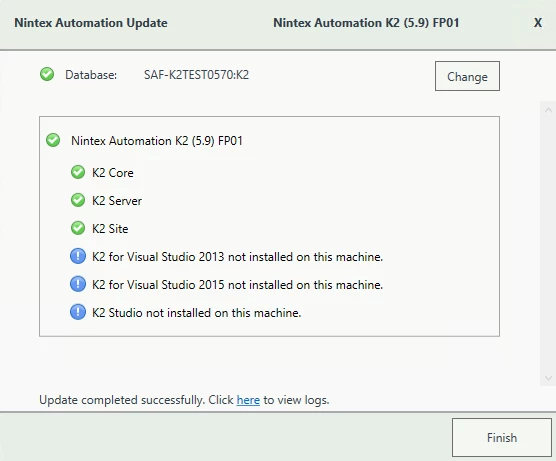
- A warning is displayed if a backup of the Nintex Automation database is not found. Create a backup before selecting OK. Click OK on the warning window to continue with the update. Click Cancel if you want to create a backup first.
- After creating the backup, you can click Update again on the Install window. If a backup for the Nintex Automation database was recently performed, the installer shows you the date and time of the last backup.
- Click OK to continue with the update.
- Wait for the update to complete, and then click Finish.
- If you need to view the installation log file, open it from the link at the bottom of the Update window or you can locate the InstallerTrace[date].log file in the %temp%K2 Setup Log folder.
Rollback Instructions
- To roll back the Nintex Automation (5.9) Fix Packs, uninstall Nintex Automation from your environment.
- Re-install Nintex Automation K2 (5.9).
- Re-install the Fix Pack you had installed prior to this rollback.
- Delete the database created when you re-installed it.
- Restore the Nintex Automation database using the backup made before the update.
You can also restore the Nintex Automation database before re-installing Nintex Automation. When you re-install, you can just point to the restored Nintex Automation database.
Fix Pack 1
This fix pack includes the following fixes:
- Code Fix: Slider control state, value, and layout inconsistencies after hide/show
- Code Fix: Error occurs when using the SPFx Migration tool
- Code Fix: SmartAction reply fails when using Exchange Web Services
- Code Fix: PowerPoint Icons Not Displayed in Attachment Control
- Code Fix: K2 Workflow importer fails to load list/library selection after appify and deletion
- Code Fix: Event Receivers Not Migrated When Using P&D Between K2 Farms
- Enhancement: SCIM API Log entries added
Fix Pack 2
This fix pack includes the following fixes:
- Code Fix: Create or update SharePoint list item fails when source date field is empty
- Code Fix: Performance issues occur when using Forms
- Code Fix: Screen reader reads value instead of display value in dropdown list
- Code Fix: K2 Administrators” Active Directory Group Not Displaying in K2 Management
- Code Fix: RecurseNestedGroups flag is ignored after upgrade
- Code Fix: Exchange Online appointments not rendering HTML via SmartObject
- Code Fix: Data label not populating on subview after upgrade
- Enhancement: Resolving outdated rules after event displayname Fix
Fix Pack 3
This fix pack includes the following fixes:
- Code Fix: Error displayed in generated PDF when using Generate PDF Workflow Action
- Code Fix: Sorting on lookup column in paged list view only applies per page
- Code Fix: Duplicate "List Data" properties appear after applying Fix Pack
Fix Pack 4
This fix pack includes the following fixes:
- Code Fix: When you activate a SharePoint Online site, an app-only token and SP Open Authorization error occurs
- Code Fix: Host Server Log File errors occur when accessing Designer
Fix Pack 5
This fix pack includes the following fixes:
Fix Pack 6
This fix pack includes the following fixes:
- Code Fix: Duplicate List Display in Workflow Importer UI
- Code Fix: Dropdown Control Lookup no longer responds to keyboard input
- Code Fix: Duplicate process instances are triggered on event triggers after the SPFx Migration
- Code Fix: Missing Workflow fields and actions in SmartForm User Task
- Code Fix: Formatting issues occur with right align email editor in Hebrew
- Code Fix: Unable to proceed on the SPFx Configuration on App Catalog URL
- Code Fix: Unable to Expand Appified SharePoint Libraries in Designer/Context Browser
- Code Fix: Deployment Blocked by Incompatible Custom Controls in Cloud Environment
Fix Pack 7
This fix pack includes the following fixes:
Fix Pack 8
This fix pack includes the following fixes:
- Code Fix: When serializing rest SmartObject input, integer 0 values are dropped
- Code Fix: When Deploying a Package Containing SharePoint Online Artifacts Throws an Error
- Code Fix: Unable to edit multiple Workflows
- Code Fix: Anonymous forms prompt for authentication
- Code Fix: Workflows not triggering as expected
- Code Fix: When clicking Workflow server schedules table header only sorts current page rows
Fix Pack 9
This fix pack includes the following fixes:
- Code Fix: MS Graph connection string supports send on behalf of via OAuth user authorization
- Code Fix: Worklist error when applying date filters using relative date or specific date
- Code Fix: Stored XSS vulnerability in out of office exception rule form
- Code Fix: Workflow issues after upgrade affecting workspace task display and designer parameters
- Code Fix: “Get Permissions on List Item by id” returns no results despite assigned permissions
- Code Fix: Workflow Importer Tool fails to fully convert semi-complex workflows and omits data fields
- Code Fix: CRM SmartObject calls slow down under increased user traffic after upgrade
Fix Pack 10
This fix pack includes the following fixes:
- Code Fix: In the formula designer, the field content does not move with the cursor movement
- Code Fix: Issues occur when you make changes to the "To" recipient configuration
- Code Fix: An error occurs when attempting to run an Identity Sync
-
Code Fix: Workflow Designer Rich Text Editor Selection, Formatting, and Writing Direction Support
Fix Pack 11
This fix pack includes the following fixes:
- Code Fix: Sync Service gets stuck in a running state
- Code Fix: Error occurs when installing K2 or when starting the K2HostServer Service
- Code Fix: Error occurs when using URL with trailing character in Designer
Fix Pack 12
This fix pack includes the following fixes:
- Code Fix: Picker Control border is broken after upgrading
- Code Fix: Workflow deployment fails when using the SoapClientProtocol SerializedValue parameter
- Code Fix: REST Service Instance registration fails with NullReferenceException error for complex Swagger definitions
Fix Pack 13
Note: This fix pack contains an important security update.
This fix pack includes the following fixes:
- Code Fix: Workflow email notifications stop working after migrating from EWS to Microsoft Graph
- Code Fix: Security Hardening Update
- Code Fix: Inconsistent watermark formatting across Form controls
Fix Pack 14
Note: This fix pack contains support for XSLT.
This fix pack includes the following fixes:
- Code Fix: Distribution list email sending fails after migrating to Microsoft Graph
- Code Fix: Error Occurs During Save As PDF
- Code Fix: Drop-Down list selection is not submitted when pressing tab
- Code Fix: Task Reminder ALM errors due to required Recipient Field
- Code Fix: SmartField composer opens slowly for inline functions in mail events
Fix Pack 15
Note: This fix pack contains support for .NET 10.
This fix pack includes the following fixes:
- Code Fix: Security updates applied to outdated packages
- Code Fix: Original listid remains referenced when changing the data source of a K2 for SharePoint view
- Code Fix: Condition action converts to placeholder instead of K2 Decision
- Code Fix: Unable to upload files larger than 1 MB
Fix Pack 16
This fix pack includes the following fixes:
- Code Fix: Unable to upload files to SharePoint Online using the PUT method
- Code Fix: Workflow Designer scroll bar inconsistent between versions
- Code Fix: Send mail fails when using a non-default from address with Microsoft Graph
- Code Fix: Configuration Error occurs after installing a fix pack on K2 5.9 with Client Tools installed
Fix Pack 17
This fix pack includes the following fixes:
- Code Fix: SharePoint Online Workflows not starting when items are added
- Code Fix: Duplicate Workflow Instances occur after SPFx Migration
- Code Fix: Watermark font and color not updating correctly with control font
- Code Fix: Workflow fails when sending emails
- Code Fix: K2 Conversion - Empty Condition branch causes Workflow to stop
- Code Fix: K2 Conversion - SharePoint column reference treated as literal text in condition
- Code Fix: K2 Conversion - Send notification fails for direct SharePoint recipients
- Code Fix: K2 Conversion - All approver comments reference converts to unmapped placeholder
- Code Fix: K2 Conversion - Hyperlink in notification body appears empty
- Code Fix: K2 Conversion - SharePoint list actions lose field mappings during conversion
- Code Fix: K2 Conversion - Build string references converted as literal text
- Code Fix: K2 Conversion - Empty switch branch causes workflow to stop
- Code Fix: K2 Conversion - Date and time variable causes deployment failure
- Code Fix: Swagger string parameter generated as object in REST SmartObject