




Chrome is deprecating client-side support for XSLT, including the XSLTProcessor JavaScript API and the XSLT processing instruction, which K2 uses in design time and runtime experiences. Chrome plans to remove this support starting with version 158, scheduled for release on November 17, 2026. Fix packs have been released for supported K2 versions (5.7), (5.8), (5.9), (5.9.1), and later versions. Nintex K2 Cloud Update 22 Fix Pack 16 is also available to ensure that K2 will continue to function after the deprecation.
The following fix packs are available for download for Nintex Automation K2
- Nintex Automation K2 (5.9.1) FP 2
- Nintex Automation K2 (5.9) FP 14
- Nintex Automation K2 (5.8) FP 35
- Nintex Automation K2 (5.7) FP 30
We recommend installing the latest available fix pack as soon as possible. If you cannot do so before November 17, 2026, there are workarounds based on the browser (Chrome or Edge) to help extend functionality temporarily.
Google Chrome Browser
Short Term (0–1 month): Enterprise Policy Controls
-
Enable XSLT through Chrome’s enterprise policy. Configure the policy dedicated to XSLT preservation via your Google Admin Console or Group Policy. (The exact policy name and registry key will be published once Chromium releases the feature.)
-
Google also offers an official XSLT Polyfill Extension. Administrators can force-install this extension via the Chrome Apps & Extensions Management policy to preserve functionality while migrating legacy web applications.
-
As a temporary manual fallback, open Chrome and go to chrome://flags/. Search for “XSLT” and select “Enabled” in the dropdown.
Note: We do not know how long this option will be available. Set it to Enabled as soon as possible.
Medium Term (3–6 months): Freeze Browser Versions
Prevent automatic updates by locking the browser to the last compatible version before the XSLT deprecation.
-
Google Chrome: configure the UpdatePolicies registry key and set Update{AppGuid} to 0 to disable updates.
-
Microsoft Edge: use the Update policy overrides to disable updates for specific browser versions.
-
Reference: see the Google Chrome Enterprise Policy List or Microsoft Edge Enterprise Policy Documentation for the appropriate Group Policy Object (GPO) templates.
Caution: This approach carries security risks, as users running older browser versions may be exposed to vulnerabilities that have been addressed in later releases.
Long Term: Upgrade to a K2 Supported Version and Fix Pack
Fix packs are available for K2 versions (5.7), (5.8), (5.9), (5.9.1), and later versions, as well as Nintex K2 Cloud Update 22, to follow the development practices from Google. All versions from K2 (5.10) onwards will have this fix included.
Upgrade to the latest K2 fix pack available for your current version, so you’re on a build unaffected by the deprecation or upgrade to the latest version of Nintex Automation K2.
Microsoft Edge Browser
We have identified cases where customers are affected by Microsoft's early introduction of a policy that allows browser-based XSLT support to be enabled or disabled through a policy setting.
If the policy value is not configured, warning messages may appear in K2. These messages are generated by the browser-based XSLT processor and are triggered by a Chromium XSLT field trial designed to raise awareness of the upcoming deprecation of browser-based XSLT support.
To suppress these warning messages, configure the Edge XSLTEnabled policy and set it to either 0 or 1:
- XSLTEnabled = 1 (Enabled): The browser-based XSLT processor will continue to function until it is deprecated.
- XSLTEnabled = 0 (Disabled): K2 will use the new server-side XSLT processor, provided that the latest K2 fix pack has been installed.
We have recently observed the same warning messages appearing in some Google Chrome browsers. These warnings are also caused by the Chromium XSLT field trial. In Chrome, the messages only appear when the XSLT option available at chrome://flags is set to Default. Once this setting is changed to either Enabled or Disabled, the warning messages will no longer be displayed.
As with Edge:
- Enabled allows the browser-based XSLT processor to continue functioning until it is deprecated.
- Disabled causes K2 to use the new server-side XSLT processor, provided that the latest K2 fix pack has been installed.
The steps for configuring the XSLTEnabled policy in Microsoft Edge are provided below.
Windows OS
- Close all Edge windows.
- Open Registry Editor (Win + R) and enter
regedit - Navigate to
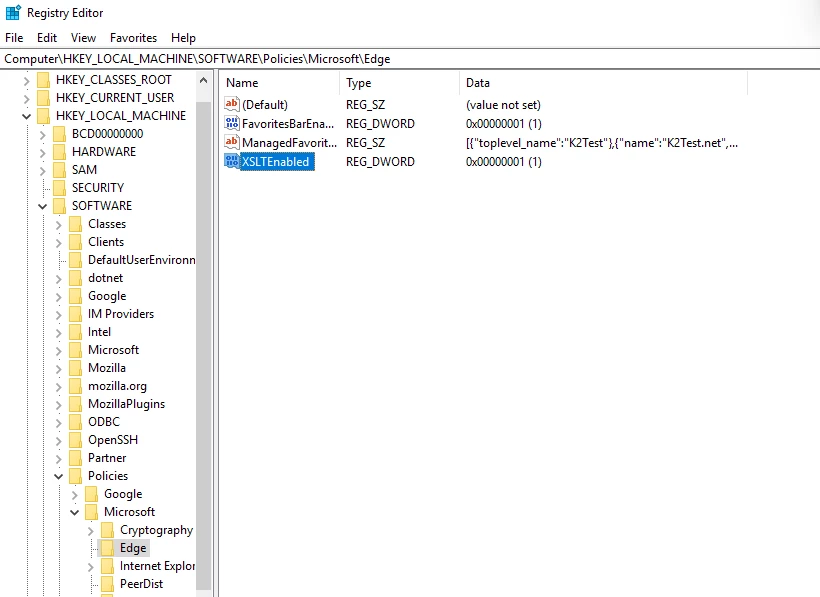
HKEY_LOCAL_MACHINE\SOFTWARE\Policies\Microsoft\EdgeIf the Edge key does not exist, create it. - Right click in the right-hand pane and add a new
DWORD (32-bit) Valuewith NameXSLTEnabledand value of1 - Microsoft’s documentation confirms that the Windows policy is:
HKLM\SOFTWARE\Policies\Microsoft\Edge XSLTEnabled = REG_DWORD 1 - Restart Edge, and in a browser navigate to
edge://policyand you should see that XSLTEnabled is set to 1
Mac OS
See configure Microsoft Edge on Mac
Option 1: Organisation-managed Macs (MDM such as Intune or Jamf)
- Create the plist in Terminal:
/usr/bin/defaults write ~/Desktop/com.microsoft.Edge.plist XSLTEnabled -bool true /usr/bin/plutil -convert xml1 ~/Desktop/com.microsoft.Edge.plist - Deploy it with your MDM tool:
- Intune: Devices > Configuration > Create > macOS > Templates > Preference file. Set the preference domain name to
com.microsoft.Edgeand upload the plist. Microsoft says to remove the XML header and the<plist>/<dict>wrapper first, leaving only<key>XSLTEnabled</key><true/>. - Jamf Pro: Configuration Profiles > Application & Custom Settings > Upload. Set the preference domain to
com.microsoft.Edgeand upload the plist.
- Intune: Devices > Configuration > Create > macOS > Templates > Preference file. Set the preference domain name to
Option 2: A single Mac without MDM (configuration profile)
- Quit Edge completely (Edge > Quit Microsoft Edge, or ⌘Q).
- Generate two unique IDs in Terminal by running this twice:
uuidgen - Save the following as
EdgeXSLT.mobileconfig. Replace the twoREPLACE-WITH-UUID-…values with the IDs from step 2<?xml version="1.0" encoding="UTF-8"?> <!DOCTYPE plist PUBLIC "-//Apple//DTD PLIST 1.0//EN" "http://www.apple.com/DTDs/PropertyList-1.0.dtd"><plist version="1.0"><dict> <key>PayloadType</key><string>Configuration</string><key>PayloadVersion</key><integer>1</integer><key>PayloadIdentifier</key><string>local.edge.xsltenabled</string> <key>PayloadUUID</key><string>REPLACE-WITH-UUID-1</string><key>PayloadDisplayName</key><string>Microsoft Edge - XSLTEnabled</string><key>PayloadScope</key><string>System</string><key>PayloadContent</key><array><dict><key>PayloadType</key><string>com.apple.ManagedClient.preferences</string><key>PayloadVersion</key><integer>1</integer><key>PayloadIdentifier</key><string>local.edge.xsltenabled.prefs</string><key>PayloadUUID</key><string>REPLACE-WITH-UUID-2</string><key>PayloadDisplayName</key><string>Edge XSLT policy</string> <key>PayloadContent</key><dict><key>com.microsoft.Edge</key><dict><key>Forced</key><array><dict><key>mcx_preference_settings</key><dict><key>XSLTEnabled</key><true/></dict></dict></array></dict></dict></dict></array></dict></plist> - Double-click the file. macOS shows a "Profile downloaded" message.
- Install the profile:
- macOS 13 Ventura and later: System Settings > General > Device Management.
- Older versions of macOS: System Preferences > Profiles.
Verify
- Restart Edge.
- Go to
edge://policy. The policy can be refreshed without a restart, so clicking Reload policies also works. - You should see:
XSLTEnabled true Source: Platform Level: Mandatory Status: OKSetting the value to false disables XSLT. Removing the profile, or the managed preference file, returns Edge to its default behaviour, which includes any field trial. Microsoft describes this as a temporary policy that will be removed in a future version of Edge.