Solution showcase: Learn how to use Nintex CE Platform
Stay informed with community announcements, updates, and participation tips to get the most out of the Nintex Community.
Recently active
Welcome to the May edition of Community ConnectMay is here, a fresh chapter filled with new energy and opportunity.As always, we'd love your input. Have ideas for what you'd like to see next? Simply hit reply and let us know! New Customer Content Now Available: Nintex Automation K2 (5.9.1) Orchestration is now in open beta - Here's what it does (and when to use it) Simplifying Multi‑Item Data Capture with Repeating Sections in Table Forms Good Automation Starts With Better Process Design Process Discovery End of Life Announcement Nintex debuts new on-premises AI and simplified identity management for Nintex K2As organizations look to adopt AI while maintaining strict governance and data sovereignty, K2 5.9.1 removes a key barrier: the need to choose between innovation and control.The release introduces a locally hosted AI engine, enabling intelligent automation that runs entirely within a customer's environment, without reliance on external APIs or cloud services during no
Nintex Automation K2 (5.9.1) is now available to download on Nintex Customer Central (filter on “K2” in the platform dropdown under Product Releases) or on Nintex Partner Central (under the Products > Product Downloads menu). This release introduces several amazing new features, including:Built-in, locally hosted AI: Organizations can embed AI directly into forms and workflows using out-of-the-box actions such as sentiment analysis and severity scoring. AI-driven decisions, including routing, prioritization, and issue detection, run entirely within the customer environment, with no external dependencies required to operate the platform. Simplified identity federation: Easier onboarding for OIDC-compatible identity providers, combined with a guided setup experience and built-in synchronization, reduces the complexity of managing users across systems and keeps identity data current without manual intervention. Enhanced accessibility and usability: WCAG runtime improvements for forms
when trying to log into the customer portal for support I get the following error. nintexOops!, something went wrongTRACKING ID: ccdd75aebc5c33a0d925
Microsoft has retired the SharePoint Add‑In app model on April 2, 2026. After this global rollout, customers will lose access to the Nintex Workflow and Nintex Forms Add‑In apps. What to Expect During the Rollout:Clicking the Nintex Workflow or Nintex Forms Add‑In will show a generic Microsoft message indicating the service is no longer available. This behaviour is expected and not specific to Nintex. Customers Who No Longer Have Access:To migrate from a classic/responsive form to SPFx following the deprecation of the Add-In app, first retrieve the XML form definition from the NintexFormXML hidden library and import it into the SPFx designer. The form will automatically be converted to the new format during import. Once completed, publish the form to finalize the migration. Please refer to the steps below: Steps (Manual) Navigate to https://[tenantname].sharepoint.com/sites/[sitename]/NintexFormXML. Locate the file whose name ends with the list ID you want to migrate, and download
I am excited to highlight an exciting new feature in RPA LE, the Credentials Vault. Previously when you had a botflow that needed to login to a system or website you needed to create the credentials directly in the botflow itself. The disadvantage to this was that if you had another botflow that needed to use those same credentials you would have to recreate them in that botflow and if you needed to update the password or username that was used to login to that system you would need to do that in all the botflows using that credential. With the new credentials vault you have a centralized location to store all the credentials that you will need to use in the various botflows you have. Let’s take a look at how this works, first make sure that you have updated to the latest version of RPA Central and Nintex Bot 3.2.0 and 17.19 respectively. Once you have upgraded you will now see a menu item for the credentials vault in RPA Central. Click to open the credentials vault, and from here y
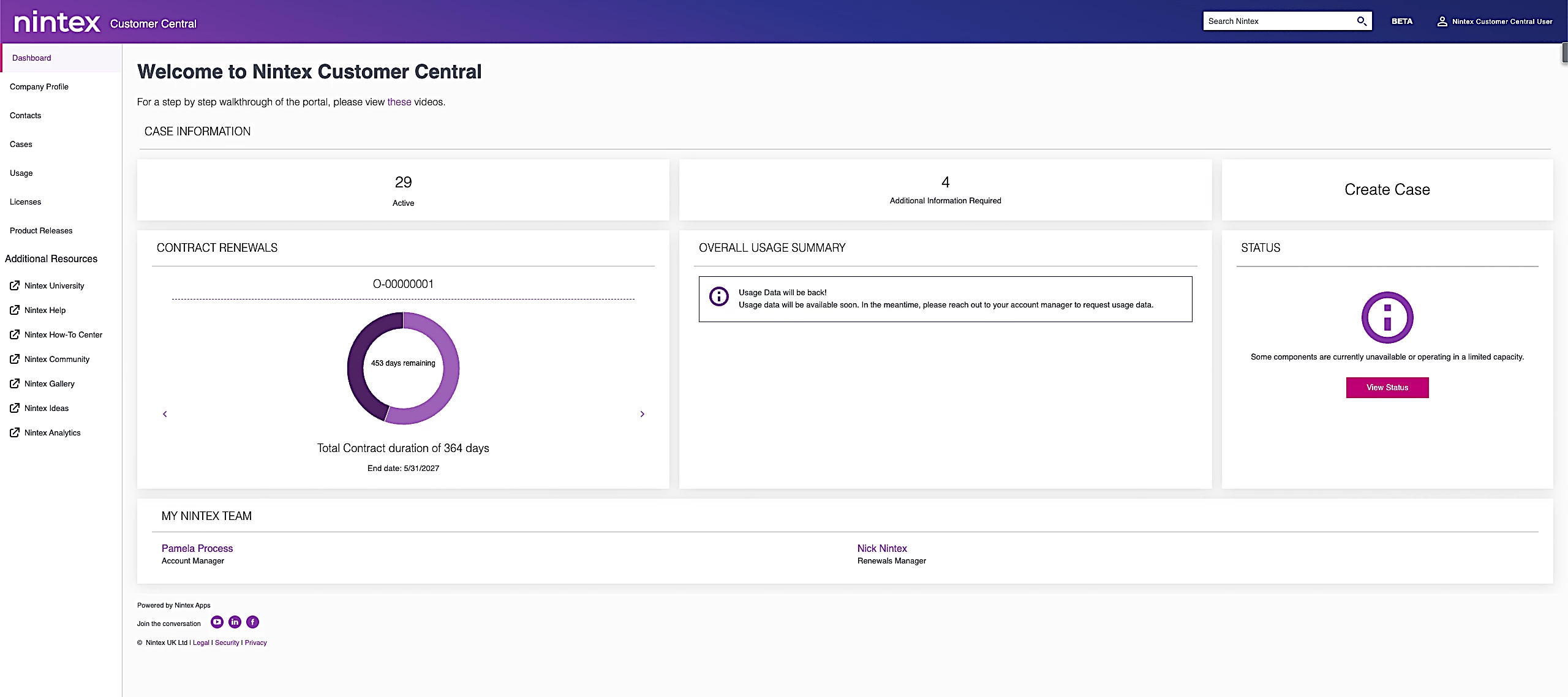
The next evolution of Nintex Customer Central is here. Nintex Customer Central (NCC) 2.0 has officially launched, now built on Nintex Apps to deliver a faster, smarter, and more connected customer experience.Designed to make managing your Nintex solutions easier than ever, NCC 2.0 brings everything you need into one powerful, centralized hub.New to NCC or looking for a refresher? NCC is your go-to destination for visibility, control, and self-service across your Nintex environment.With NCC 2.0, you can:Create and track support cases quickly from a single, streamlined dashboard Monitor entitlement usage across subscriptions and licenses with greater clarity Stay informed with easy access to current and past Nintex product releases Manage company profiles, contacts, and partner information in one placeGet started by reviewing this FAQ and video to see how NCC 2.0 can work for you, and by logging in here.Questions? Our support team is ready to help at support@nintex.com.Log in today and e
Welcome to the April edition of Community ConnectApril is here. It’s the perfect time to refocus, explore new ideas, and embrace what’s ahead. As always, we'd love your input. Have ideas for what you'd like to see next? Simply hit reply and let us know! Office 365 DeprecationMicrosoft is retiring the SharePoint Add‑In app model as part of a global rollout. The official retirement date is April 2, 2026, but tenants will experience the change at different times depending on Microsoft’s deployment schedule. When your tenant is affected, clicking the Nintex Workflow or Nintex Forms Add‑In will show a generic Microsoft message indicating that the service is no longer available. This is expected behavior and is not specific to Nintex. Related content Microsoft ACS Deprecation may impact K2 for SharePoint integrations - Updated March 19 with latest Fix packs How to Mass Export O365 Workflows using the Extraction Script Nintex Forms for Office 365 Deprecation Important Reminder: Nintex
With Nintex Workflows for O365 deprecating from 2 Apr 2026, the workflow extraction script provides you with an opportunity to mass export your workflow definitions prior to the deprecation and have them archived. Pre-Requisites Download the O365 migration script. Ensure your machine is running PowerShell version 5.x. Version 7.x is supported, but you must use the following command prior to running: Import-Module Microsoft.Online.SharePoint.PowerShell -UseWindowsPowerShell You are logged in with a SharePoint Online account that has at least Manage Web permissions on sites you wish to export workflows. Obtain your Nintex API KeyTo get your Nintex API key which is required in the workflow export, complete and submit this request form. Here are the fields required to be completed. Licensed Organization Name – Input your company name Requestor First and Last Name Requestor Email Address – Required to receive the API key details SharePoint Online URL – SPO tenant
Hi, I’m interested to know if anyone - particularly councils - have developed a management plan around the use of Process Capture when capturing customer information on screens? Have you developed a best practice for staff to use or a business rule around the deletion or redaction of information?Thanks
What’s Changing and How to Prepare Microsoft is retiring the SharePoint Online Add‑In model on April 2, 2026. Because the legacy Nintex Forms for Office 365 app is built on that model, it will stop functioning once Microsoft removes Add‑In support. Every existing Nintex form must be moved to the Nintex SPFx app before that deadline to ensure continuity. This guide outlines what’s changing, how to migrate your forms, and what to do if you’re running out of time. What This Means for Existing Nintex Forms Once Microsoft disables the Add‑In framework: All forms built in the Nintex Forms for O365 Add‑In will stop working. Forms must be republished in the Nintex SPFx app to remain functional. Classic and Old Responsive forms must be upgraded to New responsive. Where do I get the SPFx App? The SPFx app is titled “Nintex Automation Cloud” in the SharePoint Store. You can find it there or by appending “/_layouts/15/appStore.aspx/appDetail/WA200004625?entry=NewAppInSiteContents&sorting=
Microsoft is retiring the SharePoint Add‑In app model as part of a global rollout. The official retirement date is April 2, 2026, but tenants will experience the change at different times depending on Microsoft’s deployment schedule.When your tenant is affected, clicking the Nintex Workflow or Nintex Forms Add‑In will show a generic Microsoft message indicating that the service is no longer available. This is expected behavior and is not specific to Nintex. What this means for you Nintex Workflow for Office 365 Add‑InWorkflows created in the Nintex Workflow Add‑In will stop running once Microsoft disables the Add‑In model in your tenant.Guidance:https://community.nintex.com/news-18/important-reminder-nintex-workflow-for-o365-end-of-support-approaching-72864 Nintex Forms for Office 365 Add‑InForms created using the Nintex Forms Add‑In will no longer open. Any forms you need to continue using in SharePoint Online must be migrated or rebuilt using SPFx.Guidance:https://community.nintex.co
Workflow Export Key:Q54w8FBLY7qpShZLdbiHok9thBhoq7VYMLyACf4mYJtLcAest Hello, In this blog I am going to show you how you can add buttons to express approval emails to speed up the time it takes to respond, currently when you receive an express approval email you are asked to hit reply and type out your response, this can sometimes lead to mistakes in spelling, although already quite fast in relative terms, we can always improve and make them look like this: I will be adding an export of this solution to the gallery if you prefer to skip some steps below but I recommend you keep reading to understand how it is configured. Before we begin there is a couple things we need to do for this workflow. First we need to generate an App token for Nintex Automation Cloud, If you haven't already got one. Once you have created your app token you'll need to copy and keep safe the client ID and Secret by clicking on the ellipsis and then View. After that we need to create a new workflow cloud conn
I wanted to make a quick post today to highlight a new feature that was released in Nintex Workflow Cloud. The new feature is called Auto Task Delegation, this will be used for when task assignees are going on PTO, Paternity Leave, Medical Leave, etc where they will be out for a period of time and want to delegate their tasks during that time automatically.The first thing you will need to do is make sure the feature is enabled, to do this go to your tenant settings and select Auto Task Delegation from the left-hand navigation and then make sure the feature is toggled on. There is nothing that needs changed in the Assign a task action in the workflow, it will be setup like a normal task.In order for the task assignees to setup their auto task delegation, they will sign into Nintex Workflow and click on the tasks section in My Nintex, and select the Auto Task Delegation Tab. On the Auto Task Delegation Tab click the Add Auto Task Delegation button in the top right-hand corner of the pag
IntroductionWe're excited to announce that as of today, our Nintex Forms for Office 365 customers can now publish and use forms in either the Nintex Forms add-in or the Nintex Automation Cloud SPFx apps. For those who aren't already aware, Microsoft is moving away from add-in apps, and you'll need to transition to SPFx apps. For more details, check out this link. This important feature follows the completion of the final features for our Form Upgrade tooling, which helps customers upgrade to New Responsive forms. This is the next crucial step in this transition. PrerequisitesForm must be upgraded to New Responsive Format Must have a Nintex Automation Cloud Tenant Must have a valid active license Steps to Get StartedInstall the SPFx app from the store. Help Link Open the New App and you should see "Customize SharePoint list forms" as an option. Click on that. If it is your first time opening List Forms in SPFx, you will also need to grant consent for the app, so each user doesn’t need t
Welcome to the March edition of Community ConnectMarch is here, and we’re stepping into the month with fresh energy, new content, and exciting updates made just for you.As always, we'd love your input. Have ideas for what you'd like to see next? Simply hit reply and let us know! An update from the Customer Success team: Strengthening Our Commitment to Customer Success New Customer Content Microsoft ACS Deprecation may impact K2 for SharePoint integrations Action required: Salesforce Outbound Message changes could disrupt DocGen packages - new updates February 24 So, You're About to Install the K2 Platform… Migrating from Nintex for SharePoint On-Premises to Nintex Automation K2: What You Need to Know Making Sense of Giant Processes: APQC‑Aligned Extraction with Copilot Nintex Workflow Cloud - New Feature - Auto Task Delegation Nintex Customer Central (NCC) 2.0 BETA is Now Live!Explore our refreshed, enhanced NCC experience and discover what’s coming next. K2 Migration FAQ
Microsoft has drawn a line in the sand. With the deprecation of the SharePoint 2013 Workflow Engine and end-of-support dates landing between April and July 2026, organizations running Nintex for SharePoint need to act. The question isn't whether to move, but how quickly you can get started.If your organization needs to stay on-premises, the path forward with Nintex is clear:Nintex Automation K2. This Isn't New News Nintex has been shouting from the mountaintop about this for a while now. Through webinars, blog posts, FAQs, and account conversations, we've done everything we can to make sure you know what's coming. We've published detailed resources to help you evaluate your options and build a migration strategy. Here's what's out there:Microsoft End of Support covers the specific deprecation dates, the real risks of inaction, and Nintex's migration options including K2 for on-premises, Nintex Automation Cloud Edition for cloud, and hybrid approaches.Powering the Future of On-Premises
Explore our refreshed, enhanced NCC experience and discover what’s coming next. NCC is a centralized hub where customers manage their Nintex solutions.– Create and track support cases from a single dashboard.– View entitlement usage for subscriptions and licenses.– Access current and past Nintex product releases.– Manage company profiles, contacts, and partner information.Log in and start your preview today! There is a banner and a link at the top of the NCC 1.0 landing page. (A few features may still be in progress.)We welcome and appreciate your feedback. Please contact support at support@nintex.com with any questions.
As part of a planned transition, Dor Haim will be stepping out of his role as SVP of Customer Experience at Nintex on March 31. We thank Dor for his leadership and for the meaningful contributions he made in strengthening our global customer organization and advancing our commitment to delivering exceptional customer experiences. We have aligned our customer-facing and partner functions under Chief Revenue Officer Tad Finer — bringing Sales, Customer Success, Professional Services, and Partners together as one Revenue Organization structured to simplify engagement, strengthen coordination, and accelerate outcomes. A more connected experience From initial engagement to onboarding, adoption, and expansion, your Nintex teams operate as one go-to-market organization, reducing silos and delivering a consistent experience. Stronger lifecycle ownership With sales and customer success aligned, we are reinforcing accountability for long-term value realization, not just transactions. Faster coor
Below, you can find a quick reference showing the new and previous product names. Previous Product Name New Product Name - Full New Product Name - Short Nintex Workflow Cloud Nintex Workflow Nintex Workflow K2 Five Nintex Automation K2 Nintex Automation K2 Kryon Process Discovery Nintex Process Discovery Process Discovery Nintex Promapp Nintex Process Manager Process Manager Nintex AssureSign Nintex eSign eSign Nintex Drawloop DocGen for Salesforce Nintex DocGen® for Salesforce Nintex DocGen for Salesforce Nintex DocGen Nintex DocGen® Nintex DocGen Nintex Kryon RPA Nintex RPA RPA Nintex Analytics Nintex Insights Insights Nintex for SharePoint Nintex for SharePoint Nintex for SharePoint Nintex for Office 365 Nintex for Office 365 Nintex for Office 365 K2 Cloud Nintex K2 Cloud Nintex K2 Cloud Nintex RPA (Foxtrot) Nintex RPA Legacy Edition (LE) RPA LE
Hi,I am trying to find an old invoice, can you please let me know where I should be able to find it in your platform?Thanks,Stephan Avila
Edited 26 March 2026 with latest fix packs and FAQsMicrosoft has announced the deprecation of Azure ACS (Access Control Services) for SharePoint Online, effective 2 April 2026. However, we are observing that some SharePoint Online tenants are already experiencing the impact of this deprecation ahead of the official retirement date.In affected tenants:The K2 for SharePoint Registration Wizard fails during registration. Active Site Collections fail when trying to ensure the SharePoint token. SPFx Migration Tool fails on migrating event receivers. The failure presents as an SharePoint Auth Error. This appears to be related to ACS-based authentication no longer being accepted in certain SharePoint Online environments.The recommended solution is to move to the K2 for SharePoint SPFx integration, and migrate existing SharePoint add-in solutions using the released migration tool. (https://help.nintex.com/en-US/K2cloud/userguide/current/Content/K2-for-SharePoint/MigrationTool.htm)For Nintex K2
Nintex Automation K2 (5.9) is now available to download on Nintex Customer Central (filter for "Nintex Automation" in the products drop-down menu) or on Nintex Partner Central (under the Products > Product Downloads menu). This release introduces customization capabilities, accessibility improvements, and platform optimizations, including:Custom Control Framework. Build and manage custom form controls directly within K2. Create purpose-built interface components that match your specific UI requirements, manage them centrally, and deploy consistently across your applications. Accessibility improvements. Runtime SmartForms now include enhanced support for assistive technologies, helping ensure your workflow applications are accessible to all users. Enhanced error codes in the REST broker. Integration troubleshooting gets easier with descriptive error responses that help you identify and resolve issues faster across your RESTful connected systems. Direct file handling. JSSP endpoints n
A new how-to article has been released that covers the process for highlighting a text box in red when a button is clicked and the field is empty in a K2 View. The article outlines the full configuration, starting with the initial setup of the view and continuing through the creation of an IsBlank expression, transferring the expression result through a rule, and applying conditional formatting based on the evaluated outcome.This approach enables validation to occur only after a user action, preventing unwanted highlighting on initial load and providing a cleaner and more purposeful interaction flow. The article is available here:Highlighting an Empty Text Box in a K2 View Using Expressions and Conditional Formatting | Community Have you spotted a gap or have a cool idea? Your feedback matters to us, and we’d love to hear it. Click here to leave feedback, as your input helps us continuously improve Nintex University, Nintex Community, and the Nintex How-To Center.
Welcome to the February edition of Community ConnectIt’s a new year, and we're kicking things off with renewed energy, fresh content, and exciting updates just for you.Got ideas for what you'd like to see next? Just hit reply — we'd love to hear from you! New Customer Content Action required: Salesforce Outbound Message changes could disrupt DocGen packages A smart way to manage your Nintex RPA server Dynamically rendering repeating sections Salesforce OAuth updates may affect Nintex DocGen package generation What's New in Nintex Apps? What's new in Nintex Apps for Salesforce? Table Forms in Nintex Data with File Support New Modernization ContentFind step-by-step instructions to help you seamlessly transition to Nintex Workflow and optimize your workflows.Beyond the Basics: A Technical Review of the Nintex Upgrade Tool from Office 365 to Nintex Workflow Updating a Hidden Column in a SharePoint Document Library or List via Nintex Workflow Repeating Sections in a Task Form
Get ready! Changes to Microsoft Exchange online affects DocGen packages Published: January 15, 2026 Do you use Microsoft Exchange online with our SMTP (email) delivery option in your DocGen packages? Beginning March 1, 2026, Microsoft has announced that it will start rejecting calls to exchange online in this way. This means these emails will no longer be sent. The Nintex team is here to help. Actions requiredThe following should be done by a Salesforce administrator/ DocGen package designer in your organization:Identify DocGen packages using the SMTP (email) delivery option. Choose a different email delivery approach: Option A: Change the SMTP server you are using in the Delivery option to another service. For example, sendGrid and SMTPtogo have been popular alternatives Option B: Use Salesforce’s email delivery. To do this, you will need to add an Email delivery option to the DocGen packages affected and copy over the values from the SMTP delivery option before deleting them.
Already have an account? Login
Enter your E-mail address. We'll send you an e-mail with instructions to reset your password.