Solution showcase: Learn how to use Nintex CE Platform
Find out what's new in Nintex Workflow customer content, including the latest updates, releases, and retired resources.
Recently active
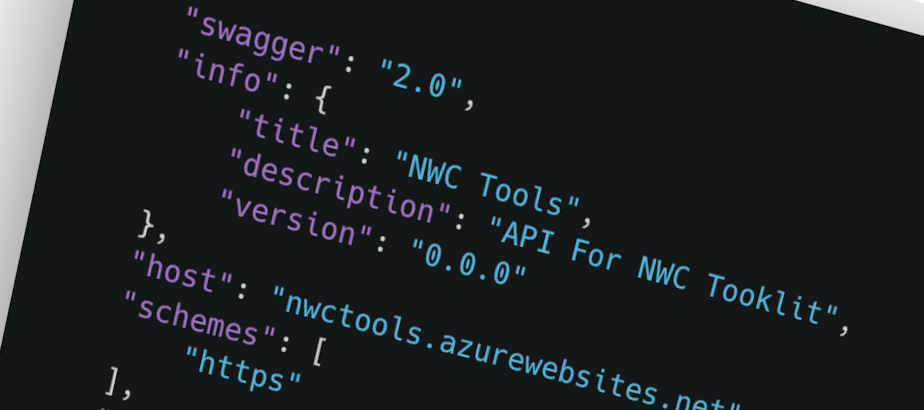
Creating custom Xtensions is now faster and easier. We're excited to introduce Use the AI Xtension Generator, a new Nintex University course that shows you how to leverage AI-powered assistance to generate draft OpenAPI connector definitions for your Xtensions. Learn how the AI Xtension Generator, powered by Azure OpenAI, can help accelerate connector development by creating a starting point for your OpenAPI 2.0 (Swagger) specification. You'll discover how to generate, review, and refine AI-created definitions so you can quickly build integrations between Nintex workflows and external systems. Enroll today and start building custom workflow integrations with greater speed and efficiency. Have you spotted a gap or have a cool idea? Your feedback matters to us, and we’d love to hear it. Click here to leave feedback, as your input helps us continuously improve Nintex University, Nintex Community, and the Nintex How-To Center.
Do you want to show master-detail information in a form and have it render automatically each time you change the master? Repeating sections are your friend for this. The secret sauce is to set the default value of the repeating section to the data containing the detail line. “Default value?” I hear you ask. “Surely that is only set when the form loads?” Well yes – every other control operates this way but we’ve tweaked repeating sections to re-render if the default value field changes. This way you could use it to set up a repeating section with default values when the form loads but you can also re-render the repeating section if you change the default value. Read on for some examples of how to get this going. Example 1 – using a collection as a data sourceThe first example we’re going to use is by using a collection variable. One thing you need to be aware of is if the collection variable is part of an object then it must be at the root level of the object. If it isn’t then you
Certificates, Re: Automation Specialist for Nintex Automation Cloud - Level I and 11Has anyone got any practice exams for these or any previous attempts documented so I can conduct some self assessments before actually taking the examinations?Would be nice to see, just like actual exam courses, some practice exams (full length - like those from university courses) and or the last couple iterations over the years. If anyone could assist me here, that would be great. I did reach out to my local Senior Customer Success Manager, however he advised he was not able to locate any such thing.
There used to be a “Automation Specialist for Nintex Automation Cloud II” certification.I was unable to find it on the new LMS page (https://learn.nintex.com/).Q1: Is this certification still available?Q2: Where can I find a list of Nintex Certifications?Thank you in advance!
The Customer Enablement team is thrilled to announce the release of a new activity course! This course comprises five scenario-based activities to help you develop your skills using Nintex Apps and Workflow, and to start unlocking a world of possibility when the two platforms are used together! Each activity includes details to guide you through accomplishing the tasks presented in the scenario, but familiarity with both Nintex Apps and Workflow is encouraged. Ready to get started? Check out the new activity course here. Have you spotted a gap or have a cool idea? Your feedback matters to us, and we’d love to hear it. Click here to leave feedback, as your input helps us continuously improve Nintex University, Nintex Community, and the Nintex How-To Center.
Hello, I am using Nintex Automation, and I noticed that there is no export button available for exporting a workflow. Is this feature unavailable in my version or platform, or is there an alternative way to export workflows? If not, how can I save my workflow locally? Thanks
The Nintex Workflow workflow designer makes it easy to create workflows. Actions can be dragged and dropped from the toolbox, which also has a search bar for finding the action you need.Commonly used actions have been put at our fingertips to make things easier.Click the plus icon in the designer, and a context menu appears with five frequently used actions, such as Send an email and Set a variable value.If our favorite action does not appear, there is also a search bar to help find it.Click the action to add it to the workflow.
Use caseNintex Workflow has SharePoint start events for new and updated items, but workflows must be manually triggered in some scenarios. A Nintex Workflow can be created that accepts an item ID so it knows which item to operate on, but wouldn’t it be much easier to pass data and start a workflow on an item with just one click? SolutionWe begin by creating a new workflow with a form start event in Nintex Workflow.To pass the ID of the SharePoint item to the start form, we take advantage of the getQueryStringParameter function.We create a form variable and add a getQueryStringParameter function with a text parameter of “ID”getQueryStringParameter("ID") Alternatively, we can display the item ID on the form by setting the function as a default parameter for a form control. SharePointTo add the link to SharePoint, the modern view must be used.We add a single line of text column to the list. From the column dropdown, we select Column settings > Format this column.A panel opens to the le
We’re excited to announce a new course on Nintex University that teaches you how to create custom plugins for your Nintex Workflow forms 🎉Whether you're an experienced developer or just starting your development journey, this course will guide you through building, deploying, and securing plugins that enhance your form functionality. Learn best practices, explore a real-world example, and gain the skills to extend Nintex solutions confidently.Get started today and take your automation skills to the next level!Create custom form controls with pluginsWhile you are there, check out our other developer courses that have been recently published.Enhance Nintex workflows with Xtensions Explore advanced features of Xtensions Integrate with Nintex Automation Cloud API Have you spotted a gap or have a cool idea? Your feedback matters to us, and we’d love to hear it. Click here to leave feedback, as your input helps us continuously improve Nintex University, Nintex Community, and the Nintex How-
We’re excited to announce a new course on Nintex University that teaches you how to create custom plugins for your Nintex Workflow forms 🎉Whether you're an experienced developer or just starting your development journey, this course will guide you through building, deploying, and securing plugins that enhance your forms functionality. Learn best practices, explore a real-world example, and gain the skills to extend Nintex solutions confidently.Get started today and take your automation skills to the next level!Create custom form controls with plugins. Have you spotted a gap or have a cool idea? Your feedback matters to us, and we’d love to hear it. Click here to leave feedback, as your input helps us continuously improve Nintex University, Nintex Community, and the Nintex How-To Center.
We're delighted to announce the addition of new courses focusing on Nintex Workflow, which seamlessly integrates with popular applications like Azure, Google, and SharePoint. If you’re utilizing an in-house application or a tool lacking built-in Nintex connectors, fear not! Our Xtensions are here to save the day. Our specially designed Nintex University course will expertly guide you in creating Xtensions tailored to your daily workflows.Enhance Nintex workflows with Xtensions Once you’ve mastered the foundational skills of crafting an Xtension, you'll be ready to elevate your knowledge in the advanced course. This empowers developers to fully leverage Xtensions by implementing security features, managing intricate objects, utilizing specification extensions, and handling files effortlessly.Explore advanced features of Xtensions Don’t forget to check out the Nintex Gallery, where you’ll find inspiration and innovative ideas for maximizing the potential of Xtensions! Have you spotted a
🎓 📢 Nintex University Updates 📢 🎓 Hello Nintex Automation Cloud users, exciting news!The Customer Enablement team is thrilled to announce the release and retirement of the following Nintex University certifications. As we evolve our learning experience, these role-based certification exams are designed to cater to different roles within your organization. They will become your gateway to unlocking the full potential of being Nintex Automation Cloud certified! New contentNintex Automation Cloud New Certifications Automation Specialist I Certification for Nintex Automation Cloud The certification exam is a fantastic chance for Automation Specialists to showcase their expertise. It's tailored for those who have finished the Automation Specialist for Nintex Automation Cloud - Level I learning path, and it's perfect for individuals keen on excelling in using Nintex Automation Cloud to craft innovative automation solutions. The exam delves into various topics such as workflow-building
Exciting News! The Nintex Automation Cloud API Course is Now Live on Nintex University!We’re thrilled to announce the release of our Nintex Automation Cloud API Training Course, which is now available at Nintex University! This course will help you master the API, from authentication to workflow automation, with real-world applications and hands-on exercises.Whether you're a developer or just starting, this course will enhance your skills and streamline your automation processes.👉 Start learning today: https://learn.nintex.com/app/courses/a4dcd6cc-0691-45cd-be87-2cfaf6df79ecHave you spotted a gap or have a cool idea? Your feedback matters to us, and we’d love to hear it. Click here to leave feedback, as your input helps us continuously improve Nintex University, Nintex Community, and the Nintex How-To Center.
Introducing the new Nintex Automation Cloud Certifications We're excited to launch two new certification exams tailored to our Automation Specialist learning paths: Automation Specialist I Certification for Nintex Automation Cloud and Automation Specialist II Certification for Nintex Automation Cloud. These certifications are set to elevate your skills and enhance your career in workflow automation. As part of our ongoing commitment to refine and optimize our educational offerings, these exams are designed with a role-based approach, serving as a critical stepping stone to mastering the Nintex Automation Cloud.These certification exams will officially launch on June 21 and replace the existing Practitioner and Expert certification exams. What to expect? Automation Specialist I Certification: Ideal for those starting their automation journey with Nintex Automation Cloud. If you're focused on grasping the fundamentals of workflow automation and seeking to make significant impacts at the
Nintex Automation Cloud Learning Path Title ChangesWe've made some simple adjustments to their titles to better position and align two of our Nintex Automation Cloud learning paths. These adjustments will help us better define roles and training for Nintex Automation Cloud as the product evolves and we grow our courses, learning paths, and certification exams.NOTE: This does not change the URL of the learning paths - just the titles.Automation Specialist for Nintex Automation Cloud - Level I Formerly Nintex Automation Cloud for Designers and Developers - Beginner, this learning path gives Automation Specialists the starting knowledge and skills to create automation solutions using Nintex Automation Cloud. It covers various topics, including workflow-building methodology, workflow framework, workflow variables, building a form, testing, and deploying workflows. Before starting this learning path, it is recommended that learners have completed the Nintex Automation Cloud for Participants
Our Nintex Ideas site allows you to submit new enhancement requests or vote on existing requests that add value to the Nintex Process Platform. Our Product Management regularly visits the site to check the feedback left. When creating a new enhancement request, please:Check if there is an existing enhancement request already for the feature. Votes significantly increase the weight of the enhancement request. Adding a vote and commenting on an existing feature request is the best way to raise its priority. If there are no existing feature requests for the idea: Create a brief title describing what the idea is about. Write a summary of the enhancement, the problem it solves, and what the current product does instead. Include a use case for the new feature. (i.e., when doing XYZ, this would allow the Nintex product to do ABC). Describe the impact this feature would have, for example, how much time or resources this would save. Add any additional material that could help Product Manage
Already have an account? Login
Enter your E-mail address. We'll send you an e-mail with instructions to reset your password.