Solution showcase: Learn how to use Nintex CE Platform
Stay informed about updates and enhancements to Nintex customer content, including the Nintex Community, Nintex Help, and Nintex University.
Recently active
🎓📣 Nintex University Updates 🎓📣 The Customer Enablement team is thrilled to announce the release of a new Learning Path for Nintex DocGen for Salesforce. Jumpstart your document generation journey with this dynamic course! Unlock new possibilities and discover how Nintex DocGen for Salesforce can transform your organization’s workflow.Explore new content on custom buttons, lookup and child relationships, and filters—plus, follow a real-world scenario to navigate the document-building process with confidence!New Content:Nintex DocGen for Salesforce Learning Path DocGen for Salesforce Basics Courses Introduction to Nintex DocGen for Salesforce Install Nintex DocGen for Salesforce Navigate Nintex DocGen for Salesforce Plan a DocGen Package Understand data relationships Build and edit document templates Configure delivery methods Deployment and access Retired Content:Nintex DocGen for Salesforce Courses Navigate DocGen for Salesforce Install DocGen for Salesfor
Exciting News! The Nintex Automation Cloud API Course is Now Live on Nintex University!We’re thrilled to announce the release of our Nintex Automation Cloud API Training Course, which is now available at Nintex University! This course will help you master the API, from authentication to workflow automation, with real-world applications and hands-on exercises.Whether you're a developer or just starting, this course will enhance your skills and streamline your automation processes.👉 Start learning today: https://learn.nintex.com/app/courses/a4dcd6cc-0691-45cd-be87-2cfaf6df79ecHave you spotted a gap or have a cool idea? Your feedback matters to us, and we’d love to hear it. Click here to leave feedback, as your input helps us continuously improve Nintex University, Nintex Community, and the Nintex How-To Center.
Hi,I’m a system administrator in my organisation and are struggling to identify through Nintex University the e-learning module for one of my users who will become process group champion for their area.Is anyone able to provide direct links to these modules and sequence to complete as I find the search option hard to navigate in order to review what each course has to offer.Please note we’re not after certification is just to equip internal user with capability to do and lead others within their own team. thanks.U
We are excited to announce a new beta feature on Nintex Community: on-the-fly translation for forum topics and replies! This functionality is designed to make it easier than ever to connect, collaborate, and share insights with fellow community members worldwide, regardless of their language.Key highlights of the beta featureInstantly translate forum topics and replies into your preferred language. Enable seamless communication and collaboration with a global audience. Supported languages include Arabic, Chinese, English, French, French-Canadian, German, Italian, Japanese, Spanish, and Thai. More languages will be available at a later date. See the Feeback and improvement section below to let us know which languages you’d like to see! This feature uses AI-based translation technology, so translations may not always be perfect or capture the full context. While we strive for accuracy, the translations are generated by algorithms and might occasionally miss nuanced meanings or provide in
Build a leave request application with this new Nintex Automation K2 video tutorial! Want to learn the essentials of building business applications with Nintex Automation K2? We've just released a new video tutorial that walks you through creating a basic leave request application from start to finish.This beginner-friendly tutorial shows you how to combine K2's core components:SmartObjects: Learn how to build a SmartObject to store your leave request data. SmartForms: Create user-friendly forms and views to interact with the application. Workflows: Design a workflow to automate the approval process, including user tasks, decision steps, and system updates. In this step-by-step video, you'll learn how to:Set up application categories Design your data structure Build intuitive forms Create a workflow with approvals Deploy and test your application Whether you're brand new to K2 or need a refresher, this video is a great way to level up your skills. Check out the tutorial now and start b
Want to tap into the power of your SQL databases within Nintex Automation K2?We're excited to introduce a new course on Nintex University: Create a stored procedure and use it as a SmartObject.This course provides a hands-on approach to integrating SQL stored procedures with your K2 environment. You'll learn how to leverage existing database logic and build more efficient, data-driven automation.What you'll learn: Harness stored procedures: Understand the advantages of using stored procedures in K2, including improved performance and simplified maintenance. Build a stored procedure: Step-by-step guidance on creating a stored procedure within your SQL database. SmartObject integration: Generate a SmartObject from your stored procedure, enabling seamless integration with K2. Data visualization: Display the results of your stored procedure in a K2 SmartForm, bringing your data to life within your applications. Who should take this course?This course is ideal for K2 users who want to
Great news, Nintex Apps has offically launched! 🚀 And with it, so has the ability to use Nintex Apps alongside Nintex Automation Cloud when your subscription includes both. Check out the video below to learn more about using these as a connected experience. Have you spotted a gap or have a cool idea? Your feedback matters to us, and we’d love to hear it. Click here to leave feedback, as your input helps us continuously improve Nintex University, Nintex Community, and the Nintex How-To Center.
📢 Great news! 🎉 We’ve just published a new video tutorial that dives into using text and input fields in bubbles in Nintex RPA. This video covers how to enhance your bubbles with formatted text, images, hyperlinks, and dynamic variables, as well as how to set up various input field types—like text, dropdowns, checkboxes, and more—to collect essential user data. 💡Whether you’re new to customizing bubbles or looking to optimize data entry in your wizards, this tutorial provides a step-by-step guide to creating more interactive and user-friendly workflows.
Good morningWhat is the cost of doing the Nintex Certification examination?Thanks
📢 Hi! Great news! 💃🏽🕺🏾I just updated a comprehensive article that guides organizations through switching to OAuth Admin Consent for DocuSign Legacy Integrations. It also includes the requirements and a step-by-step process to make the switch. 🚀Switching to OAuth Admin Consent for DocuSign Legacy Integrations This article includes:Upgrade process for Nintex DocGen for Salesforce.Review of needed DocuSign settings.Integration setup in Nintex DocGen for Salesforce Have you spotted a gap or have a cool idea? Your feedback matters to us, and we’d love to hear it. Click here to leave feedback, as your input helps us continuously improve Nintex University, Nintex Community, and the Nintex How-To Center.
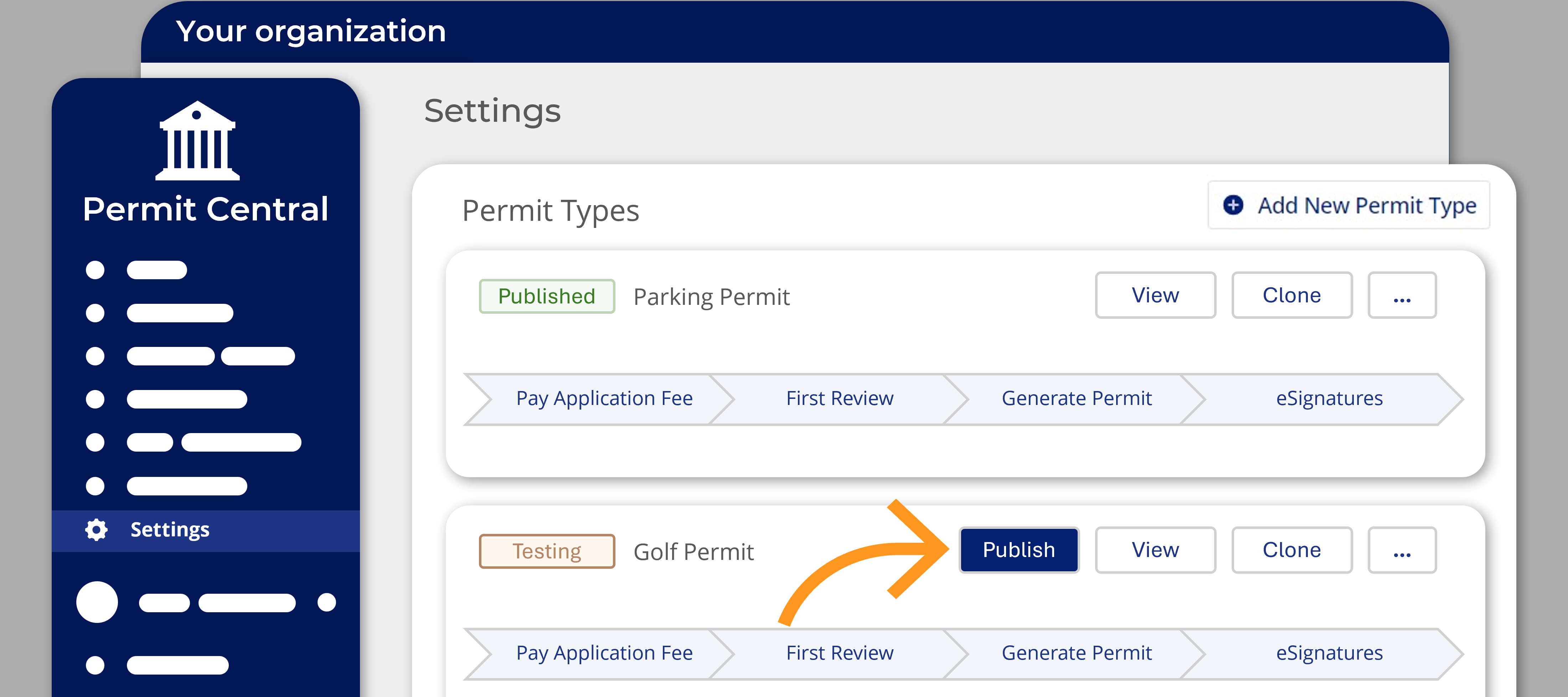
💁📢A new course is available on Nintex University!💡🏆Enrol now: Introduction to the Nintex Licensing and Permitting SolutionThis course is intended for first-time users of the Nintex Licensing and Permitting Solution.In 30 minutes, this beginner-friendly course will take you through:essential platform set-up and customization steps an overview of the permit management platform and applicant portal steps to set up, configure, and test new permit typesHave you spotted a gap or have a cool idea? Your feedback matters to us, and we’d love to hear it. Click here to leave feedback, as your input helps us continuously improve Nintex University, Nintex Community, and the Nintex How-To Center.
Hello, Process Manager Users! We’re thrilled to announce a new feature in Nintex Process Manager: localization! This exciting update means that Process Manager now supports multiple languages, starting with French, French Canadian, German, and Spanish. What is Localization?Localization in Process Manager provides a more personalized experience by supporting languages other than English. This enhancement will make it easier for our existing customers to navigate and utilize Process Manager in their preferred language. Plus, it sets the stage for us to rapidly add more language options in the future based on your feedback and needs. The initial localization work will cover the user interface elements created and managed by Nintex. While this update does not yet include translations for user-generated process content, we are exploring options to support process content-level translation in the future. In the meantime, this can be facilitated through process variations. Here’s a sneak peek
📢 Hi! Great news! 💃🏽🕺🏾I just published a comprehensive article that guides admin users through switching to OAuth Individual Consent for DocuSign Legacy Integrations. It also includes the requirements, as well as a step-by-step process to make the switch. Plus, you’ll see exactly what the process looks like for end users once the integration is live! 🚀Switching to OAuth Individual Consent for DocuSign Legacy Integrations Have you spotted a gap or have a cool idea? Your feedback matters to us, and we’d love to hear it. Click here to leave feedback, as your input helps us continuously improve Nintex University, Nintex Community, and the Nintex How-To Center.
📢 Great news! 🎉 I’ve just published a new video tutorial that guides users through adding and positioning bubbles in Nintex RPA. The video covers different bubble types—Standard, Anchored, Tooltip, and Help Button—and explains how to use them effectively in creating intuitive, engaging wizards that guide users through your processes. 💡Whether you're new to bubbles or looking to optimize your existing wizards, this tutorial provides a step-by-step walkthrough for achieving the best results.
📢 Exciting Update to Nintex Customer Content Portal 📢Hello Nintex Community!We’re thrilled to share some fantastic news about our Nintex Customer Content Portal. Each product’s portal page now includes a dedicated Nintex Ideas section. This enhancement is designed to better engage our user community and collect valuable insights directly related to your specific Nintex products.What’s New?Incorporating Nintex Ideas into each product section allows you to:Easily Access: Navigating to the Ideas section is now more straightforward, available directly from each product's page. Provide Product-Specific Feedback: Share your ideas, suggestions, and requests tailored to individual Nintex products. Engage and Innovate: Join fellow users in voting on ideas and watch as we evolve our products based on community-driven input.We believe this integration will foster a more collaborative environment and stimulate innovation by focusing feedback on specific areas. Our goal is to continually enhance
We have published a new How-to video for users switching to OAuth Admin Consent with DocuSign Legacy integrations. This video covers the upgrade process for Nintex DocGen for Salesforce, reviews the needed DocuSign setup, and finishes with switching the integration in DocGen for Salesforce. Switching to OAuth Admin Consent for DocuSign Legacy IntegrationsWe hope you find this video helpful in switching your authentication settings in Nintex DocGen for Salesforce. Your feedback is invaluable to us. Please let us know through our feedback portal if you have any suggestions or comments, leave feedback here.
We’ve just posted a new how-to article in the Knowledge Base on Community! Click the following link to learn how to get started with the Nintex Licensing and Permitting Solution. This article covers:Creating an account Configuring fee payment links in Stripe Setting up new permit types Testing and publishing your new licensing and permitting processHave you spotted a gap or have a cool idea? Your feedback matters to us, and we’d love to hear it. Click here to leave feedback, as your input helps us continuously improve Nintex University, Nintex Community, and the Nintex How-To Center.
Get started with Workflows by building a simple decision workflow.We're excited to announce the release of a new beginner video tutorial that will guide you through creating your first workflow. This step-by-step guide will teach you how to add steps and outcomes to the workflow and then deploy and test it.What you'll learn:Add application categories Create a workflow Deploy a workflow Assign permissions Test your workflowWhether you're a novice or looking to refresh your skills, this tutorial is a great place to start your journey with workflows. Check out the tutorial now and start building! We hope this tutorial empowers you to create unique workflows. Your feedback is crucial to helping us improve our resources. Please share your thoughts and suggestions on how we can enhance future tutorials through our feedback portal, leave feedback here.
Get started with SmartForms by building a simple "Hello, World!" application.We're excited to announce the release of a new beginner-level video tutorial that will guide you through creating your first SmartForms application. This step-by-step guide will teach you the fundamentals of building views and forms, essential skills for any SmartForms developer.What you'll learn:Add application categories Create an item view and add controls Build a basic "Hello, World!" form Test your new formWhether you're a novice or looking to refresh your skills, this tutorial is a great place to start your SmartForms journey. Check out the tutorial now and start building! We hope this tutorial empowers you to create amazing SmartForms applications. Your feedback is crucial to helping us improve our resources. Please share your thoughts and suggestions on how we can enhance future tutorials through our feedback portal, leave feedback here.
New How-To Video“Replace” dynamic advanced command Hey everyone!We've just released a new how-to video on the Replace dynamic advanced command in Nintex RPA.This video covers how to replace data in a variable to clean and standardize data, and modify strings effectively within your wizards. See the Video What it covers:Using the Replace dynamic advanced command. Practical examples of variable replacing. Best practices. Be sure to check it out and join the discussion in the comments!
Updated Installation Video: Now Includes Upgrade Process We have exciting news! Our new installation video for Nintex DocGen®️ for Salesforce now includes a comprehensive guide to upgrading your existing installation. This updated video will walk you through every step, ensuring a smooth transition to the latest version while maintaining your current settings and customizations.This video is a must-watch if you want to seamlessly upgrade and install Nintex DocGen for Salesforce. We’ve detailed every aspect to prevent any hiccups and streamline your experience.The upgrade and install process follow the same steps. Upgrading will not overwrite your current DocGen for SalesforceThese steps will facilitate a hassle-free upgrade and installation of Nintex DocGen for Salesforce. Watch the updated video below:Install or upgrade Nintex DocGen for Salesforce Additional InformationNintex Help: Install, upgrade, or purchase Nintex DocGen for SalesforceWe hope you find this video helpful in upgra
📢 Hi! Great news! 💃🏽🕺🏾I just published a comprehensive article that guides users through setting up the new DocuSign Apps Launcher. The article includes the requirements, as well as a step-by-step process for installing the DocuSign Apps Launcher and integrating it with Nintex DocGen for Salesforce. Additionally, there are videos demonstrating how to create a new DocuSign delivery method, explaining recipient tags, and providing instructions on how to tag a document and build a custom tag. Another video covers the process of converting an existing DocuSign Legacy delivery method to a DocuSign delivery method. This may be a nice way to accelerate moving to our newest Docusign integration. 🚀Integrate Nintex DocGen for Salesforce with DocuSign Apps Launcher Have you spotted a gap or have a cool idea? Your feedback matters to us, and we’d love to hear it. Click here to leave feedback, as your input helps us continuously improve Nintex University, Nintex Community, and the Nintex How-
New How-To VideoSplit dynamic advanced command Hey everyone!We've just released a new how-to video on the Split dynamic advanced command in Nintex RPA.This video covers how to split variables to extract specific information from a variable for multiple purposes such as data manipulation, dividing user input, etc. See the Video What it covers:Using the Split dynamic advanced command. Practical examples of variable splitting. Best practices. Be sure to check it out and join the discussion in the comments!
Introducing the new Nintex Automation Cloud Certifications We're excited to launch two new certification exams tailored to our Automation Specialist learning paths: Automation Specialist I Certification for Nintex Automation Cloud and Automation Specialist II Certification for Nintex Automation Cloud. These certifications are set to elevate your skills and enhance your career in workflow automation. As part of our ongoing commitment to refine and optimize our educational offerings, these exams are designed with a role-based approach, serving as a critical stepping stone to mastering the Nintex Automation Cloud.These certification exams will officially launch on June 21 and replace the existing Practitioner and Expert certification exams. What to expect? Automation Specialist I Certification: Ideal for those starting their automation journey with Nintex Automation Cloud. If you're focused on grasping the fundamentals of workflow automation and seeking to make significant impacts at the
Nintex Automation Cloud Learning Path Title ChangesWe've made some simple adjustments to their titles to better position and align two of our Nintex Automation Cloud learning paths. These adjustments will help us better define roles and training for Nintex Automation Cloud as the product evolves and we grow our courses, learning paths, and certification exams.NOTE: This does not change the URL of the learning paths - just the titles.Automation Specialist for Nintex Automation Cloud - Level I Formerly Nintex Automation Cloud for Designers and Developers - Beginner, this learning path gives Automation Specialists the starting knowledge and skills to create automation solutions using Nintex Automation Cloud. It covers various topics, including workflow-building methodology, workflow framework, workflow variables, building a form, testing, and deploying workflows. Before starting this learning path, it is recommended that learners have completed the Nintex Automation Cloud for Participants
Already have an account? Login
Enter your E-mail address. We'll send you an e-mail with instructions to reset your password.