

Nintex Community Menu Bar

Timezone in Nintex Won't Match SharePoint

  • January 8, 2020
  • 1 reply
  • 18 views

Forum|alt.badge.img+1

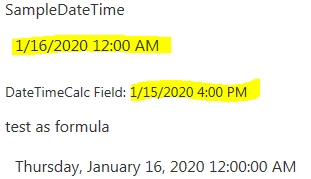
In Nintex, we want to Insert Reference to calculate a date. When we've manually entered a date in SharePoint, the date is in PST (which we want). However, when we use Insert Reference, it changes the date to UTC (an 8 hour time difference.
 

6090i051888D9DE61B811.png


We've also confirmed in Nintex Settings that "Use SharePoint Server Timezone" has been selected. What we would like is to have the Nintex form match the time zone our SharePoint is in (without us recalculating on the back end as a fix). We're not sure if this is a bug or something we can change on our end.


1 reply

Simon Muntz
Nintex Partner
Forum|alt.badge.img+23
  • Nintex Partner
  • January 9, 2020
Hi,

This looks similar to this thread here : https://community.nintex.com/t5/Nintex-for-SharePoint/Insert-Reference-date-field-always-one-day-off/td-p/107750

What build of Nintex Forms are you using?
As per the linked post above this is most likely a timezone issue between the Server time, SharePoint regional settings and maybe the individual user settings.

