Nintex Community Menu Bar

Run If Action Multiple Condition error - SharePoint/Nintex 2013

  • June 25, 2019
  • 5 replies
  • 37 views

Forum|alt.badge.img+3

This is in SharePoint/Nintex 2013 and Nintex and SharePoint are both up to date.


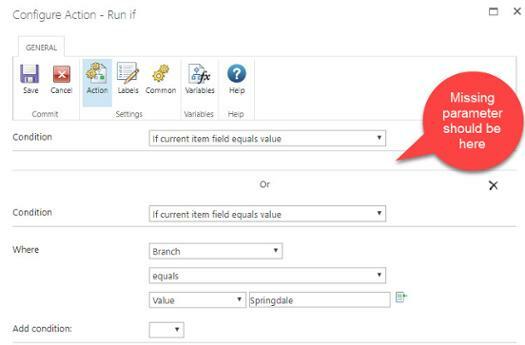
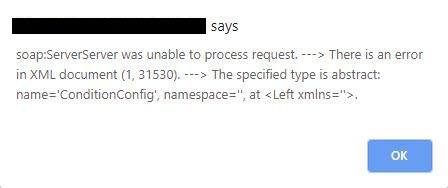
We have a user working on an existing workflow and when she tries to add a Run If action with multiple condition, the first condition "where" parameter is vanishing and it's not letting her save the workflow and is throwing an error.
2828iD9492EC6FAC75DA9.jpg2829i0E812D9BB2B6FAC4.jpg

I have asked her to try and use Set a Condition and the results are the same.

Has anyone ever seen this issue?

5 replies

MegaJerk
Forum|alt.badge.img+14
  • Scholar
  • July 10, 2019

Lots of us are seeing this happen, and I've not heard a single response from Nintex on the matter. 

There is another thread over here that talks about it, but has no more answers than: https://community.nintex.com/t5/Nintex-for-SharePoint/Error-when-using-multiple-conditions/m-p/95846#M67974


@eharris04 @EuanGamble: Have either of you all heard anything internally about this issue or know if it has been flagged as a problem by the devs? 


Curiously, if you have a Workflow that already has a conditional statement (whether that is Run If, or, Conditional Statement) with more than one condition, it'll work just fine. It's just that you cannot make NEW actions that have more than one condition or change the conditions of actions that feature more than one condition. 


EuanGamble
Nintex Employee
Forum|alt.badge.img+13
  • Nintex Employee
  • July 15, 2019

Hi @MegaJerk,


Im focused on the Forms and Mobile area so I have not heard anything of this. Have you raised a support case?


Cheers,

Euan


awpaxton
Forum|alt.badge.img
  • July 15, 2019

Hi Euan,


I've had an open support case on this issue for a few weeks now. I have upgrade all Nintex DB's and even done a re-install of the workflow product at the direction of the Nintex support team in an attempt to resolve, but the issue persists. However, it does seem that more instances of this issue are arising. Although Nintex support has claimed that they are unable to reproduce the issue, I am hoping more attempts can be made in order to take a closer look at it.


Thanks,


-Drew


MegaJerk
Forum|alt.badge.img+14
  • Scholar
  • July 17, 2019

Here is a response I left at the other thread detailing this same problem: 

I have opened a support ticket about this and the rep asked if it works just fine in FireFox and IE. For me, it does indeed work in both FireFox and IE, but will always fail in Chrome. 

I believe that i have discovered the problem coming down to the way that Chrome has started to handle the xml output on XML Document Node. It strips any attribute prefixes of attributes that were added using the createAttribute function (and then later appended to the node), while FF (and seemingly IE) do not. 

Because of this, whatever is pasrsing the blob of xml is probably failing to find certain attributes because they are malformed when passed in Chrome vs. FF/IE. Extracting identical XML output from FireFox, and using it inplace of the malformed XML in Chrome results in Chrome working correctly. 

I am bringing this to the attention of Support and hopefully they can figure out a workaround. 


MegaJerk
Forum|alt.badge.img+14
  • Scholar
  • August 29, 2019

If you update to the latest version of Chrome (76.0.3809), the problem with Multiple Conditions for Conditional Actions / Run If Actions should be resolved. 

The Chrome Browser was in error and the latest updates addresses the problem to bring it in line with FireFox and Edge: https://chromium.googlesource.com/chromium/src/+/9e54bad462fb56b46cd36bef230c5c4f38828f8b