Nintex Community Menu Bar

Need a returned value as "date" using Calculated Value form control - pls help!

  • February 7, 2020
  • 1 reply
  • 14 views

Forum|alt.badge.img


I'm trying to yield a date value using calculated value form. Tried and not working, can you pls help :)

The form is for employee to add their child birth date (time/date form), and another field should yield the date 6 years after the given date, which I cannot make it happen.

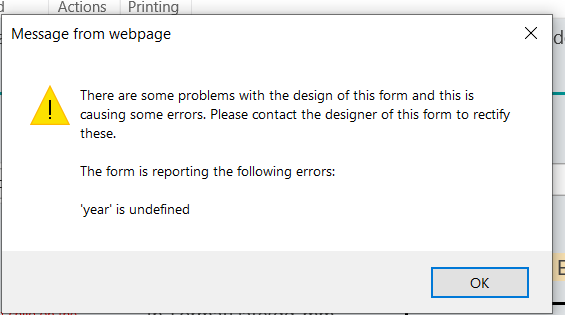
i use calculated value form and put in this formula, and when i tried preview the form, it kept saying 'yesr' is undefined.

example of what i simply want is, i.e. selected BD is 15-MAY-2014, the yield value should be 15-MAY-2020.  Thanks a bunch


to select BD

6398i54A4AF0FE400D9AD.png


formula

6397iCC4BBE591229479F.png


error msg

6396i2226567963E50D5A.png


1 reply

Michel
Nintex Partner
Forum|alt.badge.img+7
  • Nintex Partner
  • February 7, 2020

Too bad it's not as simple as we hope it would be. However, there is another post on the community that solves this issue. Please check out https://community.nintex.com/t5/Nintex-for-SharePoint/Calculate-Date-based-on-another-date/td-p/3950 and see if that works for you!


The answer from Eric Beeler:

I received some help on the JavaScript and got the dates to work. I needed to add validateStoredDate(); after the ready function. The first date is +2 days and the second one is today's date.


So my full script reads as followed:

NWF$(document).ready(function()
{
  validateStoredDate();
});


function validateStoredDate(source, arguments)
{
  var varStoredDate = NWF$('#' + varStoredDateID);
  var varCalculatedDate = NWF$('#' + varCalculatedDateID);


  // get date from first date picker
  var depart = parseDate(varStoredDate.val(),'mm/dd/yy');


  // add 129 days to the retrieved date
  depart.setDate(depart.getDate() + 2);


  // update second date picker
  varCalculatedDate.datepicker('setDate',depart);


  arguments.IsValid = true;
}


function parseDate(dateString, userFormat) {
    var delimiter, theFormat, theDate, month, date, year;
    // Set default format if userFormat is not provided
    userFormat = userFormat || 'yyyy-mm-dd';


    // Find custom delimiter by excluding
    // month, day and year characters
    delimiter = /[^dmy]/.exec(userFormat)[0];


    // Create an array with month, day and year
    // so we know the format order by index
    theFormat = userFormat.split(delimiter);


    //Create an array of dateString.
    theDate = dateString.split(delimiter);
    for (var i = 0, len = theDate.length; i < len; i++){
      //assigning values for date, month and year based on theFormat array.
      if (/d/.test(theFormat)){
        date = theDate;
      }
      else if (/m/.test(theFormat)){
        month = parseInt(theDate, 10) - 1;
      }
      else if (/y/.test(theFormat)){
        year = theDate;
      }
    }
    return (new Date(year, month, date));
}