Can anyone explain how to get JavaScript to invoke on every repeating row?
I've never understood how to get it to work and would like a solution once and for all.
Does one need to use the NWF.FormFiller.Events.RegisterRepeaterRowAdded function?
Refer to the data control name rather than the variable ID?
The JavaScript logic below is such that if Lease Start Date is not blank and Special Condition equals "Smoke alarms", the due date is automatically set to 28 days after the Lease Start Date.
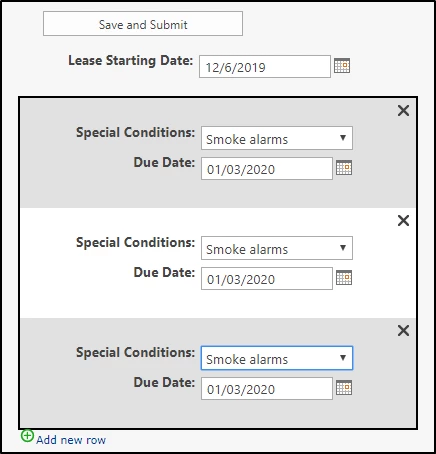
My JavaScript below is only invoked on the first row, but not the rest. If anyone could help amend my script to make this work I would really appreciate it.
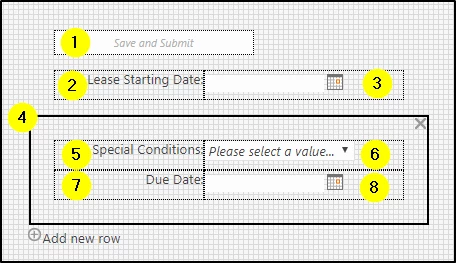
- Lease Start Date is outside the repeating section
- Special Condition and Due Date is inside the repeating section.
What should I do?
var TriggerControls = [ // Build an array of the controls which, when changed, will evaluate the the conditions below
  NWF$('#' + SpecialCondition),
  NWF$('#' + LeaseStartDate)
  ]

NWF$(TriggerControls).each(function(i) {

NWF$(this).change(function() {

if (NWF$('#' + SpecialCondition).val() == 'Smoke alarms' && NWF$('#' + LeaseStartDate).val() != "") {

var LeaseStartDateVal = NWF$('#' + LeaseStartDate).datepicker('getDate');
var Add28Days = moment(new Date(LeaseStartDateVal)).add(28, 'days').toDate();

NWF$('#' + DueDate).datepicker('setDate', Add28Days);

}

else {

NWF$('#' + DueDate).val('');

}
});
});