Nintex Community Menu Bar

Current feedback

  • August 7, 2018
  • 32 replies
  • 76 views

EuanGamble
Nintex Employee
Forum|alt.badge.img+13

Below is collated list of suggestions and feedback we have received for Universal Forms Preview so far. Please feel free to add more comments below. This list is not a road map or plan, but just feedback we have received from participants.


Planned features 

  • Need a way to bind/rebind a control to a column
  • Lookup control
  • Currency control
  • Managed Metadata control
  • Formula builder needs more expressions (e.g. Lookup)
  • Nintex Mobile support
  • An option to format the number control (e.g. thousand separator for different locales) 
  • Help button/section


Feature requests

  • More styling options
  • Possibility to create child-items automatically when using Repeating Sections
  • Translations: Some settings are not translated yet. 
    • As a designer, I can put in labels in any language but error messages are in English
  • A single control in a row cannot be shrunk/expanded
  • When two controls are in one row, you cannot be shrink/expand one control without affecting the other
  • Single choice controls allows you convert control type however Multiple choice control has no option
  • Cannot tell if a control has a rule attached from the Designer tab
  • Warning prompt before deleting a control
  • Previous version button on designer tab
  • Rename Text Mask to Text Pattern in Text - Short control
  • Add regex to Text Mask in Text - Short control
  • Make control Description field larger
  • OR condition is not obvious at all
  • Connect to data sources
  • Repeating section
  • Select a field to be the summary in a repeating section on Nintex Mobile


Bugs

  • Control config panel - search bar, when you type 'ge', result is also Image and Number also you get mix result when typing in 'ch'
  • When I added a new page (page 2), I lost controls for page 1. When I clicked Undo, page 1 restored my original controls - if you delete page 1 you also lose page 2
  • Choices do not show up when creating a WHEN condition on a choice control
  • Saved form is showing 'Drag on a form control' when there are already controls on the form


By design

  • Single and Multiple choice controls will remain separate as they are different data types (sting/array).


32 replies

Forum|alt.badge.img+2

Hi,

I have noticed some localization glitches (German), where certain UI Elements in the Designer have not been localized properly, while other have already been localized. Where is the best place to give such Feedback in more Detail and list the affected UI Elements?

Regards,

Matthias


EuanGamble
Nintex Employee
Forum|alt.badge.img+13
  • Author
  • Nintex Employee
  • August 16, 2018

Hi Matthias Bender‌,

Happy for you to share feedback on this page or just email me @ euan.gamble@nintex.com

We have not worked on translations as yet, its only in English.


Cheers,

Euan


Forum|alt.badge.img+2

Hello, Euan Gamble‌,

Thanks for your response.

I have responded via e-Mail.

Cheers,
Matthias


EuanGamble
Nintex Employee
Forum|alt.badge.img+13
  • Author
  • Nintex Employee
  • August 17, 2018

Hi Matthias Bender‌,

This is a good find. We did do some translation testing early in the development and thought translations were disabled as they are not complete. We will turn off the remaining translations until the final release.

Thanks for your feedback. Very helpful.

Cheers,

Euan


Forum|alt.badge.img
  • Novice
  • February 1, 2019

Hi Euan

When dragging an SP column onto the form, it should carry the column properties into the control. E.g. if I drag a multi-line text SP column onto the form it should show as a Text-Long control, not a Text-Short control as it does now. 
Would assume the same for default values specified on the SP column.

This might change with the control binding update?

Cheers

Lee


EuanGamble
Nintex Employee
Forum|alt.badge.img+13
  • Author
  • Nintex Employee
  • February 3, 2019

Hi Lee Harris‌,

Yes I noticed this as well - its a bit frustrating. This is something we will fix in a future release.

You should see control binding in the next couple of days if all goes well.

Cheers,

Euan


Forum|alt.badge.img+3
  • Nintex Partner
  • May 17, 2019

Here's my feedback so far. I tried to eliminate any comments related to documented issues or planned feature releases, but some may have slipped through. I'm sorry if any of these are old news or redundant. Thanks for the opportunity to take an early look at the new forms!


Issues/Bugs:
- Choice - Single Control:
        - When control is connected to a Choice column and View type is Radio buttons, unable to change Layout (Vertical, Horizontal). It says the property is inherited but layout is not configurable on the column settings.
- List Lookup Control:
       - Display format not editable

Nice to haves:
- Use Variables in a formulas and rules
- Connect a variable to a list column
- When configuring List Lookup control, ability to browse to site
- Some way to create a divider/horizontal rule

Comments/Questions:
- I like that rule-like capabilities are gone from control configuration because that was a source of confusion, but the rule-like capabilities that currently exist in the control configuration of the O365 responsive forms product should be made available in Rules.


Forum|alt.badge.img+3
  • Nintex Partner
  • May 22, 2019

I forgot to tag @EuanGamble in my feedback.


EuanGamble
Nintex Employee
Forum|alt.badge.img+13
  • Author
  • Nintex Employee
  • May 24, 2019

Hi @aohara,


Thanks for your feedback.

- Choice - Single Control:
        - When control is connected to a Choice column and View type is Radio buttons, unable to change Layout (Vertical, Horizontal). It says the property is inherited but layout is not configurable on the column settings.

This is a good find. We will get this fixed.


- List Lookup Control:
       - Display format not editable

We are working on Radio buttons, Check boxes and a couple of other options right now for the List Lookup control. Will come through in the next update.


Nice to haves:
- Use Variables in a formulas and rules

You can reference variables in formulas now. We have an update where you can access variables in the rule builder coming!


- Connect a variable to a list column


This is planned for development.

- When configuring List Lookup control, ability to browse to site

Good point. We will put this in the backlog.


- Some way to create a divider/horizontal rule

The Label control actually has a divider line. When editing the Label, pop it out to its own window, and it will show the divider in the menu.


- I like that rule-like capabilities are gone from control configuration because that was a source of confusion, but the rule-like capabilities that currently exist in the control configuration of the O365 responsive forms product should be made available in Rules.

Are you referring to Form Mode? Such as 'Control Mode'?


Thanks for your feedback @aohara! Keep it coming.


Cheers,

Euan


Forum|alt.badge.img+3
  • Rookie
  • May 29, 2019

The form is great, dare I say elegant, in edit mode... ...not so much in view mode.


Would like to have the options to include the container borders in view mode.


EuanGamble
Nintex Employee
Forum|alt.badge.img+13
  • Author
  • Nintex Employee
  • May 30, 2019

Hi @bbollmann,


If you had the chance, what would you change in the view mode?


Cheers,

Euan


Forum|alt.badge.img+3
  • Rookie
  • May 30, 2019


Basically, I would make View Mode...

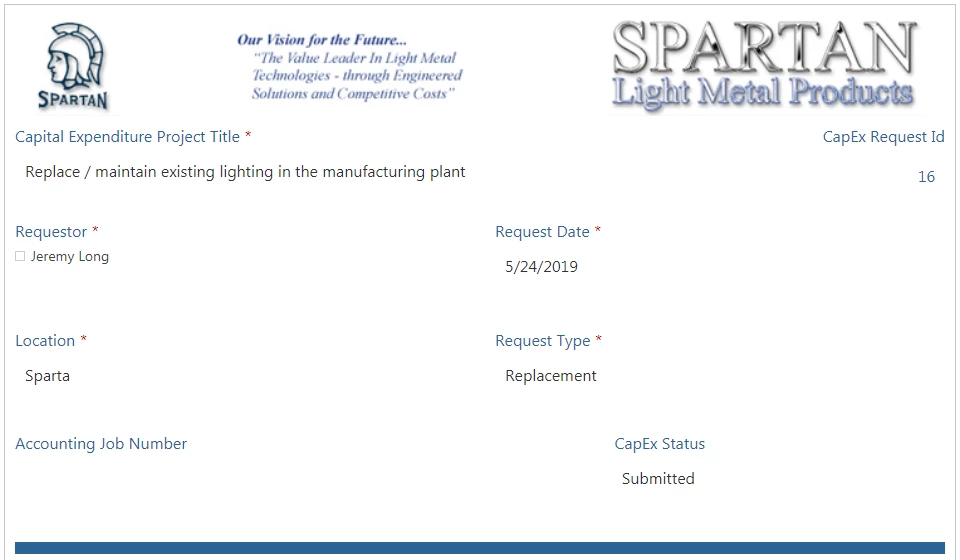
2386i00B9FCA3116B957B.png.


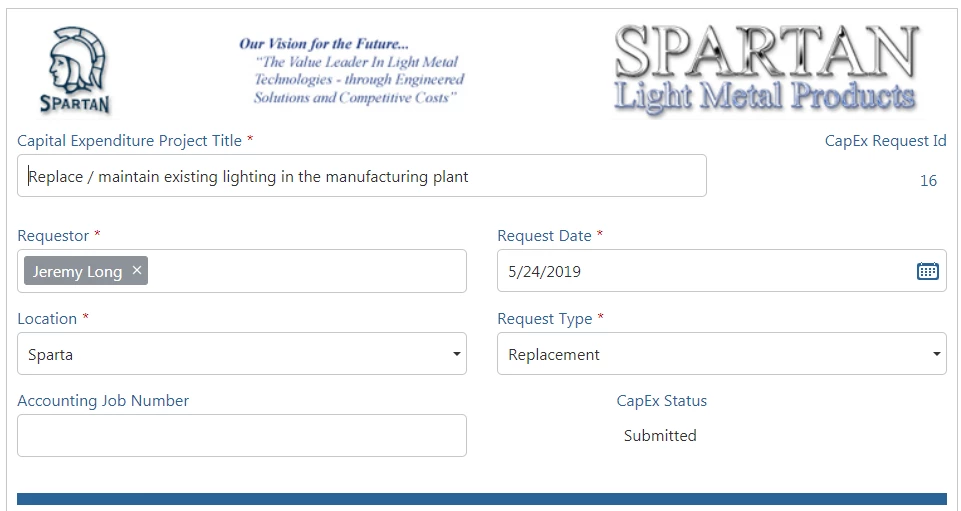
...look more like Edit Mode with the lines around the fields and maybe some graying to indicate View versus Edit.

2387i9FB0C8F60CBE73C7.png.

Should be a pretty simple switch in the CSS.

@EuanGamble 

Thanks!


EuanGamble
Nintex Employee
Forum|alt.badge.img+13
  • Author
  • Nintex Employee
  • May 31, 2019

Hi @bbollmann,


Would you mind sending me your Nintex Form to euan.gamble@nintex.com ? I would like to rebuild it in the new responsive designer.


Just export it from the designer.


Thanks,
Euan


EuanGamble
Nintex Employee
Forum|alt.badge.img+13
  • Author
  • Nintex Employee
  • May 31, 2019

Hi @bbollmann,


Here is a video showing off the new responsive designer experience with view and edit modes.


Hope this helps.


Cheers,

Euan


Forum|alt.badge.img+11
  • Nintex Partner
  • June 7, 2019

Hi,


here my quick feedback on one thing I've just seen (because I'm working on a project where responsive forms will be used and Universal Forms could fit even better requirements when it will be officially released)


Theme color selection: when I click on a color selection in the panel, it shows me the selection from the palette and RGB values, for me it was quite "tricky" to understand that the arrows on the right will change input selectors to HSL or hex code..if they were all shown it could be easier to understand and change the known parameter..


I'll keep have a look on all the other part


EuanGamble
Nintex Employee
Forum|alt.badge.img+13
  • Author
  • Nintex Employee
  • June 13, 2019

Hi @jackgelo,


Thanks for your feedback. @FabioLiberatore is working on a new style builder to address these specific concerns. We dont have a delivery date for this piece of functionality yet, but its being worked on!


Cheers,
Euan


Forum|alt.badge.img+7
  • Nintex Partner
  • June 14, 2019

Hi @EuanGamble 

Will it be possible to dynamically / externally set tooltips?

I am thinking of a scenario where I define tooltips in separate list and query one using a lookup-function.

Currently the tooltip field requires a fix value. 


Then I had a look at the List Lookup Control. 

The control currently saves the ID of the record to the list. I kind of would have expected an option to define whether I want to save the ID (e.g. 1), ID + Value (1;#Department A) or only value (Department A). Another limitation seems to be, that I can't build a "On Form Input"-rule. So I can't create a rule to detect which option from the List Lookup Control has been selected. 

What I am super excited about is the option to only display unique values.


EuanGamble
Nintex Employee
Forum|alt.badge.img+13
  • Author
  • Nintex Employee
  • June 14, 2019

Great feedback @rbachmann.


We were thinking about where else we could surface the formula builder, and we recently discussed the idea of showing it in areas like tooltips. So it sounds like we are on the right path! This is certainly something we want to bring, I dont have a date yet, but I will keep you posted.


With regards to the List Lookup bound to a 'Single Line of Text', this was in the plan but was waiting for another team to complete some dependant frameworks which has now been completed. We expect to have this ability in the next update.


Keep the feedback coming! It really helps to validate our thinking.


Cheers,

Euan


Forum|alt.badge.img+7
  • Nintex Partner
  • June 14, 2019

I am curious about the upcoming User Profile Service integration. If it will be possible to set the default value of a People Picker to e.g. Manager, the Internet will break down for sure. 


EuanGamble
Nintex Employee
Forum|alt.badge.img+13
  • Author
  • Nintex Employee
  • June 15, 2019

Hi @rbachmann,


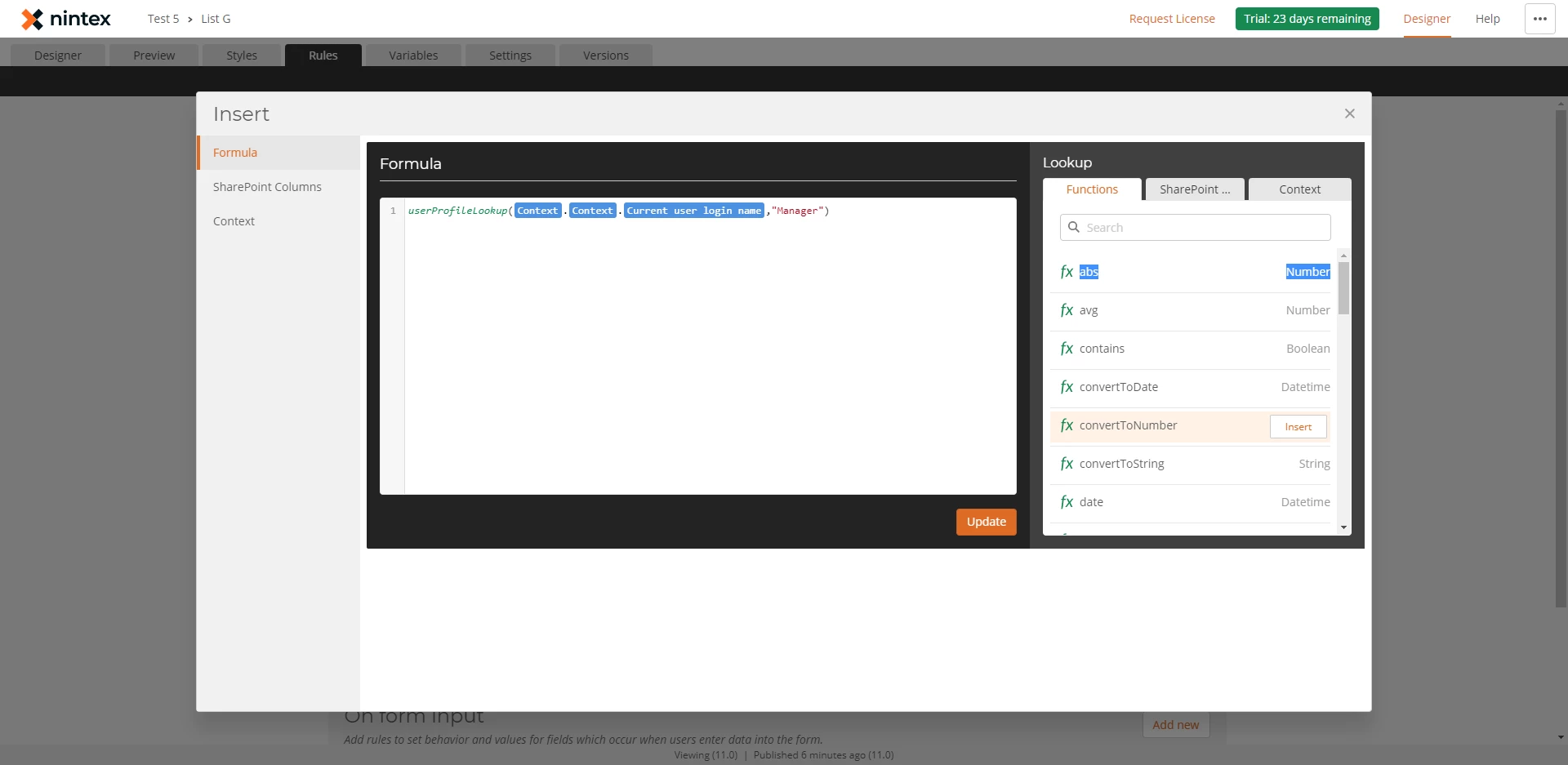
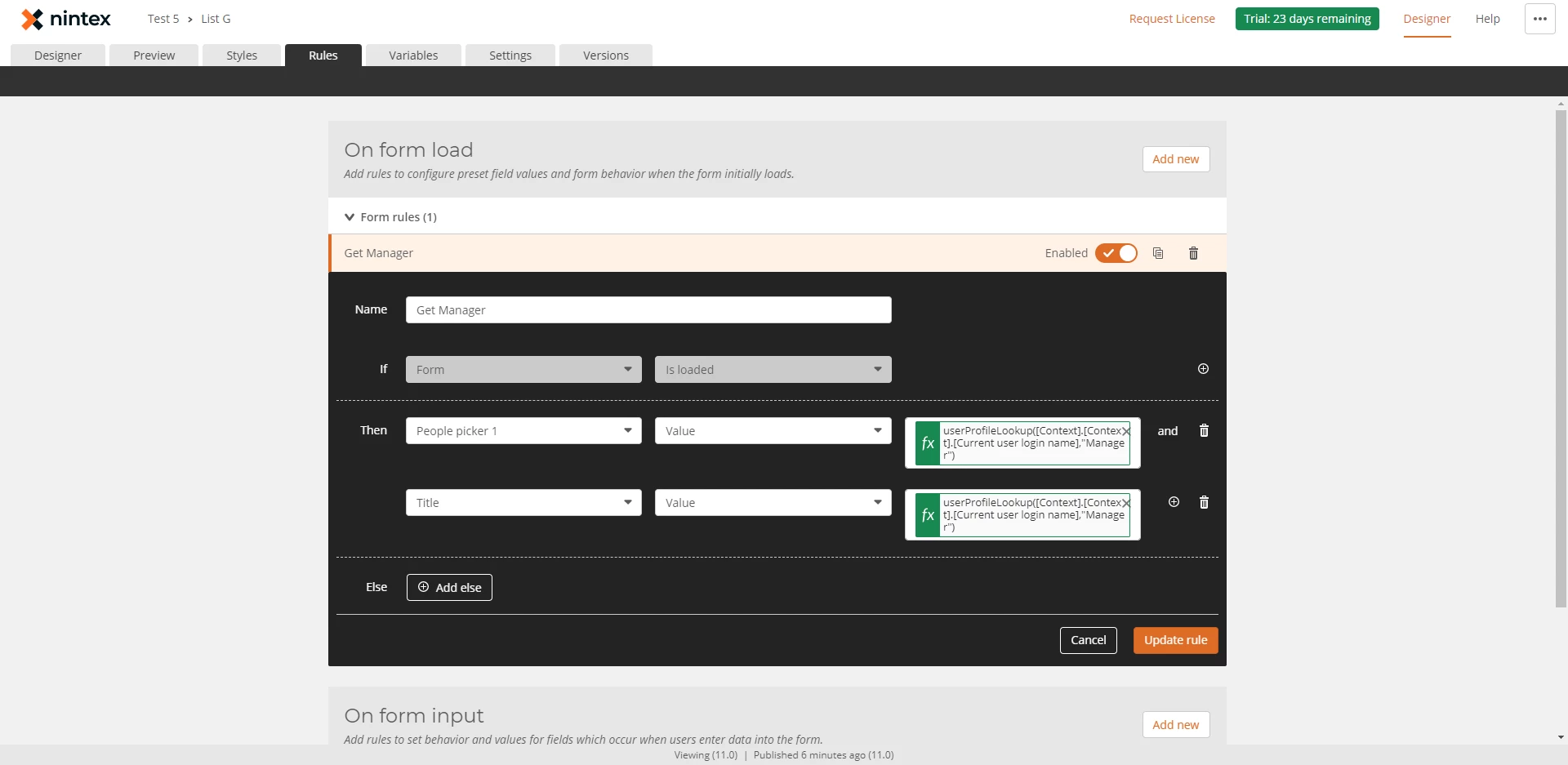
The UserProfileLookup function is currently being developed. This would allow you to place a formula or a variable in the default value field of a people picker.


Hope to have this in the next update which isnt too far away.


Cheers,

Euan


EuanGamble
Nintex Employee
Forum|alt.badge.img+13
  • Author
  • Nintex Employee
  • June 18, 2019

Hi @rbachmann,


Making some good progress on the UserProfileLookup function to set a field value. You can see the experience below that we are currently working on.


2625iD254E8C2D170E79C.png2626i33DAFD36DDB85DE7.png


Cheers,

Euan


Forum|alt.badge.img+7
  • Nintex Partner
  • June 18, 2019

Excellent! One step closer to a world free from JavaScript.


Forum|alt.badge.img
  • Nintex Partner
  • July 10, 2019

Feature Request - Connecting File uploads directly to a document library

The Issue

I've recently worked on a few projects where multiple file upload sections are required on a form:
e.g. Photos of House 1, Photos of House 2 etc.

In workflow cloud this is relatively easy (with a few snags*), every file upload generates an associated collection variable of files (well, references to a file) that can be easily looped through and uploaded.


On 365 this is a nightmare. The best I've been able to do is make sure every file upload section has a name, then in the WF get the NFFormData, query xml out the control's name to get the uploaded file names, then pass this in to the o365 upload file that looks at the list item and pulls out each attachment file one-by-one (at which point you pray two files don't share the same name). This takes quite a lot of actions to do and for multiple file uploads you either need to repeat this logic for the number of upload controls you have or make a clever state machine which can be time consuming.


Proposed Feature
Ideally the file upload control could be connected directly to a document library (and even allow specifying a dynamic folder path) - it would be even nicer if this extended to being able to set the file's column values.


* Unable to enforce a minimum number of files unlike current 365, noticed this is also a limitation in new responsive AP, are there plans for this? I would love if this could be rule/formula driven so I can require a minimum of 4 photos but only when that section is relevant - currently 365 responsive just allows a static value so if the file upload is conditionally required then you can't enforce a minimum number of uploads


EuanGamble
Nintex Employee
Forum|alt.badge.img+13
  • Author
  • Nintex Employee
  • July 15, 2019

Thanks for the suggestion @Samuel_Short. Thats a a good idea.


I will have a think about it. I feel we need to have better integration between Forms and Workflow on Office365 - similar to what we do in NWC.


Cheers,

Euan


Forum|alt.badge.img+3
  • July 23, 2019

Thank you so much for the work you guys are putting in developing the universal form. I was wondering if and when the repeating fields are available would it be able to use jquery Sortable UI

a function maybe that would allow users to move things up and down?