

Nintex Community Menu Bar

Copy To File Share - Username Question

  • July 28, 2020
  • 4 replies
  • 19 views

Forum|alt.badge.img+1

I am very new to using Nintex (2013), however I have already created a couple "Notification" workflows using conditions and find it quite intuitive.

I am using a combination of the two solutions shown in the posts below to create a workflow that copies Major versions of documents to a file share for archive purposes.

https://community.nintex.com/t5/Nintex-for-SharePoint/Copy-a-Major-version-of-a-document/m-p/38764#M32050
https://community.nintex.com/t5/Nintex-for-SharePoint/Add-sufix-to-output-filename-when-using-quot-Copy-file-to-File/td-p/113099

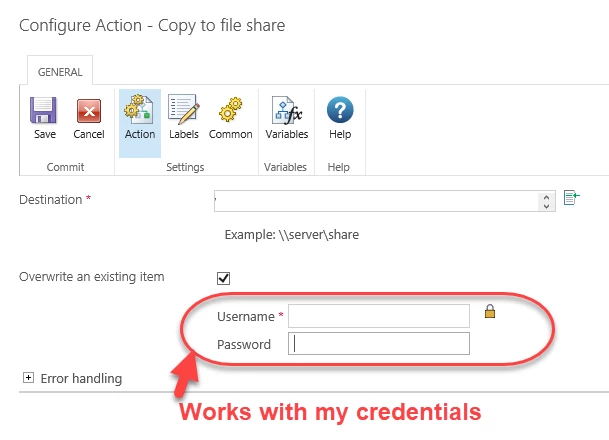
For testing purposes, I used my credentials in the Username and Password fields, but I would like these fields to be variable based on the user that is updating the document in SharePoint.

I researched the help files and many posts on this forum, however I can not find any info on this.

Is there a way to use a reference to the current user (or Initiator) to use their credentials in these fields?
How is this normally handled?

Thank-you!8516iEB4A89A3BE0ACBFA.png


4 replies

Simon Muntz
Nintex Partner
Forum|alt.badge.img+23
  • Nintex Partner
  • July 29, 2020
Hi,

No the functionality you are looking for is not available.

Forum|alt.badge.img+1
  • Author
  • July 29, 2020

Thanks for the quick response Simon.


Do Nintex admins just normally enter their own credentials in these fields and then all other users use that for authentication?


Sorry if this is a newbie question (but that's what I am) 🙂


Simon Muntz
Nintex Partner
Forum|alt.badge.img+23
  • Nintex Partner
  • July 30, 2020
Yes an admin can create the connection with their credentials and allow others to use it. Another way is to create a specific account for this purpose, kind of like a service account.

Forum|alt.badge.img+1
  • Author
  • July 30, 2020

Thanks -  a different account sounds like the best option. I will check with my IT group to see how we can make this work. Thanks for all your help!!



