



Issue
In the classic form experience, it was possible to calculate values within a repeating section and save the resulting total directly to a SharePoint list column. After upgrading to the new form experience, users may notice that this functionality is no longer available by default.
If you are looking to achieve the same outcome in the new experience, there are alternative approaches that can be used to calculate totals from repeating section data and store those values in SharePoint. This article outlines the available options and provides guidance on how to replicate the behavior that was previously supported in classic forms.
Scenario
- A repeating section contained multiple line items.
- A calculation was performed to generate a sum of values within the repeating section.
- The calculated total was automatically saved to a SharePoint list column.
- After upgrading, the direct capability to save the repeating section calculation to the SharePoint column was not functioning as it had in the classic form.
Resolution
The behavior can be replicated in an upgraded form by using a calculated field outside the repeating section and mapping that value to the SharePoint column.
Recommended Approach
1. Create a field in the form that will store the overall total.
2. Use a calculation rule or expression to total the values from the repeating section.
3. Place the calculated total in a single-value field outside the repeating section.
4. Map this field into the corresponding SharePoint list column.
5. Save and publish the form.
Example
If the repeating section contains a field called Amount, use an aggregate expression to complete the calculation:
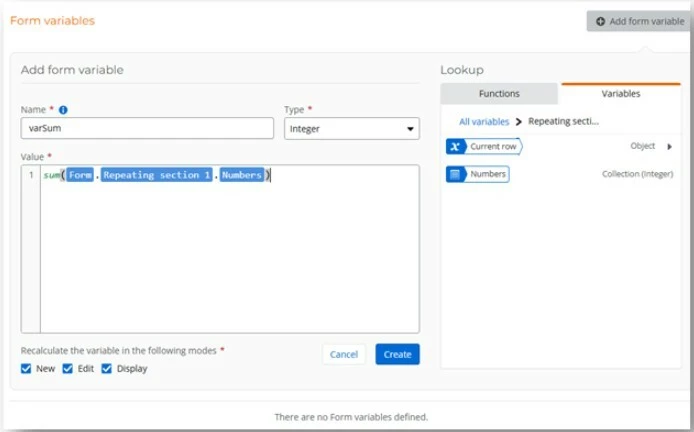
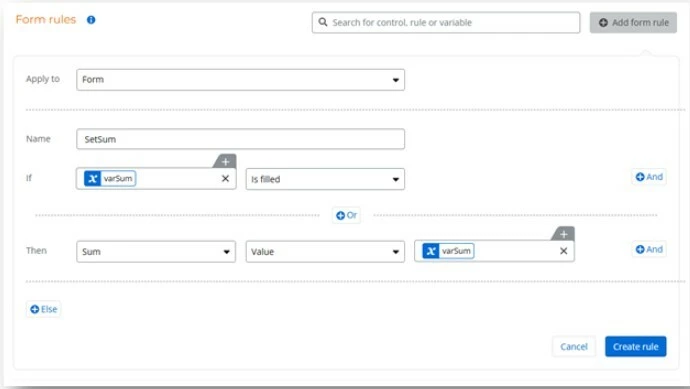
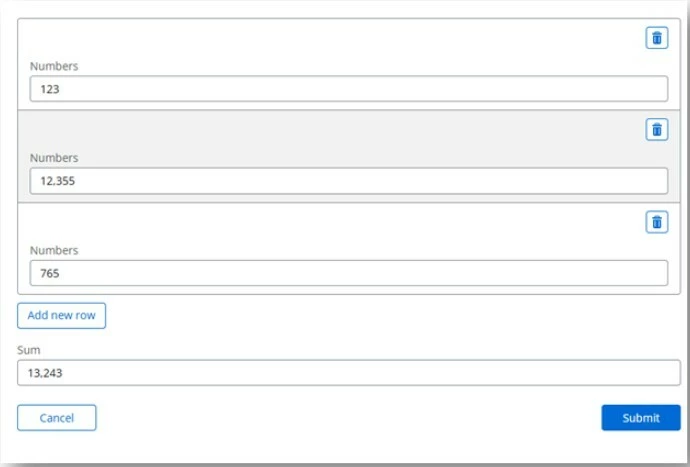
The result should be stored in a standalone field such as TotalAmount, which is then connected to the SharePoint column.
Outcome
By calculating the total outside the repeating section and binding the result to a dedicated SharePoint-mapped field, the upgraded form can achieve the same result that was previously available in the classic form. This allows users to continue capturing line-item data in a repeating section while maintaining a summary total in the associated SharePoint list column.
Key Takeaway
While the upgraded form experience does not provide the same direct save capability from within a repeating section, the functionality can be replicated by calculating the repeating section total using an aggregate expression, storing the result in a separate form field, and mapping that field to the desired SharePoint list column.