


The Assign a Task action facilitates critical workflow functions, including sending approval requests, assigning tasks to users and capturing decisions (e.g., Approve vs. Reject). While simple to configure at first glance, it remains one of the most error-prone actions in process automation and migration projects.
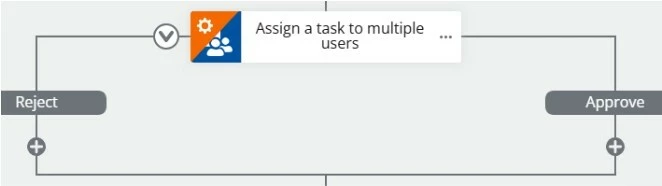
1. Assignee Resolution & User Authentication
Common Pitfalls
-
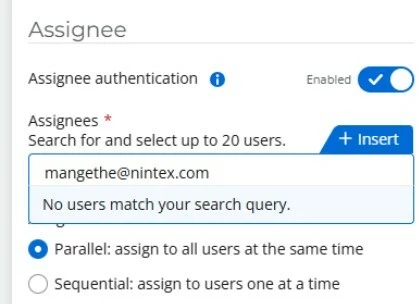
Hardcoded Assignees: Assigning static email addresses (e.g., user@domain.com) directly in the action configuration limits scalability and creates single points of failure during organizational changes.
-
Invalid or Missing Users: Assigning tasks to accounts that do not exist within the Nintex Workflow tenant or users lacking proper permissions, causes execution errors.
Impact
-
Tasks are never delivered to the intended recipient.
-
Workflow instances stall indefinitely or throw fatal execution errors.
Best Practices
-
Dynamic Assignment: Populate assignees dynamically using start form fields, workflow variables, SharePoint list metadata or Microsoft 365 directory lookups (e.g., Manager Email).
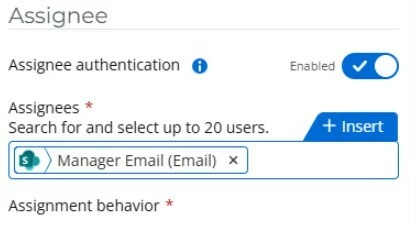
- Variable-Based Fallbacks: If static references are required, declare them via environment variables or text parameters to simplify ongoing maintenance.
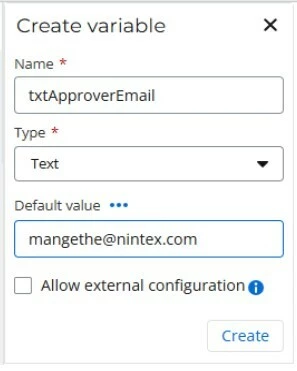
2. Task Outcomes & Branching Logic
Common Pitfalls
-
Inconsistent Outcome Names: Mismatches between task outcome labels (e.g., Approve) and subsequent conditional evaluation logic (e.g., checking for Approved or Yes) cause logical failures.
Impact
-
The workflow completes the task step but executes the incorrect conditional branch or skips subsequent actions entirely.
Best Practices
-
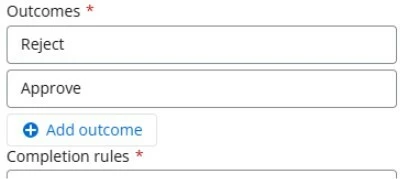
Standardize Outcome Names: Establish consistent naming conventions across all workflow definitions (e.g., strictly Approve and Reject).
-
Exact String Matching: Ensure all downstream Branching or If/Else actions match the exact case and spelling defined in the task outcome properties.
3. Task Completion Rules
Common Pitfalls
-
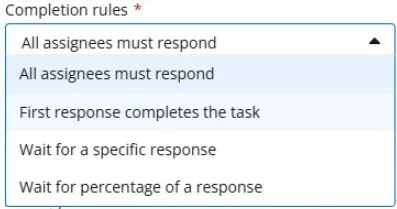
Misunderstanding multi-assignee completion behaviours when assigning tasks to groups or parallel recipients.
Configuration Guidance
| Completion Rule | Behaviour | Typical Use Case |
| All assignees must respond | Waits for 100% of assignees to submit a decision before proceeding. | Unanimous approvals or panel reviews. |
| First response completes the task | The first decision submitted closes the task for all remaining assignees. | First-come, first-served team queues or escalation groups. |
| Wait for a specific response | Advances immediately if a key decision (e.g., Reject) is met. | Early termination on rejection. |
| Wait for percentage of a response | Advances once a defined quorum percentage is achieved. | Majority-vote committee approvals. |
4. Notifications, Reminders & Escalation Policies
Common Pitfalls
-
Leaving Reminders and Escalation disabled on long-running or business-critical approval tasks.
Impact
-
Tasks are forgotten or ignored, resulting in SLA breaches and extended process cycle times.
Best Practices
-
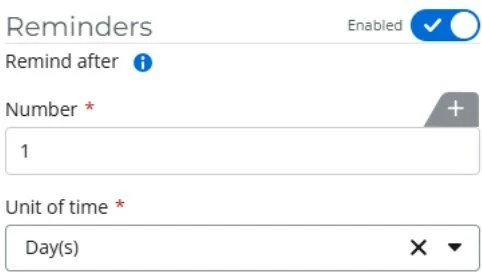
Enable Reminders: Configure automated reminders (e.g., every 1 to 3 business days) to prompt pending assignees.
-
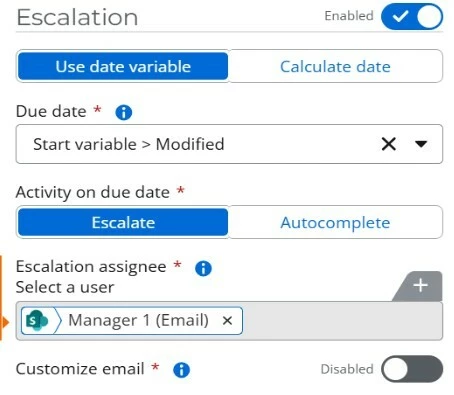
Configure Escalations: Define an operational due date and establish automatic escalation paths (e.g., reassigning to line managers or auto-completing tasks) when SLAs expire.
Pre-Migration & Quality Assurance Checklist
Before deploying or migrating workflows containing task actions, verify the following:
-
Recipient Validity: Are all task assignees mapped dynamically to active accounts within Nintex Workflow?
-
Access Permissions: Do assignees have the required tenant permissions to access and respond to the task form?
-
Outcome Alignment: Are task outcomes explicitly mapped and correctly referenced in all downstream conditional logic?
-
SLA Safeguards: Are appropriate reminder schedules and escalation paths configured?
-
Edge Case Handling: Has the task behaviour been validated for scenarios where an assignee is inactive, absent, or unresponsive?
Key Takeaway: Most workflow execution failures in the Nintex CE Platform do not stem from complex underlying logic, but from misconfigured task properties, static user assignments and missing escalation rules.