




Envelope addendums (also known as envelope attachments) are non-signable files attached to an envelope. These items do not have to be documents; they can be images, short videos, compressed files or anything else. Valid file types include: doc, docx, htm, html, jpeg, jpg, odt, pdf, png, rtf, tif, and tiff. Signers are able to download & view the addendums during the signing process.
Setup
Web Setup
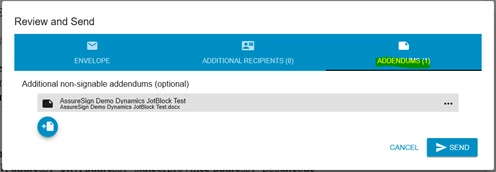
Envelope addendums can be created when you are using the new document envelope interface by clicking "Review and Send", navigating to the Envelope Addendums section and attaching the addendum files. See this for more information.
API
Envelope addendums can be created when using the DocumentNOW V2 CreateEnvelope operation (SOAP method). They may be created when using the DocumentNOW V3 /submit and /submit/prepare methods.