Nintex Community Menu Bar
Question

URL Change to remove Skuid Override

  • Jul 9, 2024 9:51 PM UTC
  • 5 replies
  • 41 views
  • Translate All

Forum|alt.badge.img+5

To view opportunities without the Skuid view, I used to be able to zero out the Skuid override in the URL by setting everything after “override=” to 0. (see below)

But, for whatever reason, the URL has changed to:
https://c.na1.visual.force.com/apex/OpportunityDetailv1?id=00630000012azQy&sfdc.override=1

and setting the override to 0 doesn’t do anything. Anyone know how I can make it so that setting the override to 0 takes me back to the Non-Skuid view?

https://skuid.na1.visual.force.com/apex/UI?id=00630000012azQy&sfdc.override=1&actiontype=View&objecttype=Opportunity

5 replies

Forum|alt.badge.img+10
  • Jul 9, 2024 11:45 PM UTC

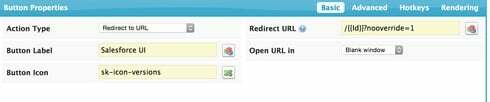
You can create a button for the override:

Translate

Forum|alt.badge.img+17
  • Nintex Employee
  • Jul 9, 2024 11:45 PM UTC

Here is a tutorial about getting back to standard salesforce:  http://help.skuidify.com/m/page-assignments-and-overrides/l/102550-how-do-i-get-back-to-a-standard-s…


Translate

Forum|alt.badge.img+5
  • Author
  • Jul 9, 2024 11:45 PM UTC

Thank you Tami - that was a simple yet great idea I didn’t even think of, and it worked. Much appreciated!

Translate

Forum|alt.badge.img+5
  • Author
  • Jul 9, 2024 11:45 PM UTC

Thanks Rob! Tami’s approach above was a good idea and worked as well. Appreciate the help.

Translate

Forum|alt.badge.img+10
  • Jul 9, 2024 11:45 PM UTC

Glad to help.

Translate