Nintex Community Menu Bar
Question

Unable to restore to previous version (Update 7) - No fonts to load" error encountered"

  • Jul 10, 2024 11:57 AM UTC
  • 10 replies
  • 67 views
  • Translate All

Forum|alt.badge.img+13

When restoring to a previous version, the following error is encountered:

There was an error while trying to restore the selected page version:
Error: no fonts to load

Steps to reproduce:
1) Create standard Account Detail page
2) Make sure the page is saved
3) Remove the “Delete” button
4) Save the page
5) Try to restore to previous version

Expected Behavior
Page restores

Actual Behavior
Error: No fonts to load encountered and page does not restore



10 replies

Forum|alt.badge.img+6
  • Nintex Employee
  • Jul 10, 2024 12:21 PM UTC

Barry,

I’m having trouble replicating this issue in an Update 7 Org. Which Composer theme are you using? Are you restoring from the Composer itself or from the Page List? Are you refreshing the Page before trying to restore the version or just save, remove the button, click Versions? What theme is the page using at runtime?

Translate

Forum|alt.badge.img+10
  • Nintex Partner
  • Jul 10, 2024 12:21 PM UTC

I’m having the same issue with the pages I’ve been working on. They’re assigned to a custom theme. I’m on the latest version. Luckily, for me, it still works if you restore the version from the page list view. I’m only getting error if trying to restore from the actual page itself.

Translate

Forum|alt.badge.img+10
  • Nintex Partner
  • Jul 10, 2024 12:21 PM UTC

The custom theme was created prior to the latest update - I should add. Perhaps that’s it?

Translate

Forum|alt.badge.img+13

Hey J -

Thanks for taking a look at this.

Only occurs when restoring from the page itself. Works properly when restoring from PageList.

Just tried this again to be sure - No refreshing involved

  1. Open existing page
  2. Remove button
  3. Save
  4. Versions
  5. Click a version - Error

Translate

Forum|alt.badge.img+6
  • Nintex Employee
  • Jul 10, 2024 12:21 PM UTC

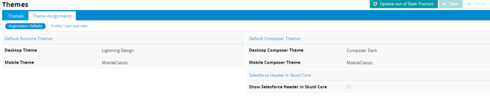
OK, I’m able to replicate it. The key piece I was missing was the theme assignment: Lightning Design. I didn’t test all of the standard themes, but switching the page’s theme to Lightning Design caused the error that you listed, Barry. This is a bug, and the best workaround I can think of would be to use the Page List, or temporarily change the theme to something else.

Louis, was your custom theme based off of the Lightning Design theme per chance?

Translate

Forum|alt.badge.img+13

Thanks J, glad you were able to repro.  The workaround (using PageList) works for me, definitely a lower priority item from my perspective compared to some of the others I’ve logged recently 🙂  Thanks again!

Translate

Forum|alt.badge.img+13

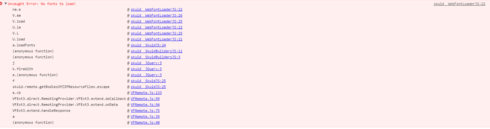
Hey J - I just noticed that refreshing the page in the builder (with my settings at least) generates the same uncaught exception.  Fortunately, it seems to be somewhat benign.  I’m guessing this is the same problem as the one with restoring versions but just in case, here’s the exception.  I encounter this when pulling up the page in the builder (or refreshing).

f843225f091bb57e188c2ff416b532cd9431ca68.png

Translate

Forum|alt.badge.img+10
  • Nintex Partner
  • Jul 10, 2024 12:21 PM UTC

The theme was indeed based on Lightning Design - good catch!

Translate

Forum|alt.badge.img+6
  • Nintex Employee
  • Jul 10, 2024 12:21 PM UTC

This issue is resolved in Banzai Update 7.1, now available on the Skuid Releases page.

Translate

Forum|alt.badge.img+13

Confirmed as resolved as of Update 7.1, thank you!

Translate