Nintex Community Menu Bar
Question

Ui-Only Field freezes preview

  • Jul 9, 2024 9:50 PM UTC
  • 15 replies
  • 54 views
  • Translate All

Forum|alt.badge.img+14

I have added my first Ui-field


I did not add the field to the page only created it.

I then selected preview and the page freezes forever.
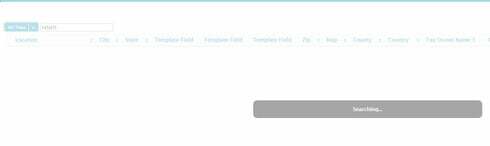
If I then delete the Ui-field the page displayes in preview. Why


15 replies

Forum|alt.badge.img+13

Hi Bill, are you running version 7.7 ? If not, can you try installing version 7.7 from the Skuid Releases page and see if this resolves the issue?

Translate

Forum|alt.badge.img+14
  • Author
  • Jul 9, 2024 11:08 PM UTC

I did download the new release and I can now search.  However, I receive the following error:
b5576a1413e0f8b023c8830a0db753195df57742.jpg

Translate

Forum|alt.badge.img+13

Okay, that explains it — Skuid’s Formula Field syntax does not support the HYPERLINK function.

However, you could recreate this using a Formula like this:

“Tax”>https://www.google.com/search?q=“+{{Tax_Property_Address_Line_1__c}}+”'>Tax Owner Map"

Translate

Forum|alt.badge.img+14
  • Author
  • Jul 9, 2024 11:08 PM UTC

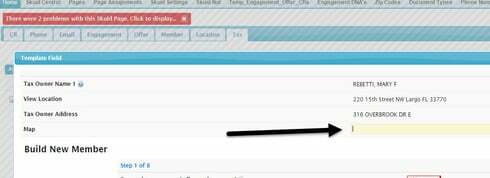
I made the changes and I made it read only. It shows up blank:

This is the error:

Translate

Forum|alt.badge.img+13

Can you post a screenshot of the Formula definition in the Page Composer? Looks like the formula was not entered correctly.

Translate

Forum|alt.badge.img+14
  • Author
  • Jul 9, 2024 11:08 PM UTC

Translate

Forum|alt.badge.img+13

Okay, I see what the problem is: add a double quote " at both the very beginning and the very end of of your formula.

Translate

Forum|alt.badge.img+14
  • Author
  • Jul 9, 2024 11:08 PM UTC

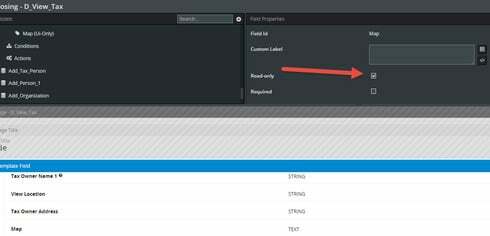
I have set as read only:

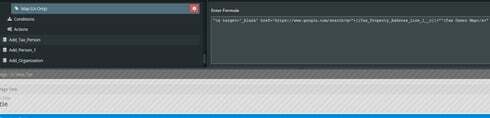
I added the doublw quotes:

But it shows like this:

Translate

Forum|alt.badge.img+14
  • Author
  • Jul 9, 2024 11:08 PM UTC

This has not been solved.

Translate

Forum|alt.badge.img+13

We are aware of the issue with Ui-Only Fields not always respecting the Read-Only setting, but we are considering that a separate issue from your original post.

Translate

Forum|alt.badge.img+14
  • Author
  • Jul 9, 2024 11:08 PM UTC

I agree the read only is not the first issue.
My intent for the field is to be html field that is a hyperlink field “Tax Owner Map” when clicked on will take them to “https://www.google.com/search?q=”+{{Tax_Property_Address_Line_1__c}}"

Translate

Forum|alt.badge.img+17
  • Nintex Employee
  • Jul 9, 2024 11:09 PM UTC

I wouldn’t use a UI Only field to try this.  I’d use a template.   Add a template to your field editor,  put the code you have put in your UI only Field formula into the body of the template.  Ensure it is read only.  You should be good. 

Translate

Forum|alt.badge.img+14
  • Author
  • Jul 9, 2024 11:09 PM UTC

Thanks Rob,

I did change to a template.  It generates a url that looks this:
https://www.google.com/search?q=%22+%3Cspan%20class=%22nx-merge%22%20data-field=%22Tax_Owner_Address…

Translate

Forum|alt.badge.img+17
  • Nintex Employee
  • Jul 9, 2024 11:09 PM UTC

Triple braces.

{{{Name}}}

Also - the value for Tax_Property_Address_Line_1__c is probably going to be a salesforce id. You probably want to go through and get the name field behind (if it is one of your address concatenation things). Somthing like: {{{Tax_Property_Address_Line_1__r.Name}}}

Translate

Forum|alt.badge.img+3

Thank you!  Huge help!!

Translate