Nintex Community Menu Bar
Question

Trying to add a filter to a search but nothing is showing to add that filter

  • July 10, 2024
  • 8 replies
  • 50 views

Forum|alt.badge.img+7

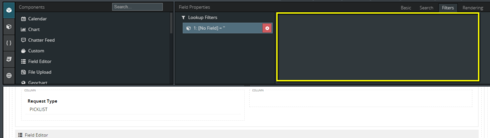
Looks like a bug. I’ve tried refreshing, X’ing it out and trying again. Updated from 7.19 to 7.20 and still not getting the info I need to set up the filter (yellow box)

8 replies

annajosephine
Nintex Employee
Forum|alt.badge.img+18
  • Nintex Employee
  • July 10, 2024

Yeah, I feel like I had this problem the other day too, also with a Lookup Filter. 


Forum|alt.badge.img+17
  • Nintex Employee
  • July 10, 2024

We’ve reproduced the error and have a bug up and running.  It does look like there is a workaround.  If you add a new reference field,  the filter properties work.  It is only when you open a page with an existing reference field that the filter properties are blank.  So…   Better get it right the first time, cuz there’s no going back! 


Forum|alt.badge.img+7
  • Author
  • July 10, 2024

What do you mean by “add a new reference field”?  I’d rather not have to rebuild this whole wizard…


Forum|alt.badge.img+17
  • Nintex Employee
  • July 10, 2024

Ugh. That would be painful.  What I mean is that if you just drag the “Request Type” field into your component again - you should be able to set the filter properties for it.  Then delete the old version.  One field, not the whole wizard. 


Forum|alt.badge.img+7
  • Author
  • July 10, 2024

Random, but effective fix.  That worked.  I had the same field on there twice (different field editors display based on rendering conditions) and replacing the field once allowed me to set the filters on the other version of the same field.

Thanks


Forum|alt.badge.img+18

Any chance this will be fixed with update 5?


Forum|alt.badge.img+10
  • July 10, 2024

I updated to version 7.27 and the filter functionality on a lookup field is working when it didn’t before the update.


Forum|alt.badge.img+13

This issue has been resolved in Banzai Update 6, available from the Skuid Releases page.