
Nintex Community Menu Bar
Question

Troubleshooting: Guest User Access After Winter '21

  • July 11, 2024
  • 6 replies
  • 64 views
  • Translate All

bill.fox
Forum|alt.badge.img+7

Thank you Justen for you description. I am still getting an error which I think I am using the wrong “guest user”
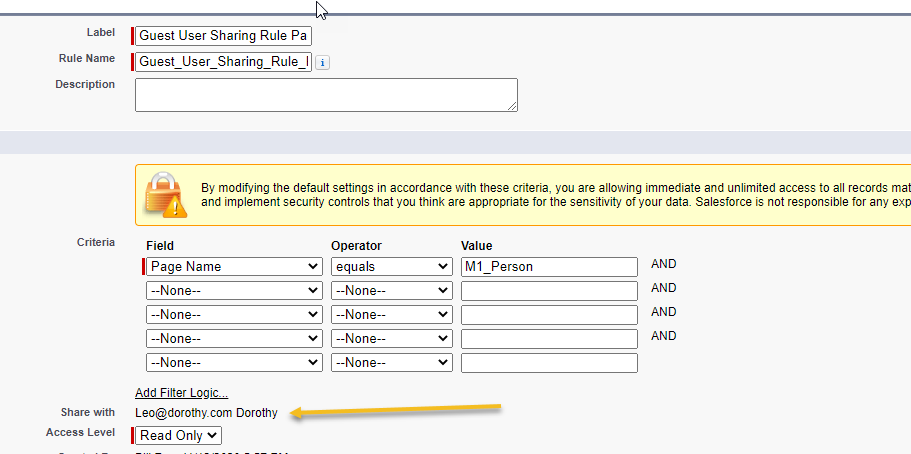
I am getting the same results: You’ve been INKED! (Something went wrong)

We were unable to find a Skuid Page named M1_Person. The Page is either inaccessible or does not exist. If you believe you should be able to view this Skuid Page, ask your System Administrator to check the Sharing Model for the Page object to ensure that you have access to this Skuid Page.

How do I determine the correct guest user or other ideas?

6 replies

bill.fox
Forum|alt.badge.img+7
  • Author
  • Rookie
  • July 12, 2024

annajosephine
Nintex Employee
Forum|alt.badge.img+18

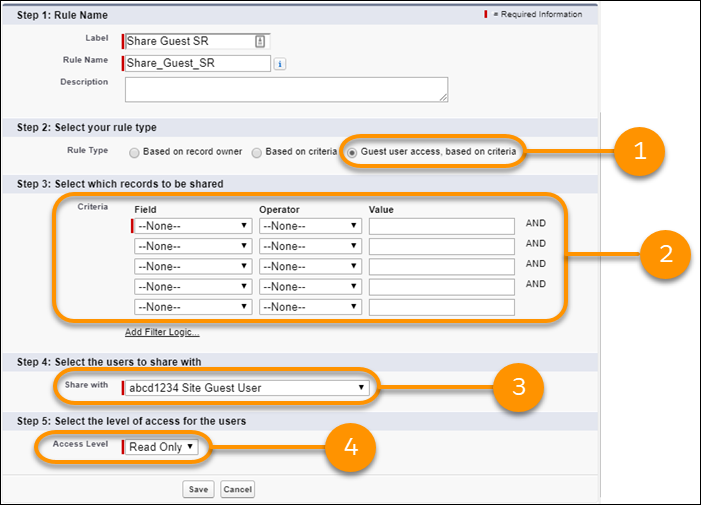
Hi Bill, check out Salesforce’s instructions for how to create a guest user sharing rule.

For “Select your rule type,” make sure you select “Guest user access, based on criteria” and for the select users to share with, make sure you select the site guest user for the specific site.

Translate

Forum|alt.badge.img+14

Hello Anna.

The above was helpful. I have one last solution to be in compliance with SF upcoming restrictions. Can you or someone take look at this?

How to create a UI-Only table from a query of a salesforce object?

The sales force object has 156 matches but only the first record shows in the UI-Only Table.

I am using "Create new rows" action

https://drive.google.com/file/d/1qBGoc04qu13y88z7_zL66lxeFQKYAzYJ/view

Cheers,

Bill

Translate

Forum|alt.badge.img+14

Hello Anna,

I found the answer

Translate

Forum|alt.badge.img+11

Awsome @Bill ! out of curiosity, what was the solution so others can know?

PS: after you post the solution, can you make this question answered?

Translate

Forum|alt.badge.img+14

I needed to give “Full Access” to all fields to be used in skuid

Translate