Nintex Community Menu Bar
Question

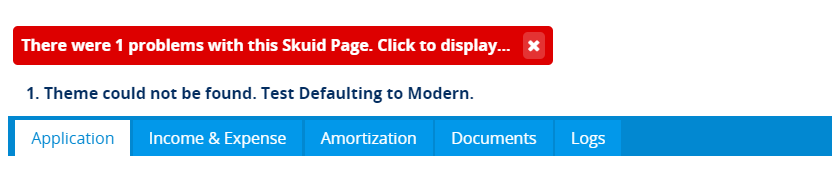
Theme could not be found. Test Defaulting to Modern. After updating Skuid

  • July 11, 2024
  • 3 replies
  • 73 views
  • Translate All

Forum|alt.badge.img+1

I am getting “Theme could not be found error when page is loaded. Test Defaulting to Modern”

3 replies

Forum|alt.badge.img+11

Hey @VaibhavFx, and welcome!

Would you please provide some more detail to have a better idea of what’s going on?

  • What Skuid version are you on?
  • When did this start happening?
  • Are you trying to use a custom theme?
  • Do you have a screenshot you can share?

Thanks!

Translate

Forum|alt.badge.img+1

Version: 12.2.9
This is coming after upgrade.

Translate

Forum|alt.badge.img+11

Thanks @VaibhavFx ,

From the info you provided, have you seen this post:

I have update Skuid to version “12.2.8” in the Salesforce sandbox. and its showing error “1. Theme could not be found. Test Defaulting to Classic.” and also there is no option of “Update Out of date Theme” under the theme tab [Image: https://d2r1vs3d9006ap.cloudfront.net/s3_images/1815090/RackMultipart20191121-117038-3eqk54-skuid_1_inline.png?1574340273] [Image: https://d2r1vs3d9006ap.cloudfront.net/s3_images/1815091/RackMultipart20191121-89598-1q804iw-Skuid_2_inline.png?1574340376]

This seems to be similar to your issue.

Translate