Nintex Community Menu Bar
Question

Still getting Input too long. [1, 57]" on 7.32"

  • Jul 10, 2024 11:58 AM UTC
  • 9 replies
  • 53 views
  • Translate All

Forum|alt.badge.img+18

Big page with lots of queries. I thought this was fixed with 7.31?

9 replies

Forum|alt.badge.img+18
  • Author
  • Jul 10, 2024 12:25 PM UTC

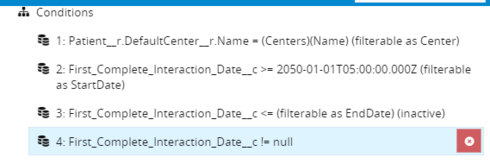
Looks like the soql isn’t reflecting my conditions.

model.soql = “SELECT Name,Id FROM Patient_Case__c WHERE (Patient__r.DefaultCenter__r.Name = ‘CompassCare’)”

Conditions:

Does it matter that First_Complete_Interaction_Date__c is a formula field?

Translate

Forum|alt.badge.img+18
  • Author
  • Jul 10, 2024 12:25 PM UTC

Obviously as it’s written it shouldn’t return anything. I’m not loading the model on pageload, I’m running a script to initialize the date conditions based on the current date, so that the StartDate condition looks like this when the query is run:

Translate

Forum|alt.badge.img+18
  • Author
  • Jul 10, 2024 12:25 PM UTC

Tried to resolve by forcing model to build client-side. Seemed to get farther in the process, but now getting this:

Translate

Forum|alt.badge.img+18
  • Author
  • Jul 10, 2024 12:25 PM UTC

And even when processed client side, the model’s soql is still just reflecting the first condition, not all of the conditions.

Translate

Forum|alt.badge.img+18
  • Author
  • Jul 10, 2024 12:25 PM UTC

bump

Translate

Forum|alt.badge.img+13

“Cannot read property tid of undefined” — your session has expired. Refresh the page.

Translate

Forum|alt.badge.img+13

Matt, I think this is a separate issue, for which you have another Community post already, so to keep the waters from getting muddied, let’s keep discussion of your Models’ Conditions being removed isolated to that post.

Translate

Forum|alt.badge.img+13

Matt, is this occurring when you save Models, or when your Models are queried?

Regardless, here’s what would be helpful: open Chrome’s JavaScript Console, and go to the Network tab, and click on XHR. Then, do whatever causes this error to occur. When it happens, you should get an “apexremote” entry in the Network Requests logger. Click on this, and then under Headers > Request Payload, click through the payload to open “data”, and then double-click on what’s next to 0, and then paste this into a text editor, and then email support with that text file. Or, if it says “”, let us know that as well.

Translate

Forum|alt.badge.img+18
  • Author
  • Jul 10, 2024 12:25 PM UTC

Zach,

Since I fixed the issue with the conditions not making it into the soql, I’m not getting the Input too long error. It was happening on query.

Issue was that I had about two dozen aggregate models with “Id in any row of another model” conditions, all pointing to the model where the conditions weren’t being added. Without the date limitation, that model was returning almost 4000 rows. So, two dozen queries each looking through 4000 rows for matching ids was causing ‘input too long’.

Translate