Nintex Community Menu Bar
Question

Skuid page not showing picklist according to the Record type

  • Jul 10, 2024 12:26 AM UTC
  • 18 replies
  • 111 views
  • Translate All

Forum|alt.badge.img+3

Hi,
The picklist values on the skuid mobile page is showing all the values and not filtering according to the Record type. API is enabled for the users, is there anything else to be done for it to work? Thanks.

-Sravanthi.

This topic has been closed for replies.

18 replies

Forum|alt.badge.img+13

Make sure that the RecordTypeId field is included in the Model.

Translate

Forum|alt.badge.img+7
  • Jul 10, 2024 12:55 AM UTC

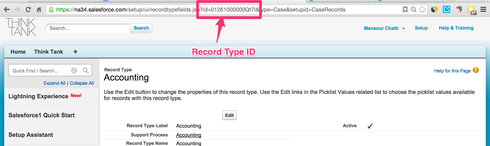
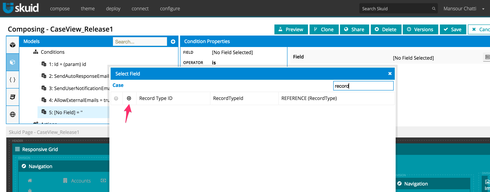
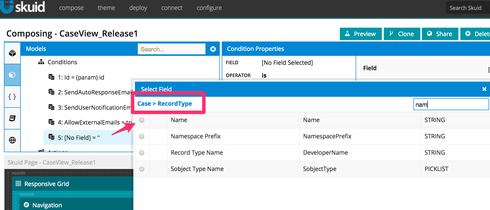
Try using the RecordType.Name instead of Record type.  RecordTypeID can be found by accessing the record type page in setup and looking at the URL (see pic)
b7f9c67ccc0203a75219d80b6c8a19385a434e70.png

Translate

Forum|alt.badge.img+3

Hi,

RecordTypeId is included in the model, I tried both with the condition of RecordTypeId=‘Member’ and also RecordTypeId=18 digit id. Both did not work. Is there anything else to be checked? Thanks.

-Sravanthi.

Translate

Forum|alt.badge.img+7
  • Jul 10, 2024 12:55 AM UTC

Did you try RecordType.Name?

Translate

Forum|alt.badge.img+13

Try adding the RecordTypeId field to the Skuid Mobile page — is it getting set to the correct Record Type? 

What version of Skuid are you using?

Translate

Forum|alt.badge.img+3

Thanks for the screen shots. I tried RecordType.Name=‘Member’, it did not work though. 

Translate

Forum|alt.badge.img+3

Yes, it is getting the correct Record Type Id (Member) on to the Skuid page. 

Translate

Forum|alt.badge.img+10
  • Nintex Partner
  • Jul 10, 2024 12:55 AM UTC

In the past I’ve found the only way to get this to work is to use RecoprdTypeId as the condition field but reference the 18 digit id. You can get this by pasting the 15 digit id (see Mansour’s post) into this tool: https://www.adminbooster.com/tool/15to18

Generate the 18 digit id and then use that in your condition. 

Translate

Forum|alt.badge.img+3

The 18 digit id also did not help. 

Translate

Forum|alt.badge.img+10
  • Nintex Partner
  • Jul 10, 2024 12:55 AM UTC

Have you tried using a different browser? For record types the picklist values can cache into the browser so that changes are not reflected. Perhaps try on another computer?

Translate

Forum|alt.badge.img+5
  • Jul 10, 2024 12:55 AM UTC

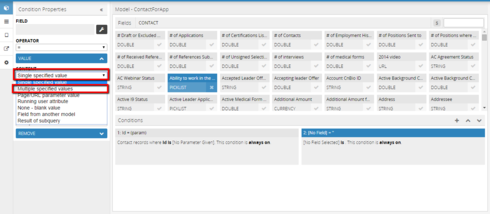
Hi Zach! The Skuid version we are using is 7.17. We have tried using the RecordTypeId field, both 15 and 18 digits. What else are we missing?5389446d7526119bfd55c74417501fd0663ea35b.png

Translate

Forum|alt.badge.img+13

Are you getting any errors in the JavaScript Console? What object are you trying to show values from, e.g. Case, Asset, custom object? There is a known issue with getting picklist dependency information from some standard objects such as Asset that we are working to resolve in the next Banzai update (Update 6).

Translate

Forum|alt.badge.img+3

I am trying to show values from the Contact object. I don’t see errors in the javascript console. 

Translate

Forum|alt.badge.img+6

Thanks Zach. Its work for me once i added RecordTypeId field in my model and now picklist values are showing according to record type.

Translate

Forum|alt.badge.img

I have a similar issue in that i have recently renamed some picklist values

These values appeared on the Skuid page before i changed the name but after i changed the name they no longer appear on the Skuid page even though they are accessible via the record type

Is there any assistance on this

Translate

Forum|alt.badge.img+7

Hi, David,
Have you tried closing and re-opening your browser and loading the page again? Since Skuid caches picklist metadata, you might need to re-open the browser to get the updated values in you Skuid page. There’s some more discussion about it in this post:
https://community.skuid.com/t/picklist-values-arent-updating?topic-reply-list%5Bsettin…

Emily

Translate

Forum|alt.badge.img

Emily

I have changed browsers, deleted cache, tried to add new pick list values, add Record Type fields to the Model, Change the Model conditions

I just cannot get new values to appear in my picklist

Translate

Forum|alt.badge.img+17
  • Nintex Employee
  • Jul 10, 2024 12:55 AM UTC

Actually Emily and David - you need to make a change to your skuid page (any change, no matter how trivial) and then save it.  This will cause the metadata cache to be refreshed which should retrieve the correct picklist values. 

Translate