Nintex Community Menu Bar
Question

Search results pop up duplicate values

  • July 10, 2024
  • 2 replies
  • 17 views

Forum|alt.badge.img+7

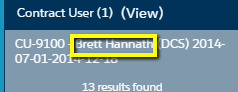
In order to get names to show up in the Search component, you have to add Contact__r.Name to your fields but that also means the name shows up in the search “View”

How can you hide the 2nd column for the name without showing the SFDC ID in the search results? If you drop the Contact__r.Name the search results (middle image) would show the ID.


2 replies

annajosephine
Nintex Employee
Forum|alt.badge.img+18
  • Nintex Employee
  • July 10, 2024

Confirmed. I’ve reported this as a bug. I want the {{ContactId}} field to display the name, and/or {{Contact.Name}} to be an active link in the view popup and/or I want the ability to edit that popup as I please.   What would be the best case scenario for you?


Forum|alt.badge.img+7
  • Author
  • July 10, 2024

I want the search results to display the name but the pop up should be the link to the Contact.

As for the pop up - right now, if you check boxes in the wrong order for fields you want to include, that defines your table of results so it’d be great if we could modify the results table (order of columns, sort ability, etc.)