Nintex Community Menu Bar
Question

Search component not rendering dropdown

  • July 11, 2024
  • 10 replies
  • 84 views
  • Translate All

Forum|alt.badge.img+1

We have created search component , we properly used return object but when we start typing in search component it does not load dropdown, it is just showing loading icon.
please suggest how to fix?

10 replies

Forum|alt.badge.img+11

Hey @Sam2 and welcome!

First I would like to cover our grounds before going forward. For the return object, did you specify the entity as well as check the SOSL box?

Also what version are you on? I just tried using the search component in Chicago Update 2 (14.4.2.1) and it seems to be working fine.

Cheers,

Translate

Forum|alt.badge.img+1

Hi there,
Yes I have specified entity in return object.
Actually I have integreted with postgresql, So I don’t know where to check SOSL box.
And I am using version v2

Translate

Forum|alt.badge.img+11

Hey @Sam2,

Thanks for sharing the API Version, but can you also share the Skuid version as well(e.g: Boston 13.X).

Actually I have integrated with postgresql

Ahh ok, so in that case let’s start from the ground up. Have you verified you were able to connect to your server? Under Data source > “your PostgreSQL” > general tab Click on Test Connection at the bottom to verify your connection.

If that checks out and you are able to connect, we may have to take a deeper look into what may be happening behind the scenes.

Cheers,

Translate

Forum|alt.badge.img+1

@QuinnRyan My skuid version is also Chicago Update 2 (14.4.2.1).

Translate

Forum|alt.badge.img+11
QuinnRyan:

Ahh ok, so in that case let’s start from the ground up. Have you verified you were able to connect to your server? Under Data source > “your PostgreSQL” > general tab Click on Test Connection at the bottom to verify your connection.

If that checks out and you are able to connect, we may have to take a deeper look into what may be happening behind the scenes.

Were you able to test @Sam2 ?

Translate

Forum|alt.badge.img+1

Thanks, @QuinnRyan
Yes I am able to connect successfully with Postgresql.
I have also imported Data source objects in Skuid.

I have configured as per below in Return object of Search component–
Data Source-- Postgresql
Entity-- Contact(i.e Object in Postgresql)
Fields-- Firstname, Lastname

Translate

Forum|alt.badge.img+11

No problem!

Thanks for sharing the info.

QQ, for the fields you are searching for, can you check to see if they are set up as filterable=true in the DSO configuration?

If it is, can you go in the dev console(network tab) and see if Skuid can verify the metadata you are trying to query(to double-check the network connection)?

As an additional troubleshooting step, have you tried using the table component to see if the data renders correctly there?

Cheers,

Translate

Forum|alt.badge.img+1

Thanks @QuinnRyan ,

  1. Yes , I have checked all fields are filterable = true

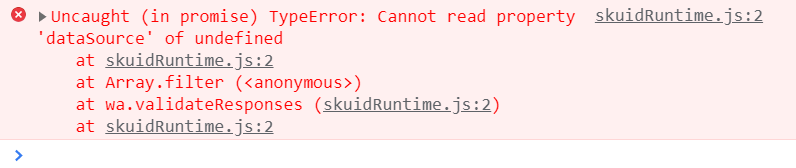
  2. I have checked in console & I am getting below error–

  1. Also checked table component & I am able to render data correctly & also used table search component and it’s working fine
Translate

Forum|alt.badge.img+7
  • Nintex Partner
  • July 12, 2024

I’m watching this thread as I am having the same issue with Skuid Platform - Chicago Update 2 (14.4.2.1) talking to postgresql. I have worked around it using a table with search, and would like to get the non-table search component working.

Translate

Forum|alt.badge.img+11

Hey @Sam2 and @duane,

I just created a sandbox and tested it out, and it looks like it is a bug. I’m sending this over to the core team to take a closer look and resolve the issue.

Once I have more info, I will let you two know ASAP, and most importantly, thanks so much for catching this!

Cheers,

Translate