Nintex Community Menu Bar
Question

Related List Drawer (B) on Related List Table (A) with A and B same object but different record type

  • Jul 10, 2024 1:33 PM UTC
  • 26 replies
  • 146 views
  • Translate All

Forum|alt.badge.img+4

So I am creating a recipe page with recipe steps on which the ingredients are linked
So:
Recipe
     Recipe Steps
            Ingredients

Recipe Steps and Recipe are the same object but possess different record types.
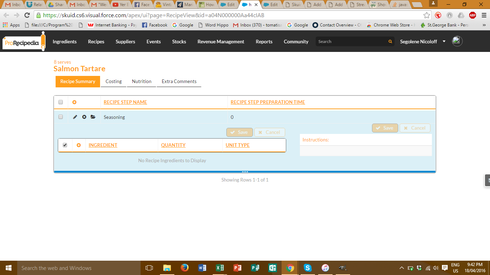
I followed the Skuid tutorial on related list drawers and it looks fine at first but when I open the drawer, there are no ingredients in the table and when I try and create a new row nothing appears even though it says I have to fill things in to save…

Any help would be appreciated.


This topic has been closed for replies.

26 replies

Forum|alt.badge.img+17

How are recipe steps linked to recipes since they are in the same object? Do you have a look up field?

Translate

Forum|alt.badge.img+4
  • Author
  • Jul 10, 2024 2:03 PM UTC

yes there is a lookup from recipe steps to main recipe

Translate

Forum|alt.badge.img+17

-Are you using separate models for your Main table and your drawer table?

Translate

Forum|alt.badge.img+4
  • Author
  • Jul 10, 2024 2:03 PM UTC

yep - one is linked to recipe object and the other to my ingredient related list

Translate

Forum|alt.badge.img+17

Your set up is a little different that I would expect in that it seems the parent is Recipe, the child is Recipe Steps, and the Grand Child is Ingredient. But you need to use the same ingredients for multiple recipes so you would need to use a junction object between Recipe step and ingredient to establish a. Many to many relationship. Or you could just skip that and have carrots listed many times as ingredients if they are used in multiple recipes. In your case, you have recipe and recipe steps as siblings instead of parent/child. Soooo… I think you will still need three models: 1) Recipe 2) Recipe steps 3) ingredients You would need two drawers and three tables. The main table would be on out recipe model. The first drawer would be on your recipe step model and your second drawer would be on the ingredient model. Is that how you have it set up or am I misunderstanding your situation?

Translate

Forum|alt.badge.img+4
  • Author
  • Jul 10, 2024 2:03 PM UTC

so i do have a junction object connecting recipe steps and ingredient which is the grandchild object in the drawer.

The main table/page relates to the recipe
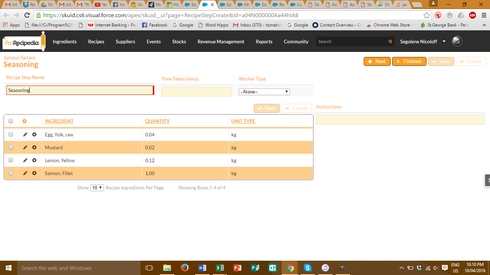
The drawer to recipe step
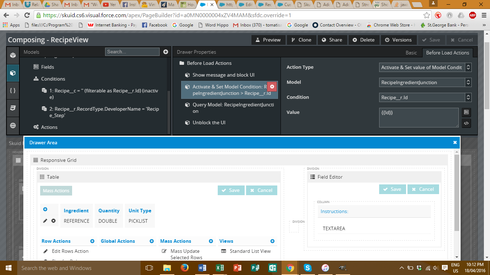
and the table in this drawer to ingredient junction object as below

Translate

Forum|alt.badge.img+17

Ah… The screenshot helped. I think I remember reported issues with using drawers within drawers. I’m not sure if they were fixed and which version they were fixed in. You could try updating to the latest version of Skuid. You could also try using a pop up instead of a second drawer to test to see if it is the drawer causing problems or one of your settings.

Translate

Forum|alt.badge.img+4
  • Author
  • Jul 10, 2024 2:03 PM UTC

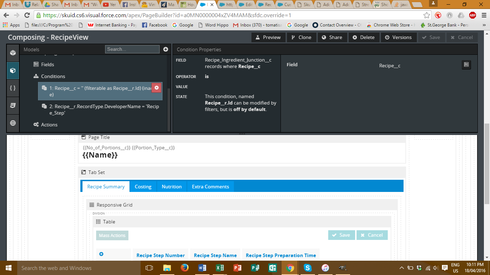
i think its my code… i’m pretty sure its the part related to the condition with the related Id… as when I do it on just a recipe step it works fine

Translate

Forum|alt.badge.img+4
  • Author
  • Jul 10, 2024 2:03 PM UTC

ps: im on the latest version of skuid

Translate

Forum|alt.badge.img+17

Did you try it without the query step in your before load actions. try removing that and see if it helps.

Translate

Forum|alt.badge.img+4
  • Author
  • Jul 10, 2024 2:03 PM UTC

just tried. No difference (I was hoping it would)

Translate

Forum|alt.badge.img+17

Last thing I can think to try would be to move your actions out of the before load actions and into the row action button’s actions. I think you would have to put the query step back in, though.

Translate

Forum|alt.badge.img+4
  • Author
  • Jul 10, 2024 2:03 PM UTC

into which row actions? the recipe steps or ingredientjunction?

Translate

Forum|alt.badge.img+17

The row action that opens the drawer to display ingredients. Change the action type from drawer to run multiple actions and add your before load actions to the action sequence before you open the drawer.

Translate

Forum|alt.badge.img+4
  • Author
  • Jul 10, 2024 2:03 PM UTC

ok well the ingredient are displaying now (well not the names but the quantities are coming through) BUT they’re all appearing to be the same for whichever drawer I open

Translate

Forum|alt.badge.img+17

You could try adding context to your table. While in the drawer, click on the table. One of the settings options will be “Context”. You should be able to set it so that the Row Id = Recipe ID

Translate

Forum|alt.badge.img+17
  • Nintex Employee
  • Jul 10, 2024 2:04 PM UTC

Um.  Everything Raymond is pointing out is covered in the tutorial.  All those processes should work in grandchild drawers…

http://help.skuid.com/m/supercharge-your-ui/l/269735-add-nested-rows-to-your-table-with-drawers

Go back and doublecheck… 

Translate

Forum|alt.badge.img+4
  • Author
  • Jul 10, 2024 2:04 PM UTC

that was already done…thanks for your help Raymond otherwise!

Translate

Forum|alt.badge.img+4
  • Author
  • Jul 10, 2024 2:04 PM UTC

…um i wouldn’t ask for help if I hadn’t triple checked every step of the way against the tutorial already…

Translate

Forum|alt.badge.img+17

As I mentioned before, I’vw had trouble with drawer in drawer that a I couldn’t figure out. Maybe if you post your page XML someone will be able to spot the issue.

Translate

Forum|alt.badge.img+17

Burn… 🙂

Translate

Forum|alt.badge.img+4
  • Author
  • Jul 10, 2024 2:04 PM UTC

Do you know how I can get the page xml?

Translate

Forum|alt.badge.img+17

The very bottom right hand corner of the page builder you will see a little link for “View Page XML”

Translate

Forum|alt.badge.img+4
  • Author
  • Jul 10, 2024 2:04 PM UTC

Translate

Forum|alt.badge.img+4
  • Author
  • Jul 10, 2024 2:04 PM UTC

sorry if that was a bit blunt, but I wouldn’t post something, especially as a new user if I hadn’t checked, double checked and triple checked against possible tutorials as well as trolling through all the conversations I could find on the community forum. 

Translate