Nintex Community Menu Bar

It would be really useful to be able to configure the row actions in a table better, for usability p

  • July 8, 2024
  • 12 replies
  • 58 views
  • Translate All

Forum|alt.badge.img+3

It would be great to be able to choose where to position row actions, and also to be able to style them beyond having just an icon. I understand that this mirrors salesforce styling, but for us we’re building an external community and it’s not very user intuitive. Currently got a developer trying (and struggling) to address via CSS, but would be great if this was an out of the box option!

This topic has been closed for replies.

12 replies

Forum|alt.badge.img+20

This would be a bit of a hack, but you create a custom field renderer to display whatever you’d like and use what I mention in this post to potentially meet your need.

Bit of a hack I admin, but if the requirement is there this will fit the bill.

Translate

Forum|alt.badge.img+11

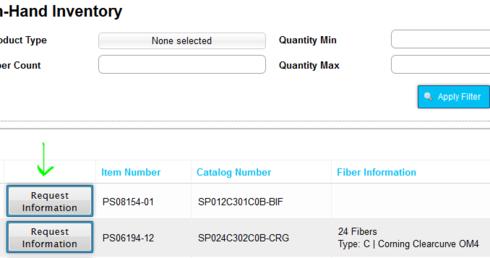
Completely agree!! I’ve just “hacked” in a button into a table using a field render snippet because my customers in the community just don’t notice those tiny icons. And they don’t know what will happen if they click on it. In my case, I’m showing available inventory to customers via the community, and need to give them a “add to cart” type button. It needs to be prominent!

Translate

Forum|alt.badge.img+3

Thanks guys. I’ll share these with our freelancer. He has a solution I think, but still worth sharing. I just think it would be very useful to make this a standard feature!

Translate

Forum|alt.badge.img+20

Hey Chandra, what does the button use to execute. I’m assuming javascript.

Translate

Forum|alt.badge.img+20

Let us know if your freelancers solution works. Especially if it’s unique.

Translate

Forum|alt.badge.img+11

I built a row action that stores what I want the button to do (easy to build that way) and the button essentially does a click() on the hidden row action.

Translate

Forum|alt.badge.img+20

Basically same solution as what I suggested. interchangable between Row action and Template w/ Action Framework.

Translate

Forum|alt.badge.img+7

Playing with the template component, css and javascript we have manage to “move” the actions inside the table:

Translate

Forum|alt.badge.img+18

Can you share?

Translate

Forum|alt.badge.img+7

It’s basically the same trick as my answer here: https://community.skuid.com/t/show-a-table-row-in-popup-when-click-on-primary-key-of-the-table-object But instead of using a field and a custom renderer I use a template. You create the table row actions and capture the click from somewhere in the row and click them vía js (I can explain it better when I arrive to a computer :p)

Translate

Forum|alt.badge.img+7

I tried to really move them, but with a lot of rows it randomly fails (you know, it’s a javaScript thing xD)

Translate

Forum|alt.badge.img+18

Makes sense. Thanks.

Translate