Nintex Community Menu Bar
Question

how to display salesforce field description

  • Jul 9, 2024 9:52 PM UTC
  • 8 replies
  • 102 views
  • Translate All

Forum|alt.badge.img+4

I know I can do this. I simply can’t seem to find how declaratively. Can someone tell me how to do this for a field. I want to display my salesforce descriptions.

8 replies

Forum|alt.badge.img+11

Do you mean the text that displays when users hover over the Info icon?

Translate

Forum|alt.badge.img+4
  • Author
  • Jul 9, 2024 11:57 PM UTC

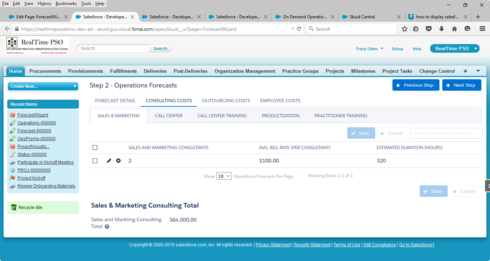
Yes; However, I am using a Wizard. I have inline editing on for a data input field. The help hover icon is not displaying.

Translate

Forum|alt.badge.img+4
  • Author
  • Jul 9, 2024 11:57 PM UTC

See screenshotf2beae0f5b3390c33414933432095bbb3b91d275.png

Translate

Forum|alt.badge.img+11

I assume that you are referring to the Sales and Marketing Consulting Total field.  The ? is there so Skuid knows you have specified Help text.  When you hover over the ? you do not get the popup, correct?  What if you right click on the ? and inspect element – do you see anything in the HTML?

Translate

Forum|alt.badge.img+11

You should see something like

Translate

Forum|alt.badge.img+4
  • Author
  • Jul 9, 2024 11:57 PM UTC

I see the help text when I hover over the ‘Sales and Marketing Total’ field. I was referring to the data input fields above. 1) Sales and Marketing Consultants 2) Avg. Bill Rate (Consultants) 3) Estimated Duration Hours. The help text does not show up in these fields. I was using a table within the Wizard. When I remove the table and use a Field Editor instead, the help text displays for all fields. I will use the workaround (Field Editor), It would be nice if it would show with the Table though. Thanks for the help.

Translate

Forum|alt.badge.img+11

Ah, I see.  I do not believe that tables support help text.  If you really need this feature, you could you a custom renderer and inject the HTML and jQuery events.

Translate

Forum|alt.badge.img+17
  • Nintex Employee
  • Jul 9, 2024 11:57 PM UTC

The merge syntax for Help Text on fields is: {{$Model.MODELNAME.fieldsMap.FIELDNAME.inlineHelpText}}

Now getting that merge syntax to appear next to your table column headers will be a different challenge.  But you could put the above syntax in a rich text component or a template. 

More information on merge syntax for Models is here: 
http://help.skuidify.com/m/11720/l/187263-global-merge-variables-functions

Translate