Nintex Community Menu Bar
Question

How can I change the date field name in a chart

  • Jul 9, 2024 9:52 PM UTC
  • 6 replies
  • 34 views
  • Translate All

Forum|alt.badge.img+14

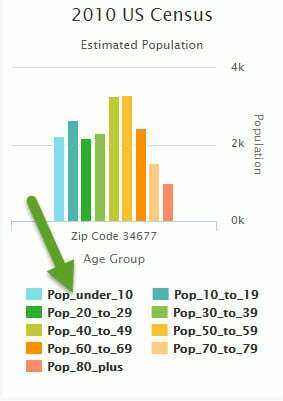
How can I change the date field name in a chart? I prefer not having the

“Pop_under_10” Would like to have “Under 10”

This topic has been closed for replies.

6 replies

Forum|alt.badge.img+17
  • Nintex Employee
  • Jul 9, 2024 11:55 PM UTC

I can’t reproduce your issue.  How is your chart set up? Do you have different series for each bar?  Are you using a split on a reference field? Are you using a template for your split?  If so you should be able to choose a nice Name Field rather than somthing that looks like an API. 

Translate

Forum|alt.badge.img+14
  • Author
  • Jul 9, 2024 11:55 PM UTC

Its my first chart so it is probably a user error. Here is my setup:

Translate

Forum|alt.badge.img+14
  • Author
  • Jul 9, 2024 11:55 PM UTC

still not working

Translate

annajosephine
Nintex Employee
Forum|alt.badge.img+18
  • Nintex Employee
  • Jul 9, 2024 11:55 PM UTC

Hey Bill, on the Series Tab (5th picture above) try having split type be “template” for each of your Series and enter the nice text in the template e.g. “Under 10.”  I think this may allow you to override the field name.

Translate

Forum|alt.badge.img+14
  • Author
  • Jul 9, 2024 11:55 PM UTC

Thanks Anna.  That was it.

Translate

annajosephine
Nintex Employee
Forum|alt.badge.img+18
  • Nintex Employee
  • Jul 9, 2024 11:55 PM UTC

Yay! Glad I was able to help!

Translate