Nintex Community Menu Bar
Question

hide Done" button at bottom of popup"

  • July 9, 2024
  • 4 replies
  • 19 views
  • Translate All

Forum|alt.badge.img+14

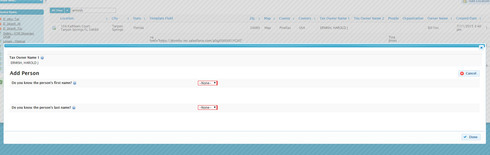
In any popup at the bottom right corner is “Done” button.  How can I hide or remove?

This topic has been closed for replies.

4 replies

Forum|alt.badge.img+17
  • Nintex Employee
  • July 9, 2024

Can you attach screen shot?  This is not standard behavior. 

Translate

Forum|alt.badge.img+14

4d81cee67d33327c890d34e9d5ed4841d12b8b86.jpg

Translate

Forum|alt.badge.img+17
  • Nintex Employee
  • July 9, 2024

I’m pretty sure that button is in the configuration you have built with Skuid.  You should totally find that button in your page composer.  Maybe in the include page you are accessing inside the popup?  As far as I know,  Skuid has never included a standard button in popups.  We do in calendar detail popups - but this is different. 

Translate

Forum|alt.badge.img+14

Yo are correct.  It is in the include page.  Can I hide it?

Translate