Nintex Community Menu Bar
Question

Fontawesome icons for Partner/Customer Community Users

  • Jul 9, 2024 9:51 PM UTC
  • 20 replies
  • 59 views
  • Translate All

Forum|alt.badge.img+7

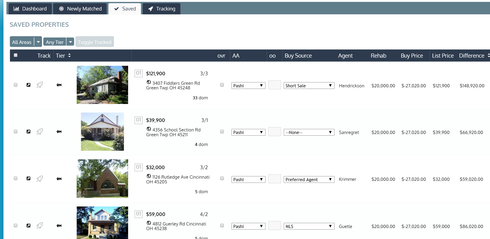
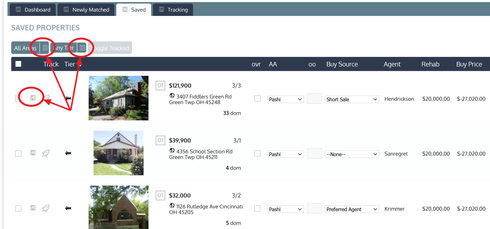
We were super excited to roll out the “Banzai’d” version of our Skuid pages…only to have our dreams crushed when we discovered that the Fontawesome icons appear to be broken for our Partner/Community users. I suspect that this has something to do with their access to static resources in SF. Is there a solution? Here is what’s happening: Working just fine for internal users - 22966688a8edc53a320f8ccafa9081e323344c84.png Fontawesome icons appear broken for Partner/Community Users - ea75a99491cdbbab11055d99e01b8447814edb6e.png
20 replies

Forum|alt.badge.img+7

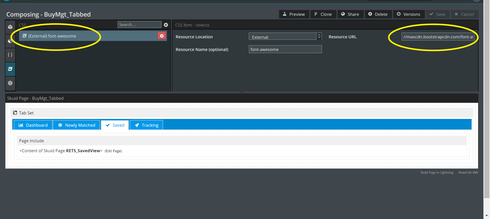
SOLVED! Since Partner/Community Users don’t often have access to Static Resources, you will need add a link to the font-awesome webfonts to the css of your page. e6ee9b87022fd5450fa74416ad9bf8e86cdc12c5.png

Translate

Forum|alt.badge.img+17
  • Nintex Employee
  • Jul 9, 2024 11:46 PM UTC

Glad you got this fixed.  Thanks for documenting your fix for posterity. 

Translate

Forum|alt.badge.img+13

Gary, what version of Skuid are you running? If you’re not using the latest version, try installing it from the Skuid Releases page, and then try removing your external resource load, that may fix it as well.

Translate

Forum|alt.badge.img+5

I am having the same problem on a Force.com site. It can’t load these files:

http://orgname.force.com/resource/skuid__Fonts/fontawesome-webfont.woff?v=4.2.0
http://orgname.force.com/resource/skuid__Fonts/fontawesome-webfont.ttf?v=4.2.0

It appears that the name of the Site is missing. These URLs should be:


http://orgname.force.com/SiteName/resource/skuid__Fonts/fontawesome-webfont.woff?v=4.2.0
http://orgname.force.com/SiteName/resource/skuid__Fonts/fontawesome-webfont.ttf?v=4.2.0

Other resources have the correct URL like:

/resource/1443745666000/Sub/silk-sprite.png

I was not able to fix this as Gary did, but maybe I just need a better URL for the webfont.

FYI I am on Skuid 7.7.

Tony


Translate

Forum|alt.badge.img+17
  • Nintex Employee
  • Jul 9, 2024 11:46 PM UTC

Tony.  I would upgrade your version of Skuid.  We took care of some of the CORS issues with loading Font Awesome after 7.7 

Translate

Forum|alt.badge.img+5

I installed Skuid 7.16 and still am getting the same problems. Still trying to download font Awesome from the same URLs that give an error.

Translate

Forum|alt.badge.img+10
  • Jul 9, 2024 11:46 PM UTC

I am experiencing the same issue with Community logins not seeing the icons. I have installed the latest version of Skuid but the icons still don’t show up. Is there an external link that will work?

Translate

Forum|alt.badge.img+10
  • Jul 9, 2024 11:46 PM UTC

Gary can you provide the full url that you used?

Translate

Forum|alt.badge.img+13

Tami / Tony, can you Grant Login Access to Skuid Support and email us your org Ids? I am not seeing this in our test orgs for Community functionality.

Translate

Forum|alt.badge.img+7

I’m not sure if my solution is the correct one, but it definitely works.  I’m on Skuid 7.16.  

The full url that I put in the parent tab page is:

//maxcdn.bootstrapcdn.com/font-awesome/4.3.0/css/font-awesome.min.css

Also, just as a test (since I have upgraded my version of Skuid since I first posted this), I removed my external resource link to the FontAwesome resource and the FontAwesome icons no longer worked for my partner users.  


Translate

Forum|alt.badge.img+10
  • Jul 9, 2024 11:46 PM UTC

Zach I have granted you login access and emailed you the org Id. Thanks!

Translate

Forum|alt.badge.img+10
  • Jul 9, 2024 11:46 PM UTC

That worked! Thanks

Translate

Forum|alt.badge.img+10
  • Jul 9, 2024 11:46 PM UTC

Zach,

As an FYI Gary’s solution works the icons are brought it but only with adding the external url.

Translate

Forum|alt.badge.img+5

Sent you the org ID and granted access.

Translate

Forum|alt.badge.img+5

Tami - what external URL did you use?

Translate

Forum|alt.badge.img+10
  • Jul 9, 2024 11:46 PM UTC

Tony,

Gary provided the URL he used: 

//maxcdn.bootstrapcdn.com/font-awesome/4.3.0/css/font-awesome.min.css

Translate

Forum|alt.badge.img+13

For anyone experiencing this issue, here is what we recommend: go to the Skuid Releases page, install Banzai Update 3, and then once it is installed, go to the “Theme” tab, and if you are using custom Themes, click “Update Out of Date Themes”. This should resolve the issue.

Translate

Forum|alt.badge.img+5

The upgrade worked on standard themes but not on my custom theme, even after I did “Update Out of Date Themes”. I went into the custom theme and clicked save and that fixed the problem.

Thanks so much for fixing this problem!

Translate

Forum|alt.badge.img+10
  • Jul 9, 2024 11:46 PM UTC

This update has fixed the icon issue. Tony thanks for the saving tip!

Translate

Forum|alt.badge.img+18

Thanks, Tony. Apparently you just have to open your custom themes and save them again. Skuid… can you take care of updating custom themes as well as the stock themes with the ‘update’ button?

Translate