

Nintex Community Menu Bar
Question

Field set in JavaScript snippet are blank

  • Jul 10, 2024 1:34 PM UTC
  • 5 replies
  • 63 views
  • Translate All

Forum|alt.badge.img+8

I have the following JavaScript snippet that create a row in a related model, based on the selected tables Ids. The snippet creates the correct number of rows, but does not pass values to the specified rows. The console is not showing any errors.

var params =arguments[0];<br>var $ = skuid.$;<br>var models = skuid.model.map();<br><br>var Ids = skuid.$.map(arguments[0].list.getSelectedItems(),function(item){<br>return item.row.Id;<br>});<br><br>var newSummaryClient = models.NewSummaryClient;<br>var summariesPU = models.SummariesPU;<br><br>$.each(Ids,function(){<br> var currentId = this;<br> var row = newSummaryClient.createRow({<br> additionalConditions: [<br> { field: 'Vendor_Relationship__c', value: currentId, operator: '=', nameFieldValue: currentId.Name },<br> { field: 'Summary__c', value: summariesPU.Id, operator: '=', nameFieldValue: this.Name } <br> ]<br> });<br> });

5 replies

Forum|alt.badge.img+18

Brayden,

What are the values in the newSummaryClient rows when you look at them in the console? Is it possible that the models are updated but the ui is not? Occasionally I have to forcibly re-render components after updating with javascript.

Translate

Forum|alt.badge.img+8

Hey Matt–

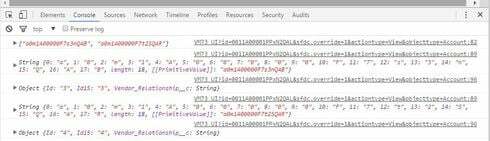
I’m not sure exactly how to view that, here’s what I’ve done in my code. I’ve added a console log after the Id’s are assigned, at the beginning of the loop to check the currentId value, and after the row is assigned.

I’m not sure how to interpret what I see.

var params =arguments[0];
var $ = skuid.$;
var models = skuid.model.map();

var Ids = skuid.$.map(arguments[0].list.getSelectedItems(),function(item){
return item.row.Id;
});

console.log(Ids);

var newSummaryClient = models.NewSummaryClient;
var summariesPU = models.SummariesPU;

$.each(Ids,function(){
 var currentId = this;
 console.log(currentId);
 var row = newSummaryClient.createRow({
 additionalConditions: [
 { field: 'Vendor\_Relationship\_\_c', value: currentId, operator: '=' },
 { field: 'Summary\_\_c', value: summariesPU.Id, operator: '=' } 
 ]
 });
 console.log(row);
 });

The attached image is after I’ve selected 2 rows.

Translate

Forum|alt.badge.img+18

after you run your code, just type this into the console and see what you get:

skuid&#46;$M('NewSummaryClient')&#46;getRows();

You can use the > arrows to expand the row objects that the console will return to see what the values are.

Translate

Forum|alt.badge.img+8

It looks like the Vendor_Relationship__c value is being set. But it doesn’t look like the Summary__c value is being set.

The summariesPU model only has one record returned. Instead of referencing the model, do I need to specifically reference the first row of that model?

Also, how to a rerender the table that shows the NewSummaryClient model?

Thanks for all your help on this.

Translate

Forum|alt.badge.img+18

Brayden,

sorry I didn’t look deeper into your code. You’re right about the reference to the first row. summariesPU.Id is just the name of the model. Replace that with 

summariesPU.getFirstRow().Id

and you should be good to go.

Translate