Nintex Community Menu Bar
Question

Conditions in a Popup

  • July 10, 2024
  • 4 replies
  • 31 views

Forum|alt.badge.img+14

I have popups where conditions are not rendering. Here is the condition

I have exposed both ID’s


If I use “=” in the condition I get this
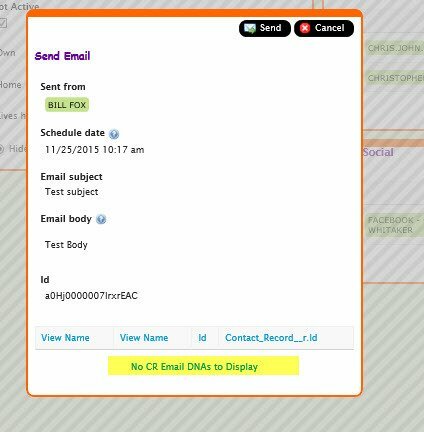
If I use “In” in the condition I get this
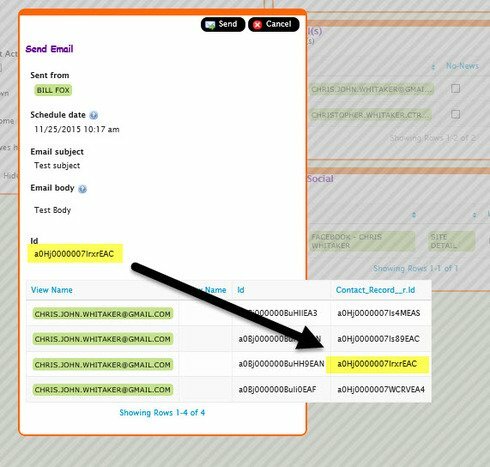
What needs to be changed?

4 replies

Forum|alt.badge.img+17
  • Nintex Employee
  • July 10, 2024

Ok.  I’m not exactly sure what you are after.  But a few ideas: 

- Is this in a page include?  Then try testing a stand alone version of the page  - before you access it directly from within a page include. 

- In the second view, would you expect to only see one Chris.John.Whitacker? 

- Are you including the name field corresponding to your ID in your models - do you intend to see that? 


Forum|alt.badge.img+14
  • Author
  • July 10, 2024

This is not a page include.  It happens in a popup.  The second view we should only see the 3rd items which has the matching Contact_Record_Id__c.  Yes, I have exposed the Name field.


Forum|alt.badge.img+14
  • Author
  • July 10, 2024

This condition does work when not in a popup.


Forum|alt.badge.img+14
  • Author
  • July 10, 2024

Is it possible to put conditions like I have done in a popup or drawer?