Nintex Community Menu Bar
Question

Checkbox showing even though all row actions are hidden to user

  • July 10, 2024
  • 3 replies
  • 10 views

Forum|alt.badge.img+11

The end user does not have access to delete opportunities, but System Admin does, so we have a row action of Mass Delete on a table. No export options, no summaries. Still, the checkbox shows up for the end user. 

How do we get this checkbox to hide??

3 replies

Forum|alt.badge.img+6

Hi Jack,

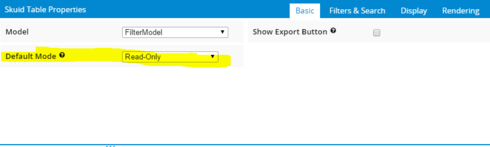
Set Table mode as read only then it will hide the check boxes for rows.

Thanks,
Rajendra


Forum|alt.badge.img+11

Thanks, but if I do that, then I won’t be able to edit. The thing is I want to edit if the user is a system administrator, but not if they are not. 

I guess I could duplicate my table, make one read-only, and conditionally render each whole table based on user profile.

But it seems like a bug - if there is nothing showing that would cause the checkboxes to appear, then they should go away.


Forum|alt.badge.img+11

Hi Jack~

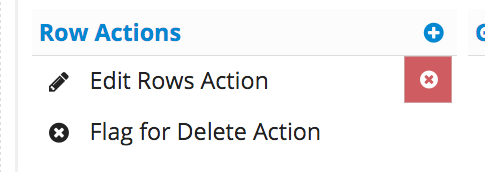
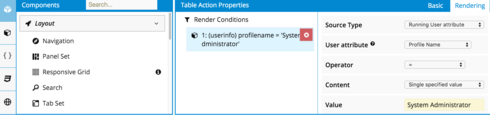
In the table, click on the row action you want only the Syst Admin to have access to.

In the properties area, select the Rendering Tab. Add a render condition based on the user’s profile as seen below.

Please let me know how that works for you!!!

Thanks!
Karen