Nintex Community Menu Bar
Question

Change the selected number shown in multi-select picklist

  • Jul 11, 2024 6:06 PM UTC
  • 5 replies
  • 75 views
  • Translate All

Forum|alt.badge.img+1

I posted this same question but didn’t get a response. You can find original here: https://community.skuid.com/t/change-the-value-shown-in-multi-select-list-when-4-or-more-…

FROM THE RESPONSE: The Multi-select Picklist renderer always switches to show “N items selected” when you have 4 or more items selected. This is not currently configurable through the Page Composer, but we are planning to make this configurable declaratively by the Q1 2017 Skuid release.

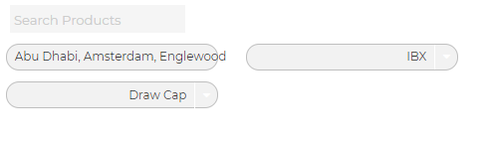
It was mentioned that functionality was going to be added to Skuid. Was this deployed? I can’t find any feature that allows me to change the number in ‘selected’. Below is an example of the problem we are running into. We want to be able to change the parameter that requires 4 selections to 2 selections.


ca212fcdf5bea8564555854efebbb6b1220d02a6.png

This topic has been closed for replies.

5 replies

Arne-Per
Forum|alt.badge.img+8
  • Rookie
  • Jul 11, 2024 7:29 PM UTC

have you tried to use skuid.ui Field Renderers or are you looking to do it declaratively?

Translate

Forum|alt.badge.img+10

Paul,

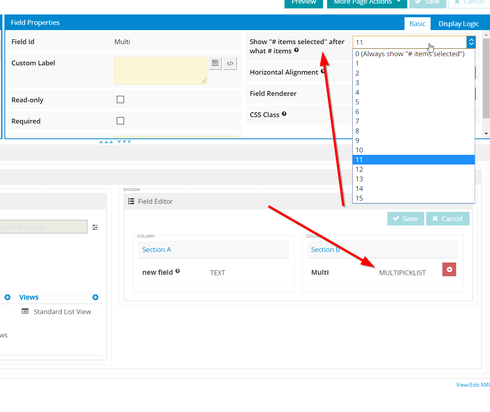
Is this what you are looking for?

(click on the field in the page builder and look at the property “show # items selected after what # items”)

Thanks,

Bill

Translate

Arne-Per
Forum|alt.badge.img+8
  • Rookie
  • Jul 11, 2024 7:29 PM UTC

Doh, not sure what I was thinking. 

Translate

Forum|alt.badge.img+6

Thanks Bill and Arne-Per!
Paul, please let us know in case this doesn’t resolve your issue 🙂

Translate

Forum|alt.badge.img+1

We did find the problem. The issue was that we were using standard picklists in Salesforce but treating them as Multi-select picklists in Skuid. 

Translate