Nintex Community Menu Bar
Question

Add title to Calendar?

  • Jul 10, 2024 12:24 AM UTC
  • 2 replies
  • 50 views
  • Translate All

Forum|alt.badge.img+3

How do I add a title to Calendar? Using Page Title component is not working. Thanks!


This topic has been closed for replies.

2 replies

Forum|alt.badge.img+17
  • Nintex Employee
  • Jul 10, 2024 12:33 AM UTC

If you want to add a title above the calendar grid - put the page title above it (or you can use a Rich Text component)

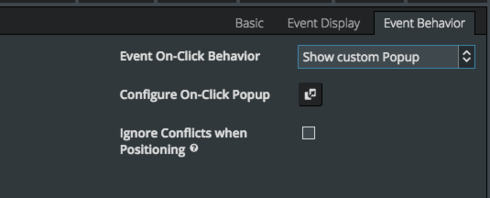
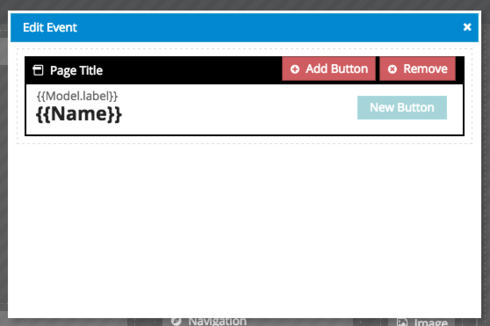
If you want the page title in the popup that shows after you click on an event - you need to use the “Show custom popup” value for the “Event on-click behavior”. This will give you a popup you can configure in any way you want. You can drag page titles into this composer area.

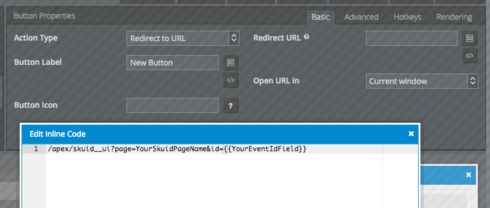
The page title is where youd add the button we described in the other thread. Below are the properties for the button, and a code example for linking to the other Skuid page that should be put in the “Redirect URL” field.

Translate

Forum|alt.badge.img+3
  • Author
  • Jul 10, 2024 12:33 AM UTC

Thanks Rob. Weird, I was doing exactly per above using {{Name}} but when I changed it to a custom text, it now works. Thanks for making me consider custom text. 🙂

Translate