Nintex Community Menu Bar

action property pause

  • July 8, 2024
  • 5 replies
  • 53 views
  • Translate All
This topic has been closed for replies.

5 replies

Forum|alt.badge.img+20

This would assume that the model would be saved every time regardless of the interaction in the popup.

Why not just put those actions in a save button in the popup?

Translate

Forum|alt.badge.img+14

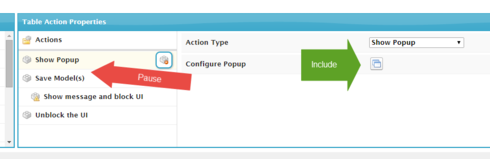
To add to the suggestion.  It would be great when there is an include in a popup, then allow a “Pause” statement until the popup closes.  Then, action properties could requery actions to finish the actions.  At this time, we have to press F5 to refresh.  This would allow the use of smaller reusable objects.

Translate

Forum|alt.badge.img+14

When you call another object with a popup with an include, there is no way of refreshing the object from where you initially started.

Translate

Forum|alt.badge.img+20

Well then … can’t comment on what I don’t know yet. 😉

The popup has a page include? Then you’d like to update data on the original page based on the changes made in the page include?

Translate

Forum|alt.badge.img+20

In the meantime, you can achieve this by hacking the XML so to speak.

You could these action on your page, open the XML, copy the actions, go to your page include page, open the XML, paste the actions into the action framework.

Kludgy I know, but it would work.

I otherwise like your idea. I’d place the action framework on the page include component itself. Similar to the Model Actions Framework. Page Include framework. On Close actions.

Translate



