Nintex Community Menu Bar
Question

Wait for target issue

  • April 9, 2026
  • 4 replies
  • 23 views

Forum|alt.badge.img

I have a couple processes set up and was in the process of setting 3 more up and noticed that my wait for target times are not working at all no matter what I put in. Are there any fixes for this? 

4 replies

MRepetti
Nintex Employee
Forum|alt.badge.img+11
  • Nintex Employee
  • April 9, 2026

Hello VanessA1240,
 

It could be that the Bot is not recognizing the target. You can check by targeting the element you want to use and try using a Get Info action to see if it will bring back and information. If it doesn’t, then the Bot isn’t seeing it. 


This is more of a complicated issue that can be addressed in this forum. If the above does not help, please send an email to support@nintex.com and write Targeting issue - RPA LE in the subject line and we will assist you right away. 


Forum|alt.badge.img+1
  • Nintex Partner
  • April 9, 2026

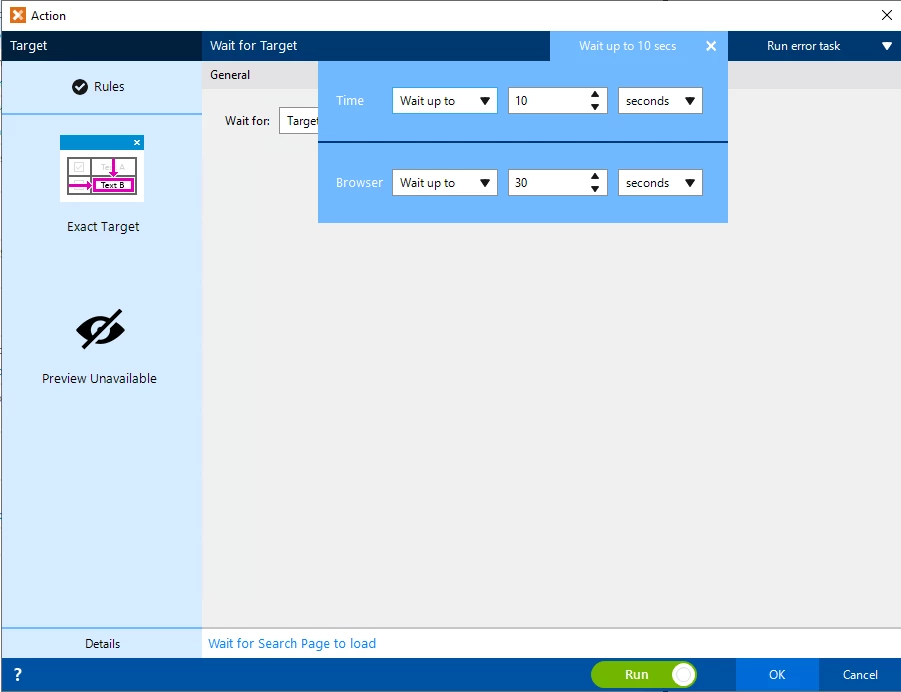
If you’re referring to the timeout before the action will throw an error, I believe by default it will wait forever. I usually change this to wait up to 10 seconds before failing:


If you’ve updated this and are getting a target not found error, I’d recommend looking in the Target Rules by clicking the button in the upper left hand corner. This is the metadata Nintex uses to find the element, and sometimes it brings back more metadata than it needs. In this window you’ll have the ability to tweak what the botflow is looking for. Usually you want it to only match on criteria that will be consistent between multiple instances; things that won’t change between records.


Hope this helps!

Nick


KSeitz
Nintex Partner
Forum|alt.badge.img
  • Nintex Partner
  • April 9, 2026


@VanessA1240 If this is with a web application, it could be some miscommunication with the element and the browser (i.e. the bot doesn’t recognize that the target has loaded). 

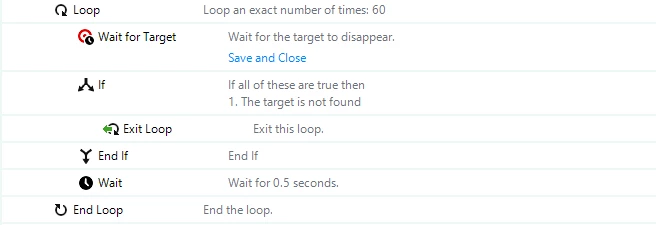
I have a few bots like this as well. What I’ve done is set that wait to 1 second and ignore error handling. Follow that wait with “If the Target is found”, and loop the process. 

Something like this (note that my ‘Wait for Target’ action is configured to Ignore Errors). This essentially waits up to 1 minute for a target to, in this case, disappear.


Forum|alt.badge.img
  • Author
  • Novice
  • April 9, 2026

Thank you both for the information. I will go ahead and try both.