


Topic
RPA is sensitive and sometimes a change in environment such as the computers zoom settings could be the reason RPA Targeting does not function as intended. With a lot of us working remotely on a mini laptop, we may adjust our computer settings so we can see the type and then forget we did it. When you plug your laptop into your monitor, it will automatically adjust so you don't realize the setting is still changed when you connect.
Smart Targeting and Screen Targeting work best at 100%. Please make sure your application window is at 100% and your computer settings are at 100%. Even if RPA is running on a remote desktop, if the local machines zoom settings are not at 100%, the targeting tool may not work correctly.
Instructions
To check/adjust computer settings:
**Please note: if you have multiple displays, you may need to hold Windows Key + P to change to PC Screen Only and then check/change the setting.
- Type "Display" into the search bar on the bottom left of your computer.
- Choose "Change the Resolution of the Display."
- In "Scale and Layout" section, make sure setting is at 100%
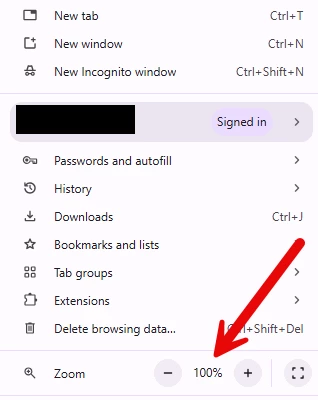
If you are targeting an element in a browser window, it is also common to increase the Zoom setting for the same reason as above.
For Chrome and Edge browsers:
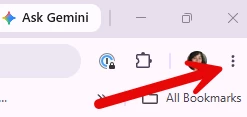
- Click the ellipsis to the right of your profile picture:
- Then check the Zoom setting and make sure it is 100%: