




Issue
When having issues with Nintex RPA Unlocker, one of the best things to do is to set up a botflow that simply has a lock action and an unlock action in it to make testing less complicated.
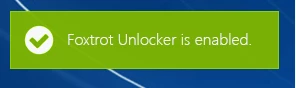
When testing, your machine should lock, and display "Foxtrot Unlocker is Enabled" in a green box on the top left of your screen.
Resolution
If you do not see this message, it could be a sign that you have Duo installed on your machine.
As mentioned in this help document below, under Best practices for remote desktops and virtual machines, Best Practice #5:
https://help.nintex.com/en-US/rpa/Actions/Unlock.htm?Highlight=unlocker
Uninstall (do not simply disable) MFA tools such as Duo on remotely-connected computers. If you are unable to uninstall MFA tools, whitelist the credential provider for the system that you need to automate with Nintex RPA.
If you are using Duo, you can read about enabling credential providers in this article and credential provider settings in this article.
**If you are having trouble whitelisting, here is an alternative to try:
Uninstall Duo, test the botflow and unlocker and if they run successfully, you should be able to reinstall Duo on the PC, but set it with the option to only do MFA through RDP and it should continue to function as expected.