



Topic
Nintex Bot cannot target Adobe Acrobat DC and Adobe Acrobat Reader DC versions 2022.003.20263 and higher because the setting required to target these applications is no longer being saved. Therefore, the Extract PDF Pages, Merge PDFs, and Split PDF actions do not work in PDF file versions 2.0 or higher.
Instructions
Below are the steps to change the version of the PDF file:
First, make a backup of the PDF before following the steps below:
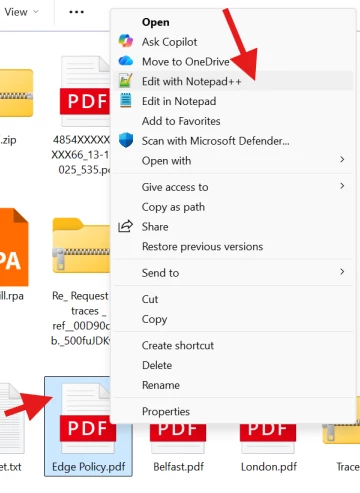
- Right-click the PDF file → Select Open with → Choose Notepad (or Notepad++)
- Find the version line at the very top of the file:
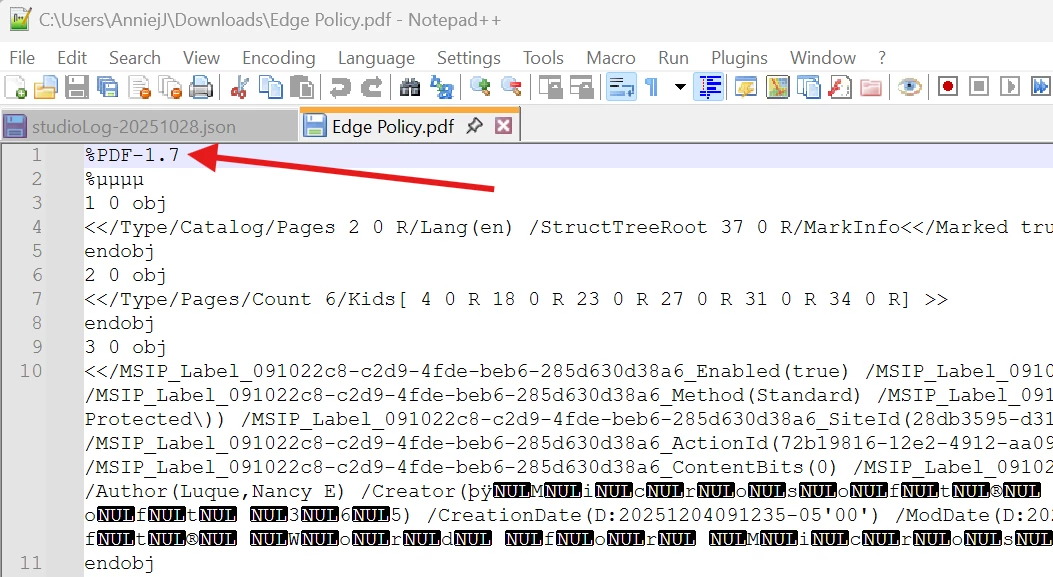
It will be at the top like: %PDF-2.0 (or %PDF-1.7, %PDF-1.6, etc.)
- Change the version number to a lower version (if it’s %PDF-2.0)
Example: Change %PDF-2.0 to %PDF-1.4, or change to %PDF-1.3 if 1.4 doesn't work.
- Save the file: File → Save (Ctrl+S)
- Close Notepad and Retest
Additional Information
If you have any issues, please reach out to Support@nintex.com and let us know what steps you performed and what error message you are receiving.