




Topic
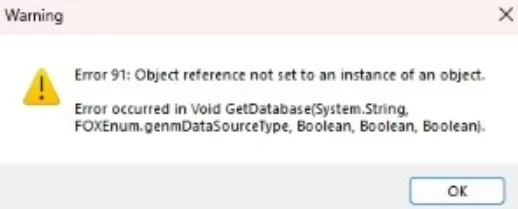
When trying to import data into Foxtrot or RPA LE, the user receives the error message below:
Instructions
This error usually means one of these things:
- User does not have Microsoft Access Database Engine installed.
- User has the wrong version of Microsoft Access Database Engine installed.
- User has more than one instance of Microsoft Access Database Engine installed.
- The 64 bit version of the Microsoft Access Database Engine is installed. Foxtrot and RPA LE does not work with 64 bit programs, uninstall it and install the 32 bit version.
- If you are using Foxtrot version 15.1.2 or below you need Microsoft Access Database Engine 2010 installed.
- If you are using Foxtrot version 15.1.4 or above including all versions of RPA LE, you need Microsoft Access Database Engine 2016 installed.
- If you have more than one instance or version of Microsoft Access Database Engine installed, please remove the one you do not need based on the information above.
- If you have the 64 bit version of Microsoft Access Database Engine installed, please uninstall this version and install the 32 bit version instead.
- If you have the correct version installed and you do not have a second instance installed, please run a repair of the Microsoft Access Database Engine.
Please note that it may be easier to follow this process instead of identifying what versions you have:
1. Uninstall Foxtrot or RPA LE
2, Uninstall the Microsoft Access Database Engine. If you have multiple, uninstall all instances.
3. Reboot the machine.
4. Install Foxtrot or RPA LE and let the installer install the Microsoft Access Database Engine that it needs.
*If you are not using the newest version of Foxtrot, v15.1.13 or newest version of RPA LE, shown at the top of the link below, this may be a great time to upgrade to the newest version to benefit from bug fixes and added features.
https://help.nintex.com/en-US/platform/ReleaseNotes/NintexRPA.htm
If the above does not help, please send an email to support@nintex.com letting us know the error you are receiving and provide the version of Foxtrot or RPA LE you are using and a screenshot of the Microsoft Access Database Engine in Programs and Features and we will start troubleshooting right away.