




Issue
When scheduling a botflow or running it manually from RPA Central, and the Bot is in Ready status, if the botflow goes into Queued status, the reason may be because the user that is attached to the Bot being used for the botflow is inactive.
A Bot is created by using the User Account Name and the Machine Name they are on. With Windows 10 only one user can be active at a time. If using a different server environment, there may be an option of 2 or more at a time.
When a botflow is scheduled, if the user that is attached to that Bot is not listed as active, it will go into Queued status and not run until that user logs in. At that point, once the user is completely logged in, refresh the Instances page, and the status will change to Running.
*Note: you may need to refresh the page a few times if the user’s machine is still loading.
Error Code
No error appears, but you will see a Queued Status in Botflows screen in RPA Central.
Resolution
With 2 Bots and 2 users you will see this in RPA Central if you click the Bots menu on the left:
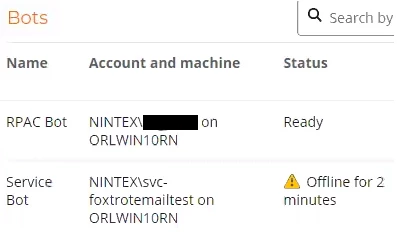
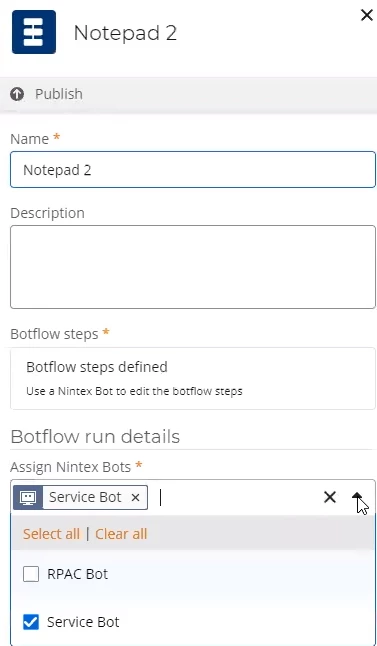
In the example above, when logged in as the user attached to the RPAC Bot if a botflow is scheduled that is attached to the user of the Service Bot, in the Task Manager that second user (Service Bot) is listed as inactive, as seen in the status column. To avoid having the botflow go into queued status, the choices are to:
1. Change the Bot as shown below or
2. Make the Service Bot user active by logging into the machine ORLWIN10RN.
Additional Information
RPA Central keeps an internal list of when each Bot was installed. When assigning multiple Bots to a botflow, please keep in mind that RPA Central will look at the Bots assigned in the order that they were installed, and find the first Bot where the Bot is in ready status and the user is active.
If the first Bot or user is not ready, RPAC will move to the second installed Bot and so on until it finds a Bot assigned that meets all of the requirements. If none of the Bots assigned have both the user active and Bot online and ready, the botflow will remain in Queued status until one of the assigned Bots/Users comes online.
Scenarios:
Two users, P1 and P2, are assigned to the botflow. both of their Bots are also assigned to the botflow.
User P2 logs into their machine and tries to run a botflow.
User P1 is already online and their Bot is in ready status, also it was the first Bot to be installed and granted access in RPAC.
RPAC will use P1's Bot since that Bot was installed first.
If User P2 has a botflow with only their Bot assigned to it, it will run on their machine.
If User P1 has the botflow running from above and they ask RPAC to run another botflow that only has their Bot assigned, the botflow will remain in queued status until the first botflow is complete and User P1s Bot is back in ready status.