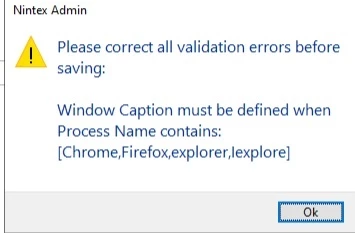
PROBLEM:
I'm trying to create a wizard (Nintex/Kryon RPA 25.11) that executes the following .bat file:
pushd \\myshare\appdirectory
myapp.exe arg1=abc arg2=xyz
"MyApp" is a Windows .exe. There's a link to the .bat file on my desktop. MyApp needs to run from “appdirectory”.
I "Start with a recording", double-click on the .bat file, and run through the initial prompts in the app.
When I stop the recording, I get:
Some of the recorded steps do not appear in the wizard...
Ask your administrator to add these applications/websites from Nintex Admin, then record the steps again:
1) explorer
I've defined "MyApp" and Windows File Explorer ("explorer") in Nintex Admin.
The first step I see in the failed recording is the first dialog "MyApp" displays (along with all subsequent dialogs). The recording doesn’t include running the .bat file.
My .bat file never actually shows Windows explorer - it just runs the app.
Q: How can I get the Wizard to invoke the bat file: to double-click on the desktop link, like I'm doing manually after I start the recording?