



Nintex Community Menu Bar
Solved

Nintex RPA (Kryon): Is it possible to insert an embedded wizard in loop rows in table???

  • September 28, 2026
  • 3 replies
  • 41 views
  • Translate All

Forum|alt.badge.img+6

CHALLENGE:

  • I would like to iterate through rows in a table, calling some embedded wizards for reach row
  • As far as I can tell, the only way to “Edit” the loop is in Advanced Commands mode...
  • ...but “Insert Embedded Wizard” is greyed out unless I exit back to “Normal mode” 🙁
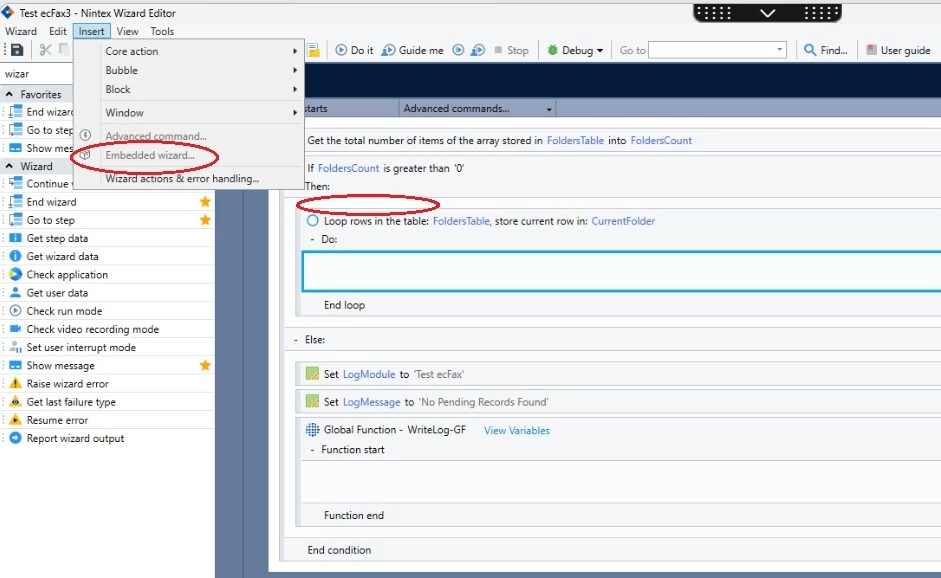
 

Q: What do I need to do in RPA Studio to insert one or more embedded wizards into my table row loop?


Best answer by paulsm4

Thank you, Pratheep.

I was really hoping Kryon might provide some kind of high-level “foreach” that could be used with any combination of graphical (e.g. embedded wizard) and programmatic (e.g. Action Commands) steps.

Shortly after posting, I ran into this reply from a couple of years ago:
You are right. The only way to accomplish this is by using the “go to step” advanced commands.

It’s not “pretty”, but that’s exactly what I’m doing:

  • I’ve created an “initial step” that initializes the loop
  • It calls a “go to step” when it’s time to terminate the loop
  • I can put whatever I need to within the “loop body”
      <= Not unlike coding in BASIC on a 6502/CPM personal computer back in the day :)
     
View original

3 replies

pratheep
Nintex Employee
Forum|alt.badge.img+5
  • Nintex Employee
  • September 30, 2026

​@paulsm4 

Embedded Wizard is greyed out because its only meant to be inserted in recorded steps and not supported directly in Advanced Commands. You may use Global functions for reusable code in Advanced Commands. Try checking if that satisfies your use case.

Translate

Forum|alt.badge.img+6
  • Author
  • Nintex Partner
  • Answer
  • September 30, 2026

Thank you, Pratheep.

I was really hoping Kryon might provide some kind of high-level “foreach” that could be used with any combination of graphical (e.g. embedded wizard) and programmatic (e.g. Action Commands) steps.

Shortly after posting, I ran into this reply from a couple of years ago:
You are right. The only way to accomplish this is by using the “go to step” advanced commands.

It’s not “pretty”, but that’s exactly what I’m doing:

  • I’ve created an “initial step” that initializes the loop
  • It calls a “go to step” when it’s time to terminate the loop
  • I can put whatever I need to within the “loop body”
      <= Not unlike coding in BASIC on a 6502/CPM personal computer back in the day :)
     
Translate

pratheep
Nintex Employee
Forum|alt.badge.img+5
  • Nintex Employee
  • October 2, 2026

Hi ​@paulsm4,


Yes, that’s a workaroud you can use right now.

You may make a feature request for the sort of loop mechanism that better supports your use case.

Translate

