Nintex Community Menu Bar
Solved

Kryon RPA: Chicken/egg dilemma opening and maximizing a new window

  • September 10, 2026
  • 3 replies
  • 63 views

Forum|alt.badge.img+6

In my Nintex RPA embedded wizards, I’m programmatically opening and closing a couple of apps (MS Edge, and Outlook).

I want to use an Advanced Command to open the URL (Edge) or run the app (Outlook).

I also want to be able to add a keyboard shortcut to maximize the window (Alt-Shift, x)

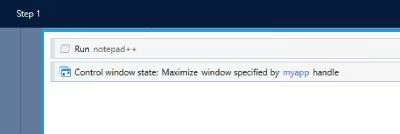
For example:
 

PROBLEM: 
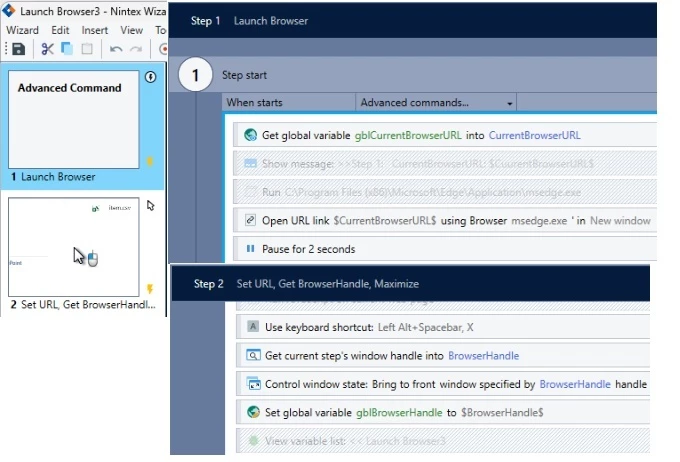
I can’t figure out how to do the “open” (Advanced Command) in the same step as the “Alt-Spacebar, x” (a core action).


My workaround is to:
  1) run the advanced command, then
  2) record the new window, and finally
  3) add my keyboard shortcut to the newly recorded Step 2.


Q: Is there any “better” way to accomplish this?
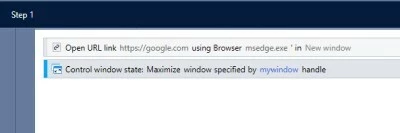
Best answer by pratheep

Hi ​@paulsm4,


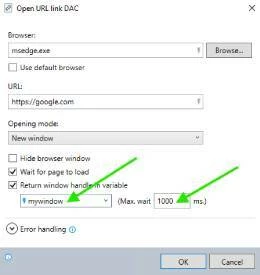
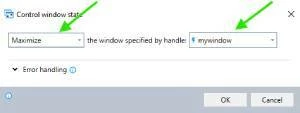
Control window state AC is the best option to maximize the browser or application window and can be used in the same step as opening the webpage or the application, as below;


1. Return the window handle in a variable in Open URL link AC. You might need to wait 0.5-2 secs for the window to fully load. 


2. Use the variable in Control window state to maximize the window. 


Also works for desktop applications. 


I tested and it works. Please try and let me know if it works for you. 

3 replies

Forum|alt.badge.img+6
  • Author
  • Nintex Partner
  • September 10, 2026

PS: I also tried “Control Window”, with “Maximize”.  That didn’t seem to work...


pratheep
Nintex Employee
Forum|alt.badge.img+5
  • Nintex Employee
  • Answer
  • September 15, 2026

Hi ​@paulsm4,


Control window state AC is the best option to maximize the browser or application window and can be used in the same step as opening the webpage or the application, as below;


1. Return the window handle in a variable in Open URL link AC. You might need to wait 0.5-2 secs for the window to fully load. 


2. Use the variable in Control window state to maximize the window. 


Also works for desktop applications. 


I tested and it works. Please try and let me know if it works for you. 


Forum|alt.badge.img+6
  • Author
  • Nintex Partner
  • September 28, 2026

Thank you, Pratheep - you’re absolutely correct.  The “Control Window” ACs are absolutely the best options!

Part of my challenge was that I was using “Open URL” AC for Edge, and the “Run app” AC for Outlook … and “Control Window” didn’t seem to be working reliably.  The problem was that I was I was using the handle returned by Outlook/Run App.  Instead, I needed to “Get Current Step’s Window Handle”, and use that (different!) handle with the “Control Window” ACs.

Everything’s working great now.  Thank you again!