Nintex Community Menu Bar
Solved

I can't get Nintex RPA to click "Save As" in an Edge "Downloads" dialog

  • August 19, 2026
  • 2 replies
  • 25 views

Forum|alt.badge.img+6

I’m using Nintex RPA 25.11 and Microsoft Edge to save an export file for a SharePoint Online list.

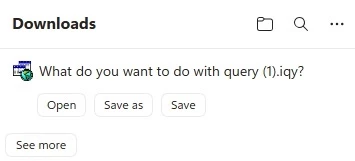
I’m able to get Nintex to browse to the list, and do an “Export, Export Excel”.  It brings up a “Downloads” dialog, with a “Save as” button:


“Record” successfully captures the core action:
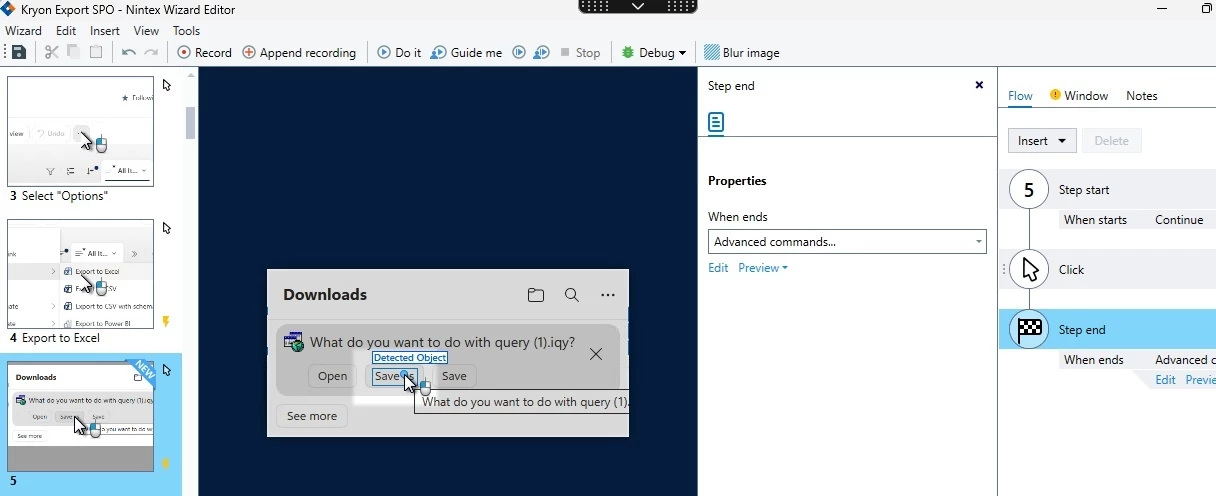
 

So far, so good.

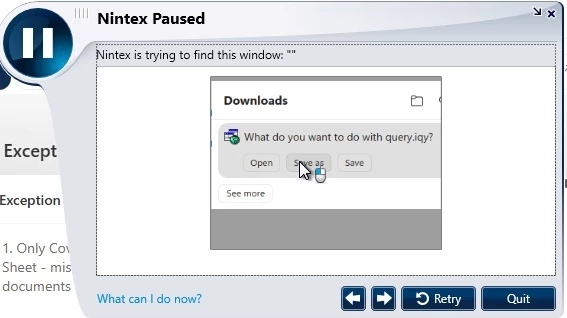
But when I try to RUN the wizard (“DoIt” or “Debug”), I keep getting:
  Nintex is trying to find this window: “”
 

Best answer by pratheep

Hi ​@paulsm4,


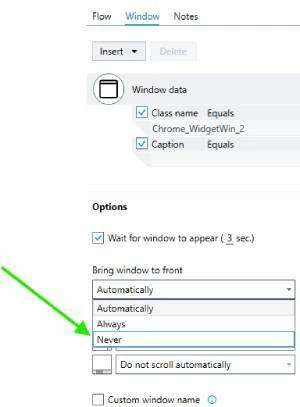
This happens because at each step Robot will try to set the window to focused if its not active but this may not work for popup windows. Fix is easy. Under the Window tab of the step, change the value for Bring window to front to Never


2 replies

pratheep
Nintex Employee
Forum|alt.badge.img+5
  • Nintex Employee
  • Answer
  • August 20, 2026

Hi ​@paulsm4,


This happens because at each step Robot will try to set the window to focused if its not active but this may not work for popup windows. Fix is easy. Under the Window tab of the step, change the value for Bring window to front to Never


Forum|alt.badge.img+6
  • Author
  • Nintex Partner
  • August 21, 2026

pratheep - thank you very much.  That was indeed the problem; your solution worked like a charm!