



Topic
| Product version | 21.4 and higher |
| Components | Studio |
Instructions
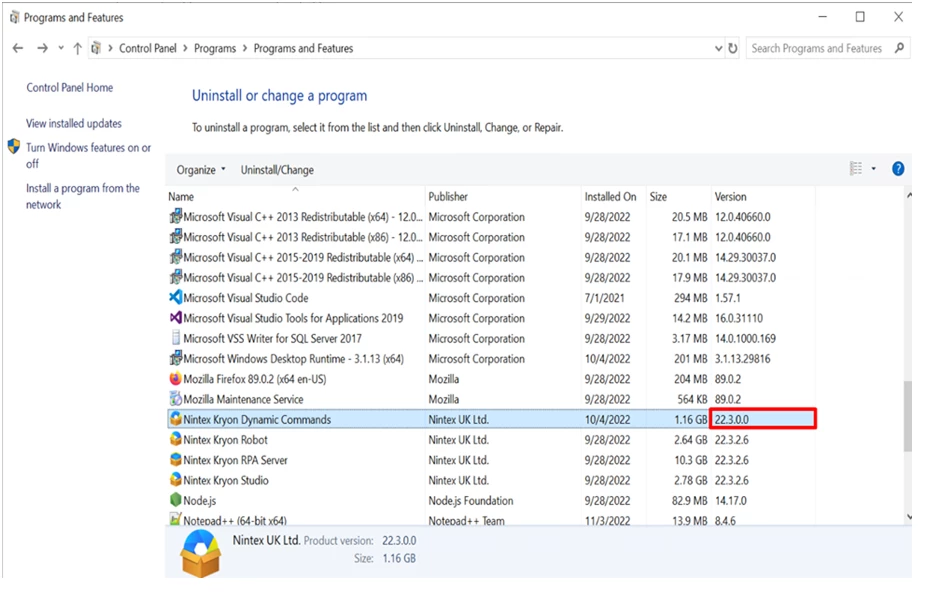
1. Verify Dynamic Advanced Commands are installed and the version matches the RPA version:
Control Panel>Programs>Programs and Features.
If Dynamic Advanced Commands are not installed, use these instructions on how to install DAC.
Use the latest DAC installer version, you can find under your RPA version folder from the Kryon Public Download Space.
2. Run Macro is failing to execute from non-local(remote or cloud location),try running the same when the file is saved locally to the Robot / Studio machine.
3. If Run Macro is executed correctly from the local file, check if the remote source is added to Trusted locations, as it could be blocked by Microsoft security policy. More information here: Microsoft Macros,VBA security policy.
4. Verify all configurations and permissions are set correctly – Guidance on allowing VBA macros to run in files you trust.