



Topic
After install RPA, when try to login to console, it able to load Tasks page and Dashboard page. However, when navigate to Triggers page or Robots page, it will show blank page.
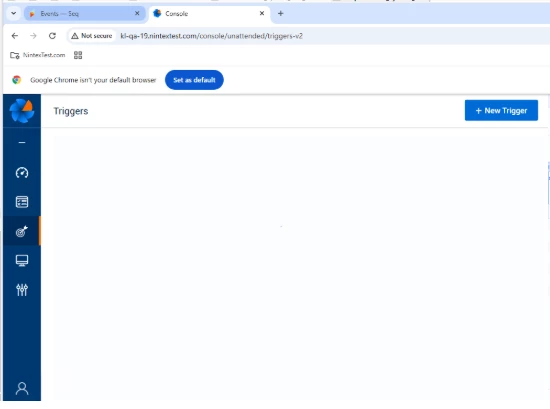
Root Cause
Most of the time, this issue happens when user is configure with AD and SSO, whereby user forget to trigger the sync in Aerobase Admin console after add the User Federation in Nintex Admin Tool.
- User is missing
tenantIdattribute in Aerobase.
Instructions
- At Aerobase Admin console under "Attributes" tab, make sure user has
tenantIdkey with value1.
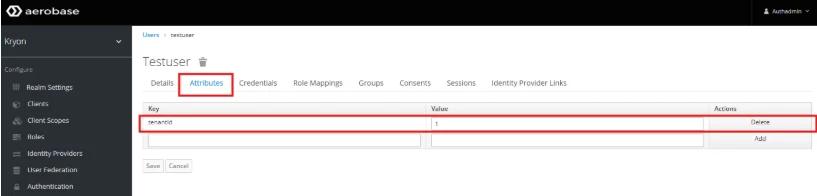
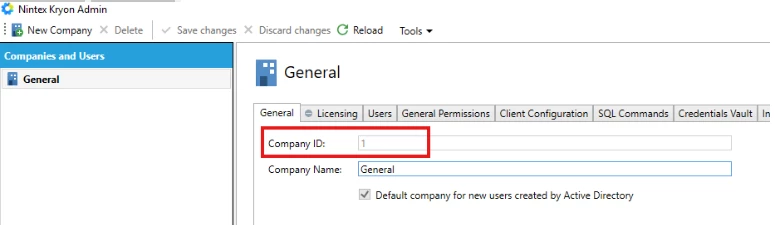
Note: Cross-check with Company Id in Nintex Admin. The values must be same as tenantId
2. Re-sync the users from AD under "User Federation" using "Synchronize changed users" which will ensure the "TenantId" attribute added to synced AD Users.
For non-AD user, the customer has to manually add the "tenantId" attribute for it.
Additional Information
If these steps do not resolve your issue, please email support@nintex.com and let us know what troubleshooting you have tried, as well as the version you are using. We will be happy to assist right away.