



Topic
After running several tasks triggered, the robot suddenly reported a “Window not found” error for the login page, and the task failed immediately with a 00:00:00 execution time. Updating the ticket creation time does not resolve the issue.
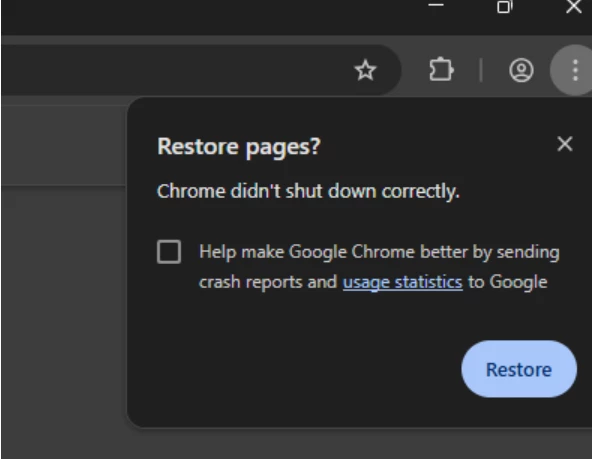
From the seq logs the process title was "Restore Page".
Root cause:
The wizard has Run Program command to kill Chrome at the beginning of wizard.
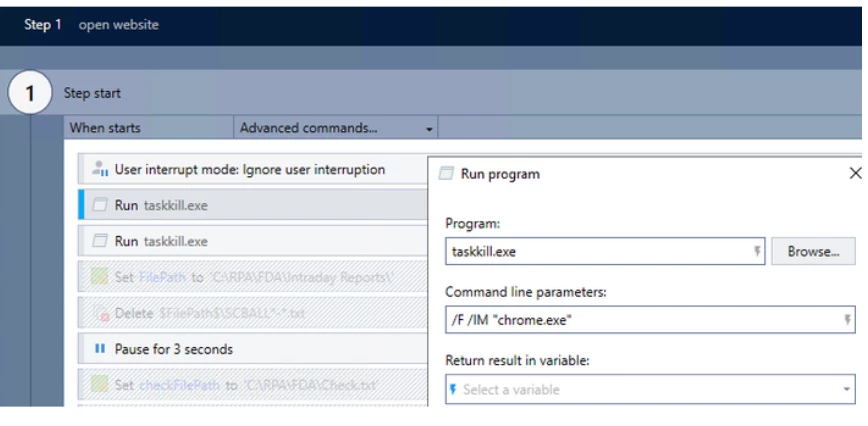
When the next task is triggered, the Chrome session may have the Restore Page? popup.
Instructions
-
Update
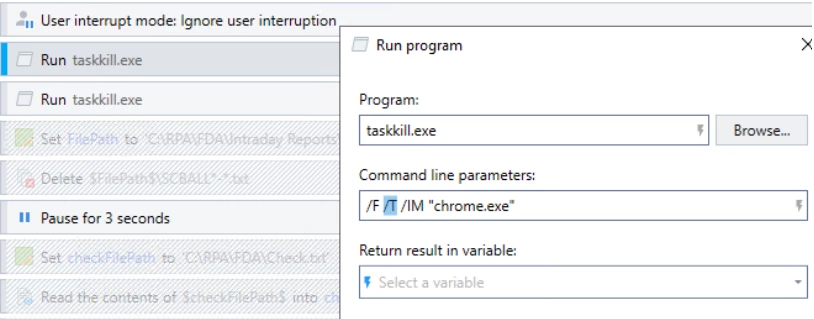
Run taskkillcommand with additional parameter "/T". This parameter will skill all subprocess created by the chrome which may not be in "chrome.exe" as process name.
-
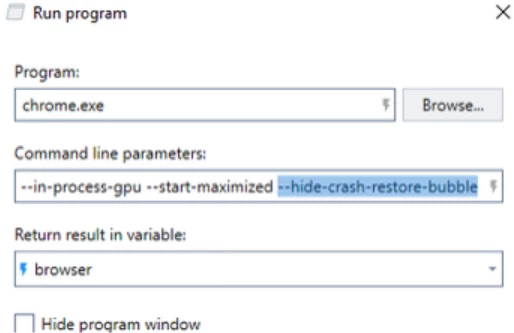
Update start chrome command with additional parameter "--hide-crash-restore-bubble". This parameter will suppress the restore page notification.
-
Add
Pausecommand afterRun chrome.execommand to allow the chrome process to start and web page to load.
Additional Information
If these steps do not resolve your issue, please email support@nintex.com and let us know what troubleshooting you have tried, as well as the version you are using. We will be happy to assist right away.