



Topic
HTML DACs are not working with the Nintex/Kryon Connector v22.9.4 for Firefox with the following message appearing: “Get HTML Object Text is not showing the object value when hovered” or "Kryon.Html.NativeMessaging.Host.exe” is not running when using Firefox.
Instructions
Obtaining the extension ID
Firefox extension’s ID could be found using following link in Firefox:
about:debugging#/runtime/this-firefox
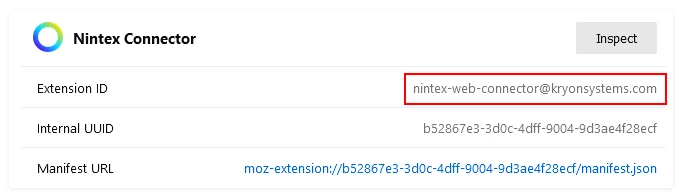
The extension ID should show an email address "nintex-web-connector@kryonsystems.com" instead of the usual string in Chrome/Edge.
Solution
Navigate to C:\Program Files\Nintex RPA Studio\native-messaging-host\firefox\com.kryon.web_connector.json
In the allowed extensions array should be:
”nintex-web-connector@kryonsystems.com”
and not
”nintex-connector@kryonsystems.com”
Resolution
1. Open Command Prompt as an administrator
2. Navigate to C:\Program Files\Nintex RPA Studio\native-messaging-host using the command below:
cd C:\Program Files\Nintex RPA Studio\native-messaging-host
If Kryon/Nintex RPA Studio is installed on a different drive/folder, please change the folder path accordingly.
3. Run the following command:
Kryon.Html.NativeMessaging.Host.exe]" register --browser firefox --extension nintex-web-connector@kryonsystems.com
4. Restart Studio and Firefox
The issue should now be resolved.